
1
Set the scene
Start with context
Fill the frame
2–3 ft for close-ups; keep ladders, cords and workers fully in view.
An AI JHA generator turns a photo of the task into the drafted core of a job hazard analysis. Photograph the work area — the electrician on the ladder, the panel, the floor around it — and the AI returns each visible hazard with the OSHA standard it may relate to, why it matters, and a suggested corrective action, in seconds. That is the hazard and control columns of a JHA or JSA, generated from your actual site instead of a template library. It is free to try with no account — and it is a draft: the competent person breaks the job into steps, verifies every finding, and adds what no photo can show.
Free · No account needed to scan · Results in seconds
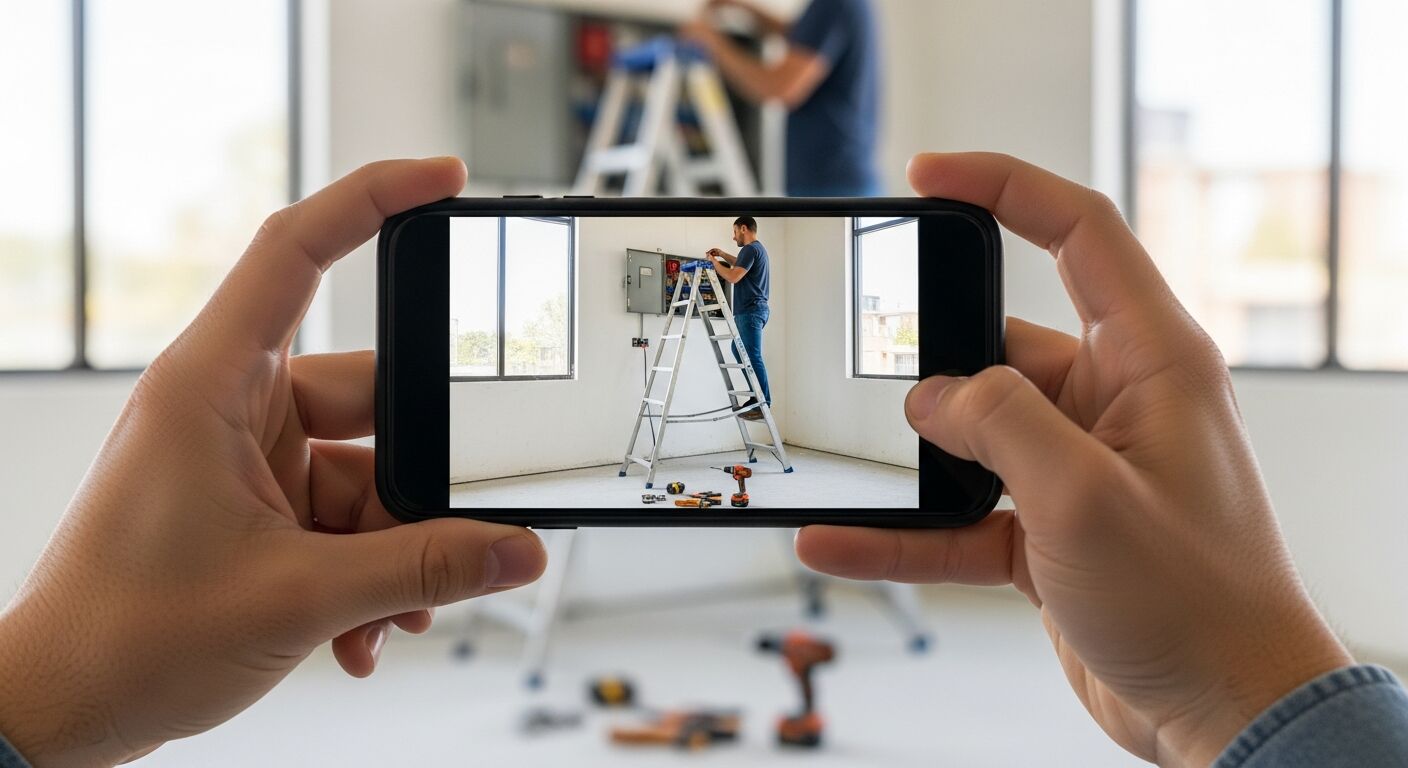
Most 'JHA generators' assemble documents: pick a trade, pick a task, and receive the hazards someone once wrote for that task in general. The output reads plausibly and describes a job site that isn't yours. The ladder in the library JHA stands on clean level concrete; yours is on the top step next to an open junction box with a drill lying at its feet. Generic generation produces the most dangerous kind of safety document — one that looks complete.
Generating from a photo grounds every line in the actual task. The scan reads the frame you took thirty seconds ago and drafts findings about that frame: the top-step stand, the tools in the dismount zone, each tied to the OSHA standard it may relate to, with a reason it matters and a control to apply. Nothing arrives that the camera didn't see — which also means the draft's gaps are honest ones, listed plainly as what to verify manually rather than papered over with boilerplate.
The workflow around the generator is built for how JHAs actually get used: each generated draft saves as a dated, scored report; accepted findings become corrective actions with owners; re-scans after fixes document the improvement; and the whole thing exports to PDF or Excel for the form your program already files. Generate, verify, assign, close — with the human sign-off exactly where OSHA expects it to be.
US construction standards lean hard on a specific legal concept: the competent person — someone capable of identifying existing and predictable hazards and with the authority to correct them. Excavation, scaffolding, and fall-protection standards all require one. An AI generator does not change that, and this page will not pretend otherwise: the scan has no authority and no judgment about your site's non-visible risks. What it changes is what the competent person starts with — a drafted, standard-referenced hazard list for the visible conditions instead of a blank column.
That division of labor is exactly how OSHA's hazard-identification guidance frames the work: collect and review information about workplace hazards, inspect the workplace, then have qualified people evaluate and prioritize. The generator compresses the first two steps to the length of a photo. The evaluation, the prioritization, and the sign-off stay human — which is why every report the scan produces is framed as a draft for verification, not a verdict.
The highest-return use is the task that was never going to get a written JHA at all: the two-hour repair, the changed setup, the short-notice crew swap. On US commercial sites those in-between tasks are where documented hazard review most often lapses — the formal JHAs cover the planned scopes, and everything else runs on experience. A generator that produces a drafted analysis from one photo drops the cost of covering those gaps to nearly zero.
The second win is consistency across crews. Ask five foremen to analyze the same task and you get five vocabularies; scanned photos come back with hazards named the same way, mapped to the same 1910/1926 references, scored on the same scale. For a safety manager rolling up records across sites — or feeding a prequalification questionnaire — that uniformity is worth as much as the speed.
An AI generator reads what a camera captures. It cannot measure an atmosphere, hear noise dose, detect a live circuit, feel stored energy, or know your lockout procedure. It sees a moment, not a sequence — a frame cannot show that the crew moves through the swing radius twice an hour. And OSHA citations are judged on conditions, not paperwork: a beautiful AI-drafted JHA for a trench with no protective system helps nobody.
So use it for what it is: the fastest first pass available for visible-hazard identification, followed by a walk. Photograph the setup, get the drafted list, verify each finding at the spot, add what the camera cannot see, and keep the dated record. Try exactly that loop on a photo of your own site below — the scan is free and takes about a minute.
Run through these steps before crews start — each one covers a visible gap the AI can help you catch.
List each discrete action in the task from start to finish — for example, for working from a ladder: set up ladder, climb to work height, perform task, descend. Finer steps make hazard identification more complete.
Walk the site with a smartphone and photograph the area where each step will happen. Capture the ladder position, the panel, the floor around it, the overhead clearances — conditions you can see but might miss writing from memory.
Upload each photo to OSHA Scan. The AI returns each visible hazard with the OSHA standard it may relate to, the risk level, and a suggested corrective action — that is the draft content for the hazards and controls columns of your JHA.
The AI draft is a starting point, not a final document. The competent person walks through each finding, adds hazards the photo could not show (noise, heat, atmospheric conditions), verifies controls are practical, and signs off.
Finalize the JHA in OSHA Scan — assign each finding for correction, export the signed document to PDF or Excel, and make it available to every worker on the task before they start. A JHA that is not read is not a control.
One frame of the task in progress or at setup — this is what comes back as drafted JHA content.
Top-step use, setup angle and footing, and what surrounds the climb and dismount zones.
Open panels and junction boxes, cord condition and routing, and the visible state of the equipment being worked.
Each hazard arrives with the standard it may relate to, why it matters, and a suggested control — the JHA's middle columns, written.
Findings carry a confidence level, so the verifier knows which lines are near-certain and which need the closest look.
Scan a photo like the one above and this is the report you get — score, findings, OSHA references, and fixes. It is an illustrative example, clearly marked — not live scan data.
Compliance score
52
Lower means more potential hazards found
5 potential hazards found
1Worker on the upper steps of a stepladder for overhead panel work
HighPossibly related to stepladder use requirements (29 CFR 1926.1053)
Observed condition: Working from the upper steps leaves little to brace against, and overhead electrical work adds a reflex-jerk risk — a fall from even this height onto scattered tools is how ladder incidents become recordables.
Corrective action: Use a taller ladder or a platform ladder so the work is at chest height with both feet on proper steps, and write the ladder-height match into the JHA's setup step.
Medium confidenceNot fully clear from the photo — verify on site.
2Tools and drill scattered in the dismount zone at the ladder base
MediumPossibly related to construction housekeeping (29 CFR 1926.25)
Observed condition: The ladder base is where the worker's attention is lowest — stepping down backward onto a drill body is a rolled ankle or a fall, and it is the easiest finding on this page to fix.
Corrective action: Stage tools in a tray or belt clear of the ladder footprint, and add a clear-dismount check to the task's JHA before each climb.
High confidence
Upload a photo like the one above and get a compliance score and hazard count in seconds. No account needed to scan — create a free account to unlock the full report.
Use the real site or facility name. If you save the scan after signup, it becomes the report name.
Three angles, one deeper scan
Only the wide shot is required — every extra angle gives the AI more places to look.
Required: Set the scene — one wide shot lets the AI sweep the whole area at once
Stand at the entry point and capture corner to corner: floors, ladders, scaffolds, and everyone at work
Drop a job-site photo or walkthrough video
Click to upload, drag & drop, or snap a photo on site. Photos scan free in about 15 seconds — no signup, no card. Video walkthroughs (up to 3 min) run on a free account.
Small habits, sharper scans
Set the scene
Start with context
Fill the frame
2–3 ft for close-ups; keep ladders, cords and workers fully in view.
Capture clearly
Make the frame usable
Light it right
Keep the sun or lights behind you — glare and shadows hide hazards.
Tap to focus
Tap the hazard on screen and hold still one second — blur can't be flagged.
Choose the useful view
Give the AI room to understand
Go landscape
Turn your phone sideways — a wider frame catches more of the scene.
Only upload photos you have permission to use, and avoid images showing personal, customer, or confidential information. Demo photos and results are held privately for up to 48 hours so you can save them to a free account; unclaimed photos are deleted automatically. Results are an AI-assisted preliminary review, not an official OSHA determination.
New: Video walkthrough scans
Record up to 3 minutes of your site — the AI extracts frames and flags every hazard with exact timestamps. Free account required.
Get the best results
Wide shot first
Stand at the entrance and photograph the entire work area so AI sees the full context
Hazard areas
Photograph elevated surfaces, equipment, electrical panels, and anywhere workers are active
Close-ups last
Move in close on anything damaged, missing, or that looks risky — the AI catches more detail
How to go from a phone photo to a verified, filed JHA. The first four steps are free — create a free account to unlock the full workflow and generate your first draft.
Photograph the task, not just the area
Frame the worker's position, the equipment, and the ground around them in one shot — the generator drafts from relationships, not close-ups.
Shoot at setup, before the pressure
A photo taken during setup gives the draft time to matter — findings about a task that is already half done protect nobody.
Generate the draft
Upload the frame and the visible hazards come back in seconds, each with its likely OSHA reference, reasoning, and a suggested control.
Read the confidence levels first
High-confidence findings verify fastest; medium ones are where the competent person's eyes matter most. Triage the draft in that order.
OSHA Scan reads a single photo. That makes it fast and easy for anyone on site — but it also means it has real limits. Here's an honest look at both.
A scan is a fast first look, not the final word. Before treating this kind of area as safe, a competent person should still confirm:
You photograph the task area and upload it. A vision model reads the frame and drafts each visible hazard — what it is, the OSHA standard it may relate to, why it matters, and a suggested corrective action — plus a 0-100 score for the area. The draft saves as a dated report you verify, edit, and export.
It generates the hazard-identification core — the columns that take the hours. A complete JHA also needs the task broken into steps, non-visible hazards added, and a competent person's verification and sign-off. The generator does the noticing at machine speed; the analysis remains yours.
Yes, fundamentally. Template generators output the generic hazards of a task type; this reads your actual photo and drafts findings only about what is visibly there. The output describes your site, and its limits are stated instead of hidden — what the camera cannot see is listed for manual verification.
Trying it is free with no account: upload a photo and see the score and hazard count. A free account unlocks the full drafted findings with OSHA references, 5 free scans, saved reports, corrective-action tracking, and PDF/Excel export.
OSHA doesn't approve or reject JHA formats — no standard prescribes how a hazard analysis must be produced. What matters to a compliance officer is whether the analysis is task-specific, whether it reflects the real conditions, and whether the controls were actually implemented. An AI-drafted analysis that a competent person verified and signed meets that bar the same way a hand-written one does; an unverified draft of either kind does not.
No. US standards that call for a competent person — excavation, scaffolds, fall protection — require a human with the ability to identify hazards and the authority to correct them, and no software has authority on your site. The generator is a drafting aid for that person: it hands them a standard-referenced starting list in seconds so their time goes into verification, judgment, and the hazards a camera can't see.
Reviewed by OSHA Scan Editorial
Last updated August 29, 2026
This content is produced by the OSHA Scan Editorial team and reviewed with AI assistance. It is general safety information, not legal or compliance advice. OSHA Scan is an independent tool and is not affiliated with, endorsed by, or certified by OSHA or the U.S. Department of Labor.
Free PDF checklist
33 critical checks across 7 categories — the same visible gaps the AI scanner looks for. Sent to your inbox as a free PDF.
More ways to see what an AI OSHA scan can do for your site.
The overview hub — how the scanner works and every job, site, and hazard it covers.
The method the generator drafts the middle of.
The broader photo-first hazard analysis workflow.
Where the generated draft lands in the paper form.
A trade-specific JHA for roofing tasks and fall-protection steps.
A trade-specific JHA for energized work, LOTO, and arc flash.
A trade-specific JHA for rooftop access, electrical, and refrigerants.
OSHA's recommended practices for finding workplace hazards — the process the AI drafts a starting list for.
Official resource — osha.govSee a complete labelled example of everything a scan returns.
Start with 5 included AI site scans plus a one-time 10-scan signup bonus — no credit card. Build JHA-ready reports and catch changing conditions sooner.
Start your free trial