
SDS accessibility requirements — what 'readily accessible during the shift' really means
OSHA requires safety data sheets to be readily accessible to employees during each work shift — meaning a worker can reach the SDS for any chemical in their area, without a delay, a key, a password someone else holds, or a call to the office. A PDF folder on the owner's laptop fails. A binder locked in a manager's office fails. Electronic access counts only if workers have an unimpeded path to it plus a reliable backup for power or internet outages. OSHA Scan gives you a no-login answer: print a QR poster for each storage room and workers scan it to see that room's chemicals and attached SDS PDFs on their own phones. It does not replace the person who confirms every sheet is on file.
Free · No account needed to scan · Results in seconds
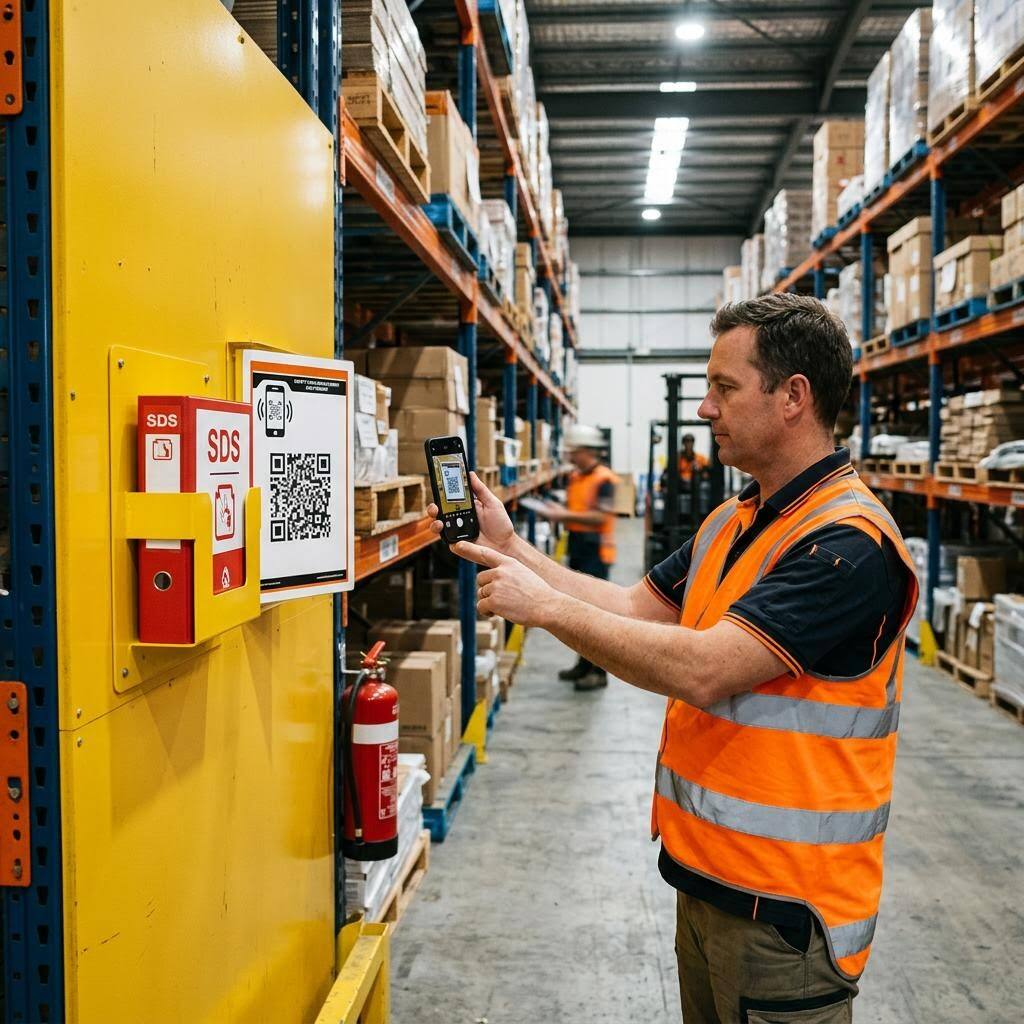
The SDS you own is worthless if a worker can't reach it in the moment
The phrase that trips up most employers is 'readily accessible during each work shift.' It does not mean you have the sheets somewhere. It means the exposed worker — on the night shift, in the far corner of the warehouse, on a jobsite forty minutes from the office — can put hands on the correct SDS quickly enough to matter after a splash, a spill, or an inhalation. When the answer is 'the SDS is in a binder in the front office, and the office is locked at 6 p.m.,' the sheets exist but the access requirement is failed. The same is true of a PDF folder on the owner's laptop that travels home every night.
Multi-site operations and field crews break the requirement in a subtler way. Corporate has a beautiful SDS system; the crew in the box truck has nothing on them. A per-location approach fixes this: post an access point where the chemicals actually are, and let workers reach the room's sheets from their own phone without logging into anything. That is exactly what OSHA Scan's QR room posters do — a worker scans the poster on the maintenance-room wall and sees that room's chemical list, signal words, pictograms, and the attached SDS PDFs. The checklist below covers the access questions a poster alone can't answer: whether every sheet is actually on file, and whether your electronic path has a working outage backup.
Electronic SDS access, the 2024 HCS update, and how inspectors test 'readily accessible'
OSHA has allowed electronic SDS access for years, and its guidance is consistent: computers, mobile devices, or online systems are acceptable as long as there are no barriers to employee access, workers are trained on how to use the system, and there is an adequate backup in case of system failure or emergency. Compliance officers tend to test this in the field rather than on paper — they'll ask a worker on the floor to pull up the SDS for a specific container and watch what happens. If the worker doesn't know where to go, needs a password only a supervisor has, or the system is down with no fallback, the electronic setup fails the same way a locked binder would. That real-world test is why a no-login access point posted at the chemicals themselves is so much stronger than a corporate portal.
The 2024 update to the Hazard Communication Standard refined SDS content — changes touching hazard classification, labels, and several SDS sections — with phased compliance deadlines OSHA has since adjusted. Those updates change what belongs on the sheet, not the bedrock access rule: whatever version of the SDS applies, it still has to be readily accessible to employees during every shift. Employers in OSHA state-plan jurisdictions should confirm their state's HazCom requirements, which must be at least as effective as federal OSHA and occasionally carry additional expectations. Across all of them, the accessibility standard is the same, and it's the piece most often exposed by a simple 'show me the SDS for this bottle' during an inspection.
Access barriers the scanner and posters help you close
How OSHA Scan supports the 'readily accessible' requirement — and the visible access gaps a storage-area photo can flag.
No-login QR room posters
Print a poster for any storage room, cabinet, or jobsite trailer. Workers scan it and see that room's chemicals and SDS PDFs on their phone — no account, no password, no waiting for the office.
Locked or office-only storage
A photo can show whether an SDS binder or station is anywhere near the chemicals — and flag when the only access point is a locked office or a single manager's desk.
Per-room location assignment
Scanning labels room by room assigns each chemical to where it actually lives, so the sheet a worker reaches matches the container in front of them.
Outage backup planning
Electronic access is fine, but only with a reliable fallback for power and internet outages. The checklist walks you through building that backup — the app hosts the PDFs, but you own the offline plan.
Demo: the library entry a scanned label comes back with
An illustrative example for this trade — product identity, signal word, GHS pictograms, and hazard statements, filed and searchable.
Sodium hypochlorite disinfecting cleaner
Example manufacturer
The disinfectant stored in a janitor closet workers can't unlock mid-shift is the classic 'not readily accessible' SDS failure this page fixes.
- H314 — Causes severe skin burns and eye damage
- H410 — Very toxic to aquatic life with long lasting effects
Now scan your own label — free
Photograph any chemical product on your shelf. The AI transcribes the label in seconds — no account needed to try it.
- A per-room QR poster workers scan with no account or password
- Each room's chemicals with signal word, pictograms, and the attached SDS PDF
- A plain-language checklist for the access gaps a camera cannot see
Free · No account needed to scan · Results in seconds
The 11-point SDS accessibility checklist
Everything 'readily accessible during each work shift' actually requires, from location to outage backup. The first four are free — create a free account or leave your email to unlock the rest and set up QR room access.
Free checklist — 11 points
Enter your email to unlock the full checklist
We'll also send you a printable PDF copy — no account required.
One email with the checklist, one follow-up. Unsubscribe anytime.
What the AI can and can't detect
OSHA Scan reads a single photo. That makes it fast and easy for anyone on site — but it also means it has real limits. Here's an honest look at both.
What it can catch from a photo
- Whether an SDS access point is visible near the chemicals in a photo
- Notices routing workers to a locked office or a single person
- Chemical storage areas with no reachable access point in frame
- Whether an access point is posted where workers would see it
What a photo can't tell it
- Whether every chemical actually has its SDS on file
- Whether the electronic path works on off-shifts or during an outage
- Whether field vehicles carry access for the chemicals aboard
- Whether workers have been shown how to reach the sheets
Always confirmed by a person on site
A scan is a fast first look, not the final word. Before treating this kind of area as safe, a competent person should still confirm:
- Open the access point on a personal phone with no login and confirm it works
- Test access on a night or weekend shift, not just during office hours
- Confirm every location and vehicle with chemicals has its own access point
- Run through an outage: can workers still reach the sheets with the internet down?
People also ask
What does 'readily accessible during each work shift' actually require?
It means an exposed employee can obtain the correct SDS for a chemical in their work area quickly and without barriers, on whatever shift they work. There's no fixed number of seconds, but the practical test is simple: if a worker were splashed right now, could they reach the sheet without a key, a password held by someone else, or a trip to a locked office? If the answer is no, the access requirement isn't met even though you technically 'have' the SDS. Posting a per-room access point workers can open on their own phone is a direct way to support that requirement.
Can I keep safety data sheets electronically instead of paper binders?
Yes. OSHA permits electronic SDS access as long as there are no barriers to employee access and you have a reliable backup for foreseeable emergencies like power or internet outages. A laptop PDF folder that only the owner can open creates exactly that barrier; a no-login mobile page workers scan at the storage room is the kind of barrier-free access OSHA describes — provided you've planned an offline fallback and confirmed the setup for your own site. OSHA Scan hosts the PDFs and serves them from a QR poster, and the checklist above walks you through building the outage backup you still own.
Why doesn't a binder in the office count as accessible?
Because access has to follow the worker, not the paperwork. A binder in the front office is out of reach for the night crew after the office locks, for the worker in the far warehouse aisle, and for the field crew on a jobsite. 'Readily accessible' is judged from where the exposed employee stands during their shift. Central storage is fine as a master copy, but each area where chemicals are used needs its own reachable access point.
How do field crews and multi-site companies stay compliant?
By putting access where the chemicals are, not only at headquarters. Each truck, trailer, and remote site needs a way to reach the SDSs for the chemicals aboard or on hand. A per-location QR poster works well here: assign each chemical to its room or vehicle when you scan its label, then print a poster for that location so the crew opens the right list on their phone — no connection to the corporate binder required beyond loading the page.
Does OSHA Scan automatically find and download the SDS for me?
No — and any tool claiming to auto-fetch every manufacturer SDS is overpromising. OSHA Scan reads a chemical's label from a photo to build the library entry, and you attach the manufacturer's SDS PDF, which is checked to look like a real SDS on upload. From there it makes the sheets readily accessible through QR room posters. Confirming that every chemical actually has its correct, current sheet on file is still a job for a competent person.
Reviewed by OSHA Scan Editorial
Last updated August 29, 2026
This content is produced by the OSHA Scan Editorial team and reviewed with AI assistance. It is general safety information, not legal or compliance advice. OSHA Scan is an independent tool and is not affiliated with, endorsed by, or certified by OSHA or the U.S. Department of Labor.
Keep exploring
More ways to see what an AI OSHA scan can do for your site.
The AI OSHA inspection tool
The overview hub — how the scanner works and every job, site, and hazard it covers.
SDS scanner & chemical library
Scan labels to build the room-by-room library your QR access points serve from.
Hazard communication checklist
The full HazCom chain that SDS access is one critical link in.
Missing SDS: what to do
The step before access — how to close the gaps when a sheet isn't on file at all.
HazCom training requirements
Access only works if workers know how to reach and read the sheets.
OSHA: Steps to an Effective Hazard Communication Program
OSHA's employer guide covering SDS access and the rest of the HazCom program.
Official resource — osha.govA full sample report
See a complete labelled example of everything a scan returns.
Ready to secure your job sites?
Start with 5 included AI site scans plus a one-time 10-scan signup bonus — no credit card. Build JHA-ready reports and catch changing conditions sooner.
Start your free trial