
1
Set the scene
Start with context
Fill the frame
2–3 ft for close-ups; keep ladders, cords and workers fully in view.
A distribution center safety inspection checklist focuses on the hazards specific to high-throughput receiving, pick-and-pack, and shipping operations: overloaded or damaged racking, conveyor pinch points, dock-door and trailer-restraint compliance, forklift and pedestrian conflicts in fast-moving aisles, and ergonomic strain from repetitive picking. OSHA Scan lets a DC supervisor or safety team photograph any zone — a receiving dock, a pick aisle, a conveyor transfer point, or a sortation area — and get an instant read on visible hazards, the OSHA standard each may relate to, and a suggested fix. It is an AI-assisted first look, not a formal industrial-engineering assessment.
Free · No account needed to scan · Results in seconds
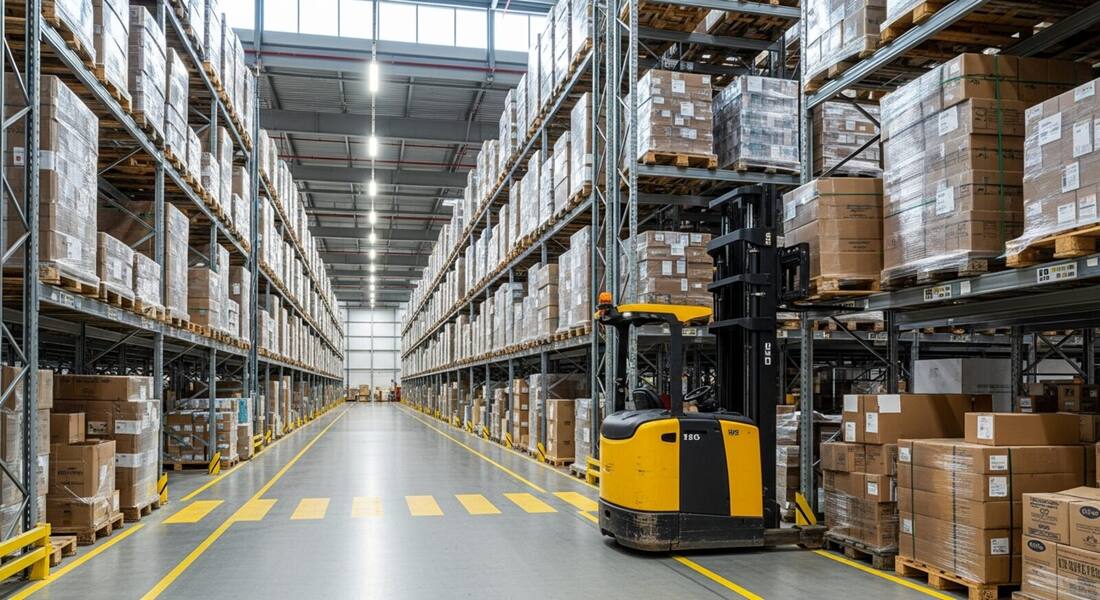
Distribution centers operate at high velocity — receiving, sorting, picking, packing, and shipping simultaneously across shifts. The pace creates hazards faster than traditional paper checklists can track them: a pallet double-stacked above the posted limit, a trailer left without a chock during a rush, a conveyor guard removed for maintenance and not replaced. Photographing each zone at the start of a shift lets supervisors catch the obvious problems before the first injury.
The scanner reads visible hazards in docks, aisles, sortation areas, and conveyor lines: racking in poor condition, pedestrians in forklift travel lanes, missing dock safety equipment, and conveyor nip points without guards. It surfaces the most relevant OSHA standard and a specific suggested fix for each finding — ready to assign to a lead before the shift starts.
OSHA has issued citations at large distribution and fulfillment centers under both specific standards (powered industrial trucks, walking-working surfaces, fire protection, exit access) and the general duty clause (for ergonomic hazards in high-repetition picking and packing operations). The general duty clause ergonomics citations are notable because they require OSHA to prove that the employer recognized the hazard and failed to correct it — which means employer injury logs, incident reports, and employee complaints that mention musculoskeletal symptoms become the evidence base. Distribution operations with high injury rates and no documented ergonomics intervention are the most vulnerable to general duty clause ergonomics citations.
Conveyor systems in distribution centers present a specific regulatory challenge: OSHA's general machine guarding standard (1910.212) applies to conveyor nip points, in-running nip points, and crossing hazards, but the American National Standard for Conveyors (ASME/ANSI B20.1) provides the engineering baseline inspectors reference when evaluating whether guarding is adequate. Automated storage and retrieval systems (AS/RS) and robotic picking areas create additional hazard zones where energy control procedures are critical — the LOTO standard requires machine-specific procedures for every piece of equipment in scope, including automated systems that may have multiple energy sources and fail-safe modes that are not self-explanatory.
Run through these steps before crews start — each one covers a visible gap the AI can help you catch.
Walk the storage bays before the shift ramps up. Look for uprights with impact damage, bays loaded above the posted placard, and missing safety clips — overloaded or struck racking can collapse onto pickers and may relate to 29 CFR 1910.176.
Move through the pick and travel aisles. Confirm painted lanes, barriers at intersections, and mirrors at blind corners keep workers on foot out of forklift paths — struck-by conflicts are among the most lethal DC events and may relate to 29 CFR 1910.178.
At each dock position, confirm parked trailers are chocked or restrained before a dock plate goes in, and that open dock edges have a chain or barrier when no trailer is present. Dock hazards may relate to 29 CFR 1910.22 and 1910.28.
Check that guards are in place at conveyor nip points, transfer zones, and drive components, and that lockout/tagout is used before any jam clearance. Missing guards may relate to 29 CFR 1910.212 and LOTO to 1910.147.
Photograph the dock, aisle, or conveyor line and upload it to OSHA Scan for an AI second-pass. The AI flags visible hazards it can see, notes the OSHA standard each may relate to, and suggests a fix — treat the findings as a draft to verify on site. Free, no account needed.
The safety core of a high-throughput DC inspection, read from an image.
Impact damage to uprights, overloaded bays, missing safety clips, and unstable floor-stacked product that could collapse into a pick aisle.
Workers on foot in forklift travel lanes, missing pedestrian barriers at aisle intersections, and staging forcing foot traffic into truck paths.
Trailers without wheel chocks or restraints in view, open dock edges when no trailer is present, and dock levelers out of the stored position.
Missing or displaced guards at conveyor nip points, transfer zones, and drive components — the most common caught-in hazard in sortation.
Scan a photo like the one above and this is the report you get — score, findings, OSHA references, and fixes. It is an illustrative example, clearly marked — not live scan data.
Compliance score
61
Lower means more potential hazards found
5 potential hazards found
1Pallet stacked above the posted rack load limit on bay 3
HighPossibly related to materials storage (29 CFR 1910.176)
Observed condition: Overloaded racking can collapse under dynamic load, dropping product onto pickers below — a leading cause of fatalities in DC environments.
Corrective action: Reduce the load to within the posted capacity and retrain receiving staff on weight limits before accepting inbound freight.
High confidence
2Pedestrian walking in a marked forklift aisle during active operations
HighPossibly related to powered industrial trucks (29 CFR 1910.178)
Observed condition: Struck-by incidents between forklifts and pedestrians are among the most lethal events in distribution center operations.
Corrective action: Enforce aisle separation with physical barriers and conduct toolbox talk on pedestrian-free zones before the next shift.
Medium confidenceNot fully clear from the photo — verify on site.
Upload a photo like the one above and get a compliance score and hazard count in seconds. No account needed to scan — create a free account to unlock the full report.
Use the real site or facility name. If you save the scan after signup, it becomes the report name.
Three angles, one deeper scan
Only the wide shot is required — every extra angle gives the AI more places to look.
Required: Set the scene — one wide shot lets the AI sweep the whole area at once
Stand at the entry point and capture corner to corner: floors, ladders, scaffolds, and everyone at work
Drop a job-site photo or walkthrough video
Click to upload, drag & drop, or snap a photo on site. Photos scan free in about 15 seconds — no signup, no card. Video walkthroughs (up to 3 min) run on a free account.
Small habits, sharper scans
Set the scene
Start with context
Fill the frame
2–3 ft for close-ups; keep ladders, cords and workers fully in view.
Capture clearly
Make the frame usable
Light it right
Keep the sun or lights behind you — glare and shadows hide hazards.
Tap to focus
Tap the hazard on screen and hold still one second — blur can't be flagged.
Choose the useful view
Give the AI room to understand
Go landscape
Turn your phone sideways — a wider frame catches more of the scene.
Only upload photos you have permission to use, and avoid images showing personal, customer, or confidential information. Demo photos and results are held privately for up to 48 hours so you can save them to a free account; unclaimed photos are deleted automatically. Results are an AI-assisted preliminary review, not an official OSHA determination.
New: Video walkthrough scans
Record up to 3 minutes of your site — the AI extracts frames and flags every hazard with exact timestamps. Free account required.
Get the best results
Wide shot first
Stand at the entrance and photograph the entire work area so AI sees the full context
Hazard areas
Photograph elevated surfaces, equipment, electrical panels, and anywhere workers are active
Close-ups last
Move in close on anything damaged, missing, or that looks risky — the AI catches more detail
Walk docks, pick aisles, sortation, and conveyor lines with these points. The first four are free — create a free account to unlock the full checklist and scan your own DC photos.
Free checklist — 12 points
Enter your email to unlock the full checklist
We'll also send you a printable PDF copy — no account required.
One email with the checklist, one follow-up. Unsubscribe anytime.
OSHA Scan reads a single photo. That makes it fast and easy for anyone on site — but it also means it has real limits. Here's an honest look at both.
A scan is a fast first look, not the final word. Before treating this kind of area as safe, a competent person should still confirm:
It covers the hazards specific to high-throughput receiving, picking, and shipping operations: racking integrity, forklift and pedestrian separation, dock-door safety, conveyor pinch points, and ergonomic strain. OSHA Scan flags the visible versions of these from a photo and references the OSHA standard most likely to apply.
Distribution centers add high-velocity conveyor and sortation equipment hazards, faster pallet movement, and more complex dock operations than typical storage warehouses. The scan covers these DC-specific hazards — conveyor guards, sortation chutes, cross-dock traffic patterns — in addition to the racking and aisle safety common to both.
Forklift safety (29 CFR 1910.178), materials storage and racking (1910.176), lockout/tagout (1910.147), and means of egress (1910.37) are consistently among the top citations in DC operations. The scan flags visible conditions associated with each of these categories.
Docks, pick aisles, and conveyor lines benefit from a photo-based check at the start of each shift. Racking inspections should be done weekly at a minimum, with formal engineering assessments after any known forklift impact.
Any shift lead or area supervisor can run it. The report gives a specific suggested fix for each finding in plain language, so it works as a pre-shift checklist tool without requiring a dedicated EHS professional on every shift.
Reviewed by OSHA Scan Editorial
Last updated August 29, 2026
This content is produced by the OSHA Scan Editorial team and reviewed with AI assistance. It is general safety information, not legal or compliance advice. OSHA Scan is an independent tool and is not affiliated with, endorsed by, or certified by OSHA or the U.S. Department of Labor.
More ways to see what an AI OSHA scan can do for your site.
The overview hub — how the scanner works and every job, site, and hazard it covers.
Racking, exits, and forklift safety for storage operations.
The hazard guide behind struck-by, slip, and ergonomic risks on docks and in warehouses.
Travel lanes, pedestrian routes, and load checks.
LOTO compliance for conveyor and sortation maintenance.
The full software platform behind every industry safety scan.
How AI-assisted audits compare to traditional safety audit programs.
See a complete labelled example of everything a scan returns.
Start with 5 included AI site scans plus a one-time 10-scan signup bonus — no credit card. Build JHA-ready reports and catch changing conditions sooner.
Start your free trial