
1
Set the scene
Start with context
Fill the frame
2–3 ft for close-ups; keep ladders, cords and workers fully in view.
OSHA Scan is an AI OSHA inspection tool: you upload a photo of a work area and it returns a preliminary safety review in seconds. It flags the hazards visible in the frame, references the OSHA standard each one may relate to, computes a 0-100 compliance score from what it finds, and lists a suggested fix for every item. There is no setup and no safety background required — if you can take a photo, you can run an inspection. It is an AI-assisted first look that helps anyone on site catch obvious hazards early, not a replacement for a qualified safety professional.
Free · No account needed to scan · Results in seconds
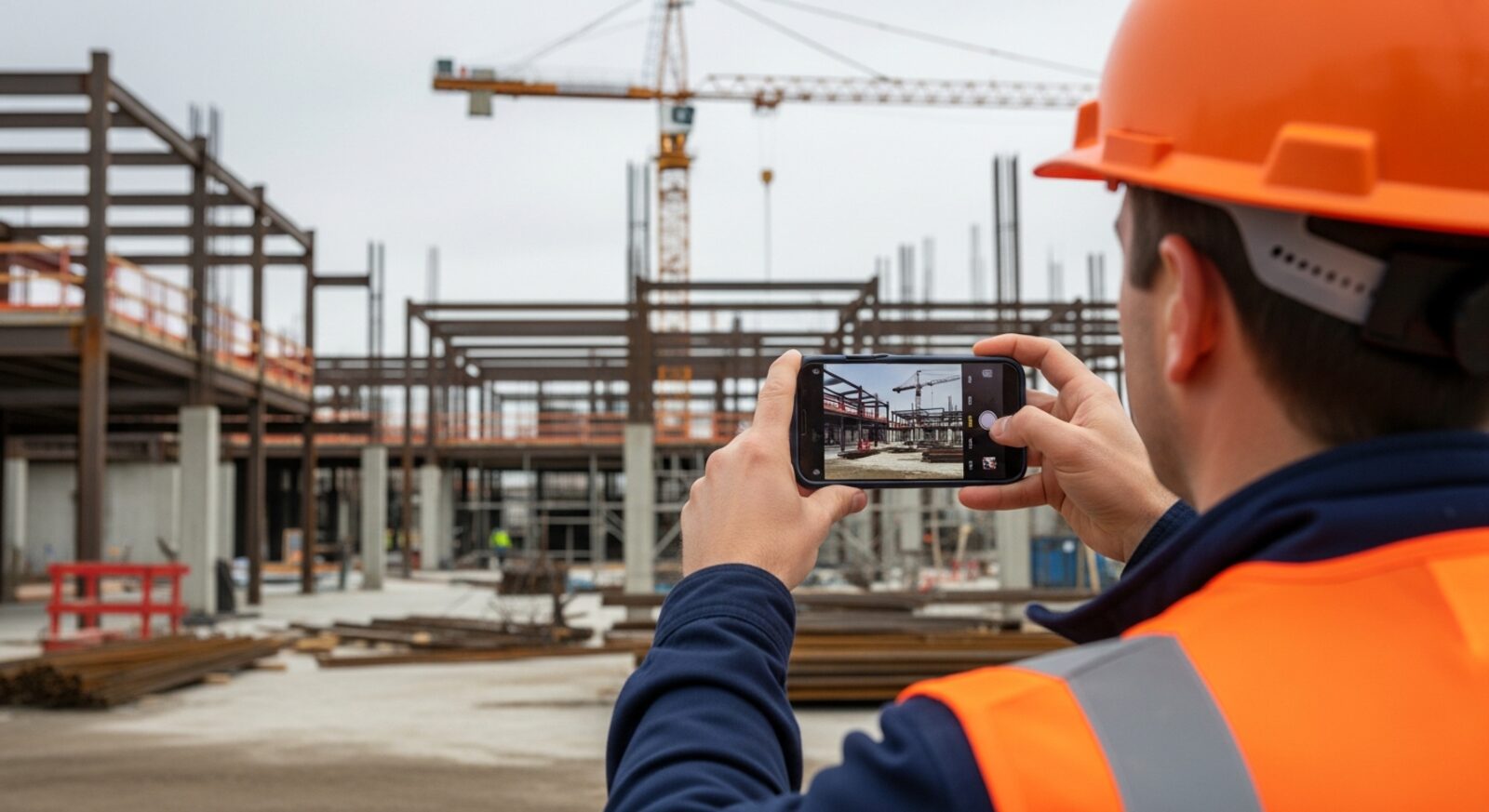
The scanner works from a single photo across trades, settings, and specific hazards. Start with the one closest to your work.
How the AI reads a single image and turns it into a list of flagged hazards.
Falls, PPE, struck-by, and edge hazards on active construction sites.
Racking, forklifts, blocked aisles, and stacking hazards from a photo.
Leading edges, ladders, and fall-protection gaps on roofing work.
Wet floors, blocked exits, and kitchen hazards for food-service teams.
Missing hard hats, eye protection, and hi-vis spotted in the frame.
Obstructed exits, egress paths, and cluttered walkways in a photo.
Spills, trailing cords, clutter, and uneven surfaces at floor level.
Angle, footing, extension, and visible damage checked before the climb.
Guardrails, planking, and access checked between competent-person inspections.
Travel lanes, pedestrian routes, and load stacking around powered trucks.
Protective systems, spoil setback, and access on open excavations.
Damaged cords, open panels, blocked clearance, and wet-area wiring.
Missing guards, exposed belts, and reachable pinch points on equipment.
Workers under suspended loads, damaged slings, and lift-area hazards.
Combustibles near sparks, unsecured cylinders, and missing fire gear.
Missing retrieval gear, absent attendants, and unprotected openings.
Unlocked disconnects and live-panel work during machine service.
Missing grinder guards, damaged cords, and unprotected tool work.
The full self-inspection walkthrough, area by area, with a scan per area.
The administrative side — programs, postings, logs, and training records.
GHS labels, SDS access, and the unlabeled containers OSHA cites most.
What citations cost in 2026 and the most-cited standards behind them.
The five levels of control, from elimination to PPE, and how to apply them.
Open panels, missing arc-rated PPE, and blocked clearances in one scan.
Bare ears near loud equipment and the muffs hanging unused beside them.
Visible dust, sagging masks, and respirators on hooks instead of faces.
Dry cutting, missing water suppression, and the dust cloud that proves it.
Missing shade, empty water coolers, and crews showing strain in full sun.
Bare-handed first aid and contaminated dressings left loose on surfaces.
Bent-back lifts, overhead pulls, and heavy handling with no carts in sight.
Blocked extinguishers and combustibles stacked against heaters and panels.
Workers under suspended loads and lift zones with no exclusion barriers.
One scan across every hazard family at once — PPE, falls, electrical, and egress.
The visible half of compliance — exits, storage, cords, PPE — scored from a photo.
Start the job hazard analysis from a picture instead of a blank form.
A 0-100 grade of the site's visible conditions, tracked week over week.
Turn the photos you already take on site into documented inspections.
The clipboard walkthrough replaced by a camera, for any facility.
What the AI reads out of one frame — findings, standards, and a score.
Break a task into steps and catch the hazards from a photo before work starts.
The sections a complete JHA template covers — and how a photo scan fills them.
What to actually test when choosing a digital job hazard analysis tool.
From a phone photo of the task to a drafted hazard list in seconds.
Break down roofing tasks step by step — leading edges, ladders, and fall protection.
Step-by-step hazard review for electrical work — energized parts, LOTO, and arc flash.
Task-by-task hazards for HVAC crews — rooftop access, electrical, and refrigerants.
A structured walk of an active site's hazards — falls, struck-by, and edges.
Guardrails, ladders, and fall-protection gaps — what to fix before anyone climbs.
Run a pre-task JSA that reflects this morning's site, not last month's form.
The rows a JSA form needs to be an analysis rather than a signature sheet.
How to pick — and keep crews actually using — a digital JSA tool.
Photos that document the job and inspect it for hazards at the same time.
How computer vision reads a work photo and what it can and cannot see.
Hazard results in seconds from a photo — while the crew is still on site.
Structured, exportable inspection reports written by the scan itself.
The sections a complete inspection report needs — and how a scan fills them.
Keep a dated, defensible record of the hazards you find and the fixes you make.
Photo scans, scores, and corrective actions as your compliance record.
A buyer's guide to picking an OSHA compliance tool — what to test before you commit.
A browser-based scanner that runs on the phone already in your pocket.
The repetitive parts of compliance — spotting, writing up, tracking — automated.
Common areas, parking structures, and mechanical rooms from a photo.
Patient corridors, sharps disposal, and egress in care facilities.
Housekeeping chemicals, pool areas, and guest-area egress.
Conveyor hazards, forklift lanes, and dock safety in fulfillment operations.
Machine guarding, LOTO, and production-floor hazards from a photo.
Machine guarding, slippery floors, LOTO, and chemical hazards in plants.
The full software platform — features, industries, and multi-site dashboards.
How AI-assisted audits compare to traditional safety audit programs.
Exits, labs, kitchens, and maintenance areas across campus buildings.
Cords, exits, storage stacking, and walkway hazards in office spaces.
Chemical storage, eyewash access, and fume hood clutter from a photo.
Lifts, LOTO, flammables, and compressed-gas storage in service bays.
Ladders, electrical work, refrigerants, and rooftop access for HVAC crews.
Photo-first safety management — scans, scores, and records in one place.
Run compliance scans from any phone — no forms, no setup.
What photo-based safety software covers across industries.
A superintendent walking a site can only be in one place at a time, and formal inspections are scheduled — hazards are not. The AI OSHA inspection tool closes that gap by letting anyone on site turn a quick phone photo into a structured hazard review, so unsafe conditions get flagged the moment someone notices them rather than waiting for the next audit.
A foreman photographs a work platform before the crew climbs on. A warehouse lead snaps an aisle that looks cluttered. A restaurant manager checks a back-of-house walkway during a rush. In each case the same scanner reviews the frame, groups what it sees into hazard categories, and returns a report anyone can act on — with the OSHA standard each finding may relate to as a starting point for follow-up.
The point is not to replace the expert. It is to give every person on site a fast, consistent second set of eyes, so the obvious problems are caught and fixed before they turn into incidents — and so the safety professional's time goes to the judgment calls that actually need it.
Most OSHA citations cite a specific standard — 29 CFR 1926.501 for a missing guardrail, 29 CFR 1910.37 for a blocked exit. But the General Duty Clause (Section 5(a)(1) of the OSH Act) fills the gaps: it requires every employer to provide a workplace free from recognized hazards likely to cause death or serious physical harm, even when no specific regulation covers the exact condition. For inspectors, a recognized hazard is one the employer knew or should have known about — which means the hazard-identification step is itself an enforcement threshold. Employers who inspect systematically and document findings are demonstrating active recognition; employers who skip the inspection step face a 'you should have seen it' argument when something goes wrong.
The practical implication is that documentation of the finding-and-fixing cycle carries legal weight beyond its operational value. An OSHA compliance officer reviewing a post-incident employer file asks two questions: what did the employer know, and what did they do about it? A stream of dated, scored inspection records showing hazards found and corrective actions closed is the evidentiary answer to both. OSHA Scan is not affiliated with or endorsed by OSHA, but the inspection record it produces is the kind good-faith employer defenses are built from.
Twenty-nine states and territories operate OSHA-approved safety programs — including California (Cal/OSHA), Washington (L&I), Michigan (MIOSHA), and Oregon (OR-OSHA) — each of which must maintain standards at least as effective as the federal baseline. In practice many set stricter requirements: California's fall-protection thresholds for residential construction differ from federal, and Washington's heat-illness rules go further than current federal guidance. Employers operating across multiple states need inspection programs that account for state-plan requirements, not just the federal floor.
State plans also vary in citation practice: some issue willful citations more frequently and at higher per-violation penalties than federal regions for the same underlying condition. For industries concentrated in state-plan states — construction and general industry in California or Washington, for example — understanding local enforcement history is part of a complete compliance picture. The OSHA standard references on these pages apply the federal baseline as a starting point; anyone operating in a state-plan jurisdiction should verify which version their state has adopted.
OSHA classifies violations into tiers with very different financial consequences. Serious violations — where there is substantial probability the hazard could cause death or serious physical harm — and other-than-serious violations both carry maximums that OSHA adjusts annually for inflation; check OSHA's current penalty schedule for exact figures. Willful violations, where the employer knew of the hazard and made no reasonable effort to fix it, carry a substantially higher per-violation maximum. Repeat violations — citations for the same condition within the prior five years at any workplace the same employer controls — are a distinct classification that can carry the same elevated maximum as willful. Willful and repeat are separate categories, but both significantly exceed the serious-violation ceiling.
The repeat-violation exposure is the most consequential element for multi-site operations: a citation at one facility can make the same finding at a second facility a repeat violation even if the two sites are managed independently. This is why consistent photo inspection programs across all locations carry practical penalty-prevention value: a documented pattern of identifying and correcting the same hazard category at multiple sites is the strongest evidence against a repeat-violation classification.
Three steps, no training required — the same flow behind every page in this hub.
Snap or drop a photo of the area — a platform, an aisle, a worker, a piece of equipment. No forms, no configuration.
A vision model flags each hazard it can see and sorts it into a category such as fall protection, PPE, electrical, or housekeeping.
Every finding references the OSHA standard it may relate to and includes a suggested corrective action, plus a compliance score.
The 0-100 score is computed from the number and severity of hazards found — the same photo always produces the same score.
This illustrative public sample of the real report interface shows the visible findings, related OSHA references, score, and suggested actions produced from an inspection photo.
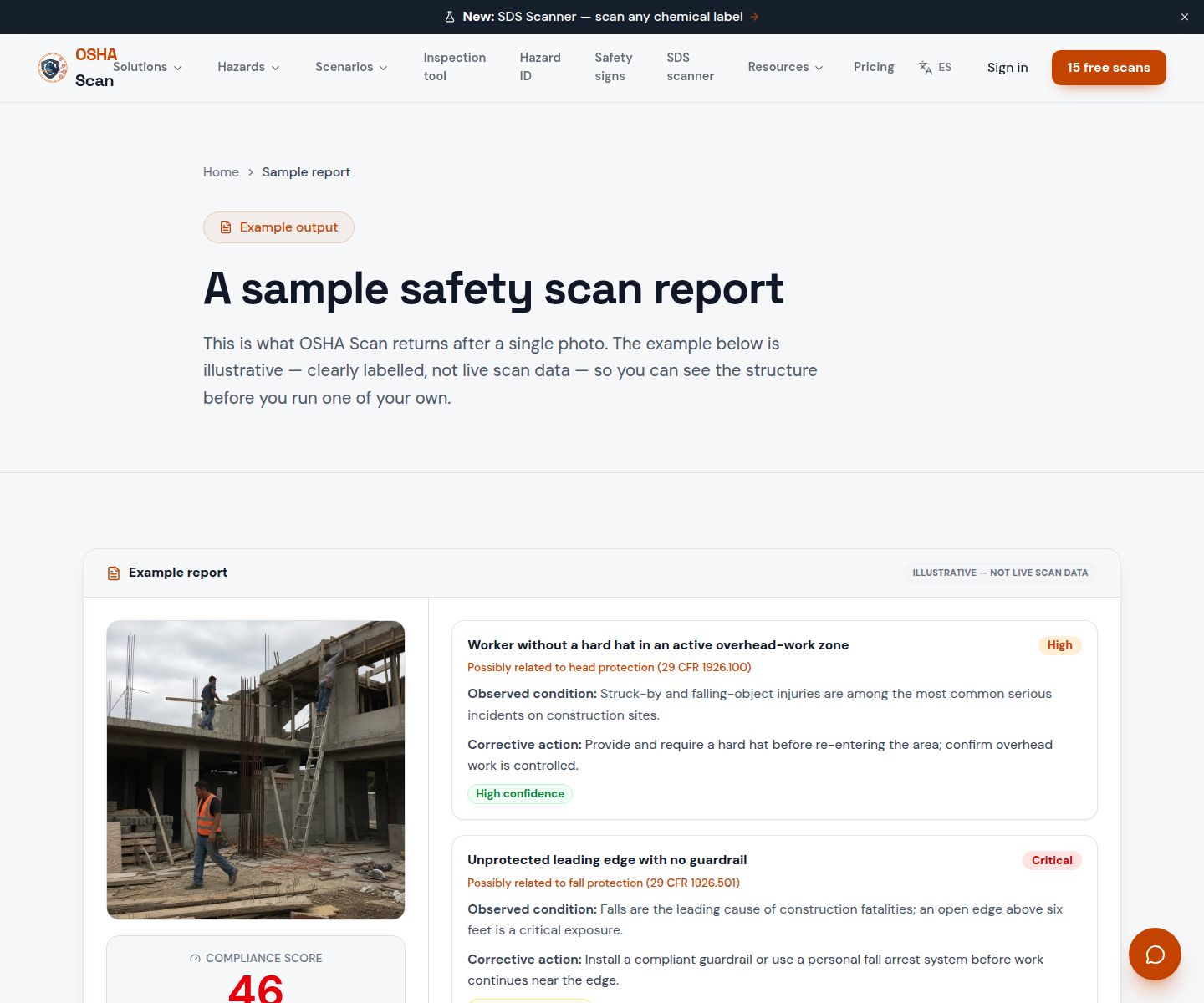
Scan a photo like the one above and this is the report you get — score, findings, OSHA references, and fixes. It is an illustrative example, clearly marked — not live scan data.
Compliance score
52
Lower means more potential hazards found
5 potential hazards found
1Steel stock staged across a ground-level access route
MediumPossibly related to housekeeping and materials storage (29 CFR 1926.25)
Observed condition: Materials across an access route create trip and struck-by exposure for everyone moving through the area.
Corrective action: Restack the steel in a marked staging area clear of walkways and access routes.
High confidence
2Unprotected leading edge with no guardrail
CriticalPossibly related to fall protection (29 CFR 1926.501)
Observed condition: Falls are the leading cause of construction fatalities; an open edge above six feet is a critical exposure.
Corrective action: Install a compliant guardrail or use a personal fall arrest system before work continues.
Medium confidenceNot fully clear from the photo — verify on site.
Upload a photo like the one above and get a compliance score and hazard count in seconds. No account needed to scan — create a free account to unlock the full report.
Use the real site or facility name. If you save the scan after signup, it becomes the report name.
Three angles, one deeper scan
Only the wide shot is required — every extra angle gives the AI more places to look.
Required: Set the scene — one wide shot lets the AI sweep the whole area at once
Stand at the entry point and capture corner to corner: floors, ladders, scaffolds, and everyone at work
Drop a job-site photo or walkthrough video
Click to upload, drag & drop, or snap a photo on site. Photos scan free in about 15 seconds — no signup, no card. Video walkthroughs (up to 3 min) run on a free account.
Small habits, sharper scans
Set the scene
Start with context
Fill the frame
2–3 ft for close-ups; keep ladders, cords and workers fully in view.
Capture clearly
Make the frame usable
Light it right
Keep the sun or lights behind you — glare and shadows hide hazards.
Tap to focus
Tap the hazard on screen and hold still one second — blur can't be flagged.
Choose the useful view
Give the AI room to understand
Go landscape
Turn your phone sideways — a wider frame catches more of the scene.
Only upload photos you have permission to use, and avoid images showing personal, customer, or confidential information. Demo photos and results are held privately for up to 48 hours so you can save them to a free account; unclaimed photos are deleted automatically. Results are an AI-assisted preliminary review, not an official OSHA determination.
New: Video walkthrough scans
Record up to 3 minutes of your site — the AI extracts frames and flags every hazard with exact timestamps. Free account required.
Get the best results
Wide shot first
Stand at the entrance and photograph the entire work area so AI sees the full context
Hazard areas
Photograph elevated surfaces, equipment, electrical panels, and anywhere workers are active
Close-ups last
Move in close on anything damaged, missing, or that looks risky — the AI catches more detail
How to run a photo-first safety inspection end to end. The first four points are free — create a free account to unlock the full checklist and put it to work on your own site.
Define the scope before you walk
Decide which areas, trades, and hazard types this inspection covers, so the photo set is systematic instead of whatever caught your eye.
Photograph systematically, area by area
Wide shot first, then working shots of each activity — following the same route each time makes trends visible across inspections.
Capture people and PPE at working distance
PPE compliance findings need workers visible clearly in the frame — close enough to see hard hats, glasses, and connections.
Cover work at height
Ladders, scaffolds, lifts, edges, and openings — the hazard family behind the most serious construction injuries gets frames from useful angles.
See the illustrative report format before trying a scan on your own photo.
View sample reportOSHA Scan reads a single photo. That makes it fast and easy for anyone on site — but it also means it has real limits. Here's an honest look at both.
A scan is a fast first look, not the final word. Before treating this kind of area as safe, a competent person should still confirm:
It is software that reviews a job-site photo with computer vision and returns a preliminary hazard report — flagged hazards, the OSHA standard each may relate to, a compliance score, and suggested fixes. OSHA Scan does this in seconds from a single image, with no safety training required to run it.
No. OSHA Scan is an independent tool and is not affiliated with, endorsed by, or certified by OSHA. A scan is an AI-assisted preliminary review to help you spot and prioritize hazards; it is not an official OSHA inspection or a determination of legal compliance.
No. You can run a scan and see a result without creating an account. A free account unlocks full saved reports, history, PDF and Excel export, and team features.
Any setting you can photograph — construction, warehousing, roofing, food service, manufacturing, and general facilities. The pages in this hub cover the most common jobs, sites, and specific hazards the scanner handles.
Reviewed by OSHA Scan Editorial
Last updated August 29, 2026
This content is produced by the OSHA Scan Editorial team and reviewed with AI assistance. It is general safety information, not legal or compliance advice. OSHA Scan is an independent tool and is not affiliated with, endorsed by, or certified by OSHA or the U.S. Department of Labor.
Free PDF checklist
33 critical checks across 7 categories — the same visible gaps the AI scanner looks for. Sent to your inbox as a free PDF.
More ways to see what an AI OSHA scan can do for your site.
Organize saved inspections by location and review scores, hazards, dated trends, and checklist progress.
Keep accepted findings pending until the correction is verified and marked completed.
A closer look at how the AI turns one image into a hazard list.
The scanner applied to active construction sites.
See a complete labelled example of everything a scan returns.
Start with 5 included AI site scans plus a one-time 10-scan signup bonus — no credit card. Build JHA-ready reports and catch changing conditions sooner.
Start your free trial