
1
Set the scene
Start with context
Fill the frame
2–3 ft for close-ups; keep ladders, cords and workers fully in view.
An AI safety compliance tool turns a photo of any work area into a structured compliance review. Upload a picture of a warehouse aisle, a shop floor, or a construction bay and the AI checks the visible conditions — exits, walkways, cords and panels, PPE, material storage, machine guarding — against the OSHA standards each condition may relate to. You get a 0-100 compliance score, a finding-by-finding breakdown with suggested fixes, and a corrective-action checklist you can assign. It is free to try, needs no account, and works from a phone. It is an AI-assisted preliminary review, not a formal compliance determination.
Free · No account needed to scan · Results in seconds
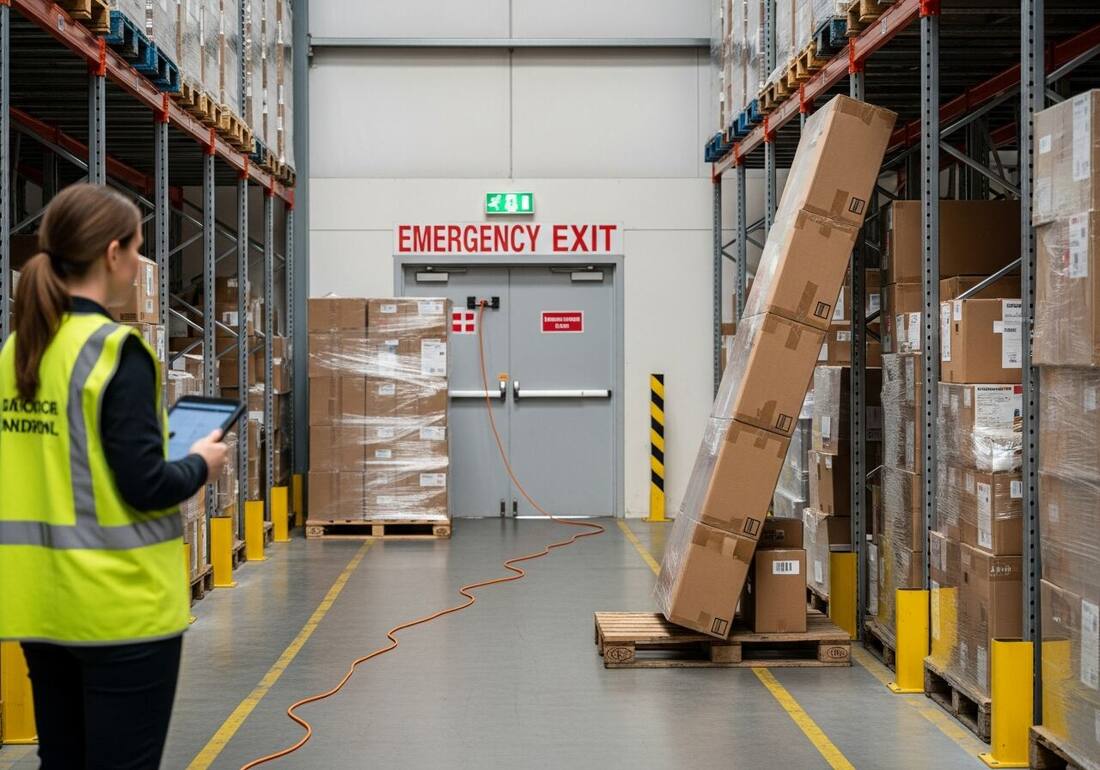
Compliance work has two halves. The paperwork half — written programs, training records, SDS binders — moves slowly and lives in a filing cabinet. The floor half moves every shift: a pallet gets staged in front of an exit at 10am, a cord gets run across an aisle after lunch, a guard comes off a machine for a jam and never goes back on. Audits catch the paperwork; the floor half is whoever happens to walk past, whenever they happen to look.
An AI compliance scan puts the floor half on the same footing as the paperwork half. Any supervisor photographs an area and gets back a scored, standard-referenced snapshot of its visible compliance state — in seconds, not at the next quarterly audit. Findings become assigned corrective actions, and re-scans document that they were closed. Over weeks, the scores turn compliance from a feeling into a trend line.
For US employers the stakes are concrete: OSHA penalties run per violation, repeat findings multiply them, and the General Duty Clause expects recognized hazards to be found and fixed. A dated record of scans and closed corrective actions is the kind of good-faith evidence that matters when a compliance officer — or an insurer — starts asking what your program actually does.
OSHA classifies citations on a scale that determines penalty exposure and legal strategy. Other-than-serious violations — conditions with low probability of causing death or serious physical harm — and serious violations — the most common classification, where there is substantial probability of severe injury or death — both carry maximums that OSHA adjusts annually for inflation; check OSHA's current penalty schedule for exact figures. Willful violations, where the employer knew of the hazard and consciously chose not to fix it, carry a substantially higher per-violation maximum. Repeat violations — citations for the same condition within the prior five years at any facility the employer controls — are a distinct classification that can carry the same elevated maximum as willful violations. Repeat and willful are separate categories, each carrying significantly higher exposure than a first-time serious citation.
For compliance programs, the most actionable implication is the repeat-violation rule: a documented failure to address a hazard category at one site exposes all other sites to elevated penalties for the same condition. A compliance tool that creates a dated record of finding-and-fixing at each location is not just an operational convenience — it is the evidentiary foundation of a good-faith defense if a compliance officer ever asks whether a hazard was known and acted on.
OSHA's top general-industry citations year after year cluster around the same visible conditions: hazard communication (missing or inadequate chemical labels and SDS access), lockout/tagout (energy control during maintenance), respiratory protection (fit testing and written program gaps), and machine guarding. Exit routes and emergency egress (29 CFR 1910.37) are also consistently cited — blocked exits are easy to create between inspections, straightforward for compliance officers to observe, and correctable immediately. Walking every exit path and documenting that it was clear is one of the highest-return compliance checks any program can perform.
Machine guarding (1910.212) and electrical safety (1910.303–1910.305) round out the list of frequent citations in manufacturing and warehouse settings. These hazard families are all visible-condition problems: a photo-based compliance sweep catches the open panel, the missing guard, and the cord across the aisle in the same pass. The compliance tool on this page is designed to surface exactly these conditions because they account for the plurality of OSHA citations issued to general-industry employers.
One frame, every visible compliance family at once — this is what the AI looks for.
Blocked emergency exits, obstructed aisles, trip hazards, and material staged in walking paths — the most-cited and fastest-fixed findings.
Cords run across floors, damaged insulation, blocked panels, and daisy-chained power strips near wet or busy areas.
Leaning or unstable stacks, overloaded racking, unbanded loads, and storage that blocks sprinklers, panels, or exits.
Missing hard hats, eye protection, and hi-vis on anyone in the frame, judged against the work happening around them.
Scan a photo like the one above and this is the report you get — score, findings, OSHA references, and fixes. It is an illustrative example, clearly marked — not live scan data.
Compliance score
38
Lower means more potential hazards found
5 potential hazards found
1Boxes stacked in front of a marked emergency exit
HighPossibly related to exit routes (29 CFR 1910.37)
Observed condition: A blocked exit turns a routine evacuation into a fatal bottleneck — and it is one of the first things any inspector checks.
Corrective action: Clear the exit immediately and mark the floor zone in front of it as no-staging.
High confidence
2Extension cord run across the aisle floor
MediumPossibly related to wiring methods and flexible cords (29 CFR 1910.305)
Observed condition: A cord across an active aisle is a trip hazard for people and a damaged-insulation hazard every time a pallet jack rolls over it.
Corrective action: Re-route the cord overhead or along the racking, or use a rated floor cord cover.
High confidence
Upload a photo like the one above and get a compliance score and hazard count in seconds. No account needed to scan — create a free account to unlock the full report.
Use the real site or facility name. If you save the scan after signup, it becomes the report name.
Three angles, one deeper scan
Only the wide shot is required — every extra angle gives the AI more places to look.
Required: Set the scene — one wide shot lets the AI sweep the whole area at once
Stand at the entry point and capture corner to corner: floors, ladders, scaffolds, and everyone at work
Drop a job-site photo or walkthrough video
Click to upload, drag & drop, or snap a photo on site. Photos scan free in about 15 seconds — no signup, no card. Video walkthroughs (up to 3 min) run on a free account.
Small habits, sharper scans
Set the scene
Start with context
Fill the frame
2–3 ft for close-ups; keep ladders, cords and workers fully in view.
Capture clearly
Make the frame usable
Light it right
Keep the sun or lights behind you — glare and shadows hide hazards.
Tap to focus
Tap the hazard on screen and hold still one second — blur can't be flagged.
Choose the useful view
Give the AI room to understand
Go landscape
Turn your phone sideways — a wider frame catches more of the scene.
Only upload photos you have permission to use, and avoid images showing personal, customer, or confidential information. Demo photos and results are held privately for up to 48 hours so you can save them to a free account; unclaimed photos are deleted automatically. Results are an AI-assisted preliminary review, not an official OSHA determination.
New: Video walkthrough scans
Record up to 3 minutes of your site — the AI extracts frames and flags every hazard with exact timestamps. Free account required.
Get the best results
Wide shot first
Stand at the entrance and photograph the entire work area so AI sees the full context
Hazard areas
Photograph elevated surfaces, equipment, electrical panels, and anywhere workers are active
Close-ups last
Move in close on anything damaged, missing, or that looks risky — the AI catches more detail
The visible compliance items to sweep before an auditor or inspector does. The first four points are free — create a free account to unlock the full checklist and start scanning your own facility.
Walk every marked exit first
Each exit door opens freely, the route to it is clear its full width, and the exit sign is lit — blocked egress is the classic write-up.
Photograph every aisle end to end
Cords, spills, staged pallets, and pinch points show up clearly in a single down-the-aisle frame.
Check extinguishers and sprinkler clearance
Extinguishers mounted, tagged, and unobstructed; nothing stored within 18 inches of sprinkler heads.
Sweep electrical panels and cords
Three feet of clearance at every panel, covers closed, no cords across walking paths, no daisy-chained strips.
OSHA Scan reads a single photo. That makes it fast and easy for anyone on site — but it also means it has real limits. Here's an honest look at both.
A scan is a fast first look, not the final word. Before treating this kind of area as safe, a competent person should still confirm:
It reviews the visible conditions in a photo — exits and egress, housekeeping, electrical, material storage, machine guarding, and PPE — and flags each issue with the OSHA standard it may relate to, a suggested fix, and a 0-100 compliance score for the frame. It checks what a camera can see; written programs and records still need a human review.
No — it makes them faster and better-aimed. The scan handles the visible-conditions sweep in seconds and documents it, so your audits can focus on the parts a camera cannot judge: training records, written programs, permits, and measurements. Findings still need verification by a person on site.
Both. The scan reviews whatever is in the frame, and the compliance families it checks — egress, housekeeping, electrical, storage, PPE — span 29 CFR 1910 general-industry and 1926 construction contexts alike. Warehouse aisles, shop floors, kitchens, and job sites all work.
Running a scan and seeing the score and hazard count is free with no account. A free account unlocks the full finding-by-finding report with OSHA references and the corrective-action checklist, plus 5 free scans, saved history, and PDF export. No credit card required.
Reviewed by OSHA Scan Editorial
Last updated August 29, 2026
This content is produced by the OSHA Scan Editorial team and reviewed with AI assistance. It is general safety information, not legal or compliance advice. OSHA Scan is an independent tool and is not affiliated with, endorsed by, or certified by OSHA or the U.S. Department of Labor.
Free PDF checklist
33 critical checks across 7 categories — the same visible gaps the AI scanner looks for. Sent to your inbox as a free PDF.
More ways to see what an AI OSHA scan can do for your site.
The overview hub — how the scanner works and every job, site, and hazard it covers.
The paperwork side of compliance inspectors ask for first.
Photo scans, scores, and corrective actions as your record.
The repetitive parts of compliance work, automated.
The full area-by-area self-inspection walkthrough.
One scan across every hazard family in a single photo.
The scanner tuned to racking, docks, and forklift traffic.
How the photo scanner works and every trade checklist it supports.
See a complete labelled example of everything a scan returns.
Start with 5 included AI site scans plus a one-time 10-scan signup bonus — no credit card. Build JHA-ready reports and catch changing conditions sooner.
Start your free trial