
1
Set the scene
Start with context
Fill the frame
2–3 ft for close-ups; keep ladders, cords and workers fully in view.
A photo hazard analysis starts with the picture instead of the form. Photograph the work area — a workshop corner, a task in progress, a piece of equipment — and the AI analyzes the frame for visible hazards: damaged cords, flammables near heat, cluttered paths, missing guards, missing PPE. Each finding comes back with the OSHA standard it may relate to, why it matters, a suggested fix, and a 0-100 score for the area. It takes seconds, is free to try with no account, and gives a job hazard analysis a running start — though the person on site still verifies every finding and covers what a camera cannot see.
Free · No account needed to scan · Results in seconds
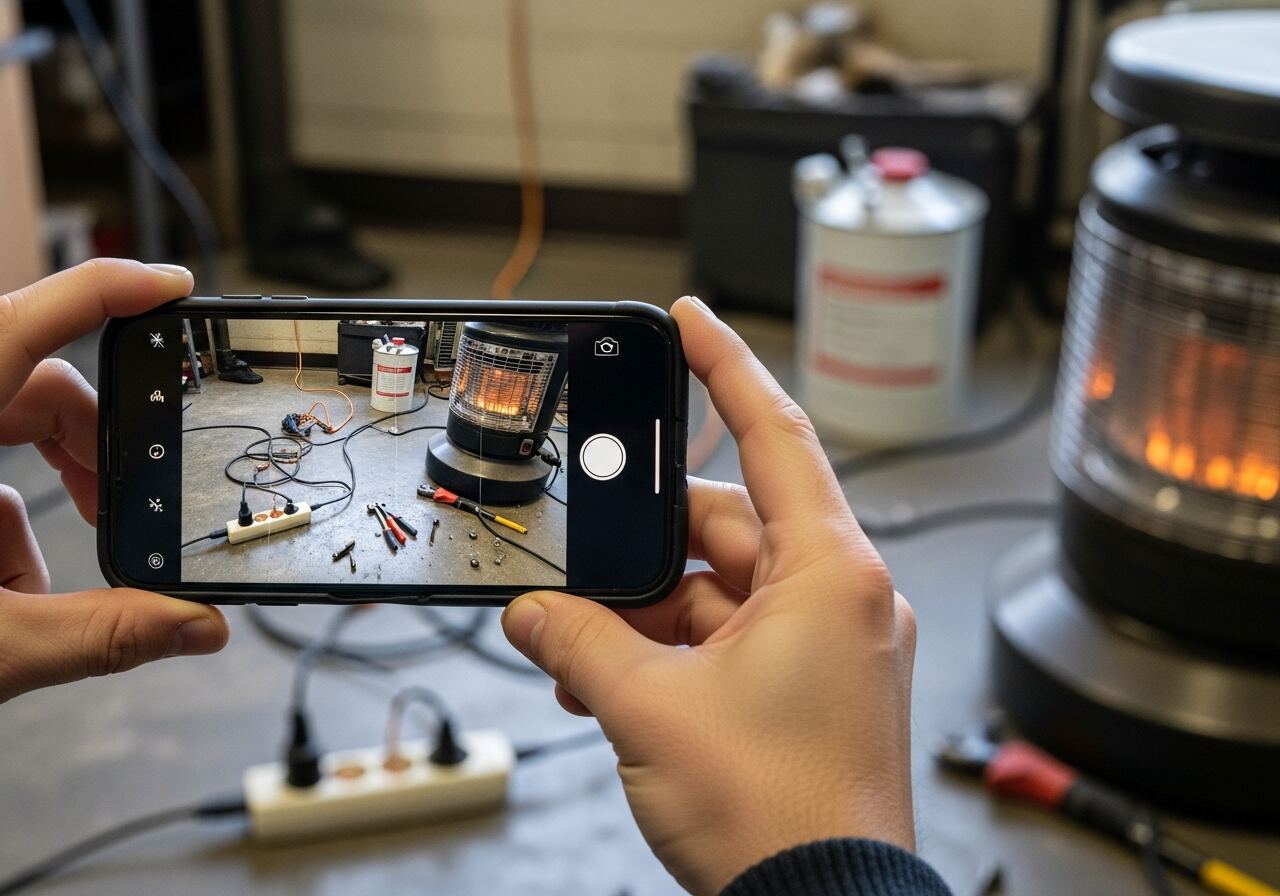
A job hazard analysis is only as good as the hazards it starts with, and the blank-page problem is real: the person filling in the form lists what they remember, not what is actually in front of them. Familiarity works against you — the cord that has been across that floor for a month stops registering as a hazard to the people who step over it every day.
Starting from a photo flips that. The camera has no habits: it records the frayed cord, the solvent can beside the heater, the tools in the walking path, exactly as they are. The AI then does the recall work — naming each visible hazard, referencing the OSHA standard it may relate to, and suggesting the control — so the person writing the analysis starts from a concrete finding list instead of an empty template. Their judgment goes into verifying, prioritizing, and catching what the camera missed, which is where it was always most valuable.
It also changes when analysis happens. A formal JHA gets written when a job is planned; conditions change by the shift. A photo analysis is cheap enough to run at the start of any task — the two minutes between noticing something feels off and knowing specifically what to fix.
OSHA does not have a single standard requiring job hazard analysis (JHA) by name across all industries, but the requirement surfaces throughout specific standards — 1910.132 requires a workplace hazard assessment for PPE, 1910.147 requires energy-control procedure development that amounts to task-level hazard analysis, and 1926.502 requires site-specific fall-protection plans for certain construction operations. More broadly, OSHA's voluntary JHA guidelines describe hazard analysis as the prerequisite to effective hazard control: before you can select controls, you have to identify what the hazards actually are. Photo-based hazard identification addresses the first step of that sequence — the recognition phase — by making the hazard list concrete rather than relying on memory and familiarity.
The hierarchy of controls — elimination, substitution, engineering controls, administrative controls, PPE — is the framework OSHA expects employers to apply once hazards are identified. A photo analysis produces the raw finding list; the person reviewing the findings applies the hierarchy to select the appropriate control for each item. This division of labor is by design: AI vision is well-suited to recognition from images, and trained safety professionals are better suited to the judgment calls about which controls are feasible, cost-effective, and adequate for a specific task. The two steps together produce a more complete JHA than either could achieve alone.
BLS injury data consistently show the same industries at the top of the non-fatal injury and illness rate tables: warehousing and transportation, construction, manufacturing, food service, and healthcare. These industries share a common characteristic — their hazard conditions change frequently, within a single shift, in ways that make point-in-time scheduled inspections insufficient. A warehouse receiving dock changes configuration every time a trailer comes in; a construction site changes every day as trades cycle through. Hazard analysis that can be triggered at the start of a task, rather than on a quarterly schedule, directly addresses the time lag between when a hazard appears and when it is caught.
For construction specifically, OSHA's Focus Four hazard categories — falls, struck-by, caught-in/between, and electrocution — are all visually detectable from photos of active work areas. Photo hazard analysis at the start of each major task phase, applied consistently across a project, produces a documented recognition record that supports both the competent person's inspection obligations and the employer's post-incident defense if a citation is issued.
The AI reads the whole frame and reports by hazard family — this is what it looks for.
Frayed or damaged cords, overloaded power strips, missing covers, and equipment run in wet or dirty conditions.
Solvents and fuels stored near heat sources, combustibles piling up, blocked extinguishers, and hot work near anything that burns.
Tools and material cluttering paths, spills, uneven surfaces, and the trip hazards that cause the most common injuries.
Missing machine guards, missing protective equipment, and mismatches between the work being done and the protections in view.
Scan a photo like the one above and this is the report you get — score, findings, OSHA references, and fixes. It is an illustrative example, clearly marked — not live scan data.
Compliance score
41
Lower means more potential hazards found
5 potential hazards found
1Solvent container stored beside an operating space heater
HighPossibly related to flammable liquids (29 CFR 1910.106)
Observed condition: Flammable liquid next to a glowing heat source in the same corner is how workshop fires start — separation is the whole control.
Corrective action: Move the container to a flammables cabinet and keep chemical storage clear of heaters and other ignition sources.
High confidence
2Loaded power strip and cords run across the floor work area
MediumPossibly related to wiring methods and flexible cords (29 CFR 1910.305)
Observed condition: Floor-level strips in a walking and working area take foot traffic, dropped tools, and debris — the fastest route to damaged insulation.
Corrective action: Mount the strip off the floor, reduce the load on it, and route cords out of the walking path.
High confidence
Upload a photo like the one above and get a compliance score and hazard count in seconds. No account needed to scan — create a free account to unlock the full report.
Use the real site or facility name. If you save the scan after signup, it becomes the report name.
Three angles, one deeper scan
Only the wide shot is required — every extra angle gives the AI more places to look.
Required: Set the scene — one wide shot lets the AI sweep the whole area at once
Stand at the entry point and capture corner to corner: floors, ladders, scaffolds, and everyone at work
Drop a job-site photo or walkthrough video
Click to upload, drag & drop, or snap a photo on site. Photos scan free in about 15 seconds — no signup, no card. Video walkthroughs (up to 3 min) run on a free account.
Small habits, sharper scans
Set the scene
Start with context
Fill the frame
2–3 ft for close-ups; keep ladders, cords and workers fully in view.
Capture clearly
Make the frame usable
Light it right
Keep the sun or lights behind you — glare and shadows hide hazards.
Tap to focus
Tap the hazard on screen and hold still one second — blur can't be flagged.
Choose the useful view
Give the AI room to understand
Go landscape
Turn your phone sideways — a wider frame catches more of the scene.
Only upload photos you have permission to use, and avoid images showing personal, customer, or confidential information. Demo photos and results are held privately for up to 48 hours so you can save them to a free account; unclaimed photos are deleted automatically. Results are an AI-assisted preliminary review, not an official OSHA determination.
New: Video walkthrough scans
Record up to 3 minutes of your site — the AI extracts frames and flags every hazard with exact timestamps. Free account required.
Get the best results
Wide shot first
Stand at the entrance and photograph the entire work area so AI sees the full context
Hazard areas
Photograph elevated surfaces, equipment, electrical panels, and anywhere workers are active
Close-ups last
Move in close on anything damaged, missing, or that looks risky — the AI catches more detail
How to photograph a task or area so the analysis catches everything worth catching. The first four points are free — create a free account to unlock the full checklist and start analyzing your own photos.
Frame the whole task area
Stand back far enough that the work, the worker, and the surroundings share one frame — hazards live in the relationships, not the close-ups.
Shoot before the work starts
A pre-task photo catches the setup hazards — the cord run, the ladder angle, the staging — while they are still cheap to fix.
Get the floor in the frame
Angle down enough to include walking surfaces; cords, spills, and clutter are the most common findings and the easiest to crop out by accident.
Photograph energy sources up close
Panels, cords, hoses, and connections get one clear frame each — condition details like fraying need to be visible to be flagged.
OSHA Scan reads a single photo. That makes it fast and easy for anyone on site — but it also means it has real limits. Here's an honest look at both.
A scan is a fast first look, not the final word. Before treating this kind of area as safe, a competent person should still confirm:
It is a hazard analysis that starts from a photograph instead of a blank form. The AI reviews the image for visible hazards — electrical condition, fire risks, housekeeping, guarding, PPE — and returns each finding with the OSHA standard it may relate to, a suggested fix, and a 0-100 score. A person then verifies the findings and adds what a camera cannot see.
As the starting point, yes. The scan generates the visible-hazard list and suggested controls in seconds, which removes the blank-page problem. The competent person still verifies each finding, adds task-step hazards a photo cannot show — energy isolation, atmosphere, procedure — and owns the final JHA.
Well-lit frames that include the whole task area — the work, the people, and the floor — plus close-ups of cords, panels, and connections where condition details matter. A short series of three or four angles of the same area catches more than any single shot.
Yes to try: upload a photo and see the score and hazard count with no account. A free account unlocks the full finding-by-finding analysis with OSHA references and the corrective-action checklist, plus 5 free scans, saved history, and PDF export.
Reviewed by OSHA Scan Editorial
Last updated August 29, 2026
This content is produced by the OSHA Scan Editorial team and reviewed with AI assistance. It is general safety information, not legal or compliance advice. OSHA Scan is an independent tool and is not affiliated with, endorsed by, or certified by OSHA or the U.S. Department of Labor.
Free PDF checklist
33 critical checks across 7 categories — the same visible gaps the AI scanner looks for. Sent to your inbox as a free PDF.
More ways to see what an AI OSHA scan can do for your site.
The overview hub — how the scanner works and every job, site, and hazard it covers.
The vision pipeline behind every analysis.
One scan across every hazard family in a single photo.
Cords, panels, and wet-area wiring in the frame.
Guards, cords, and condition checks for the tool bench.
The bigger picture: AI-assisted risk assessment from photos.
Turn the photo findings into a step-by-step task JHA.
From a task photo to a drafted hazard list in seconds.
See a complete labelled example of everything a scan returns.
Start with 5 included AI site scans plus a one-time 10-scan signup bonus — no credit card. Build JHA-ready reports and catch changing conditions sooner.
Start your free trial