
1
Set the scene
Start with context
Fill the frame
2–3 ft for close-ups; keep ladders, cords and workers fully in view.
A job site photo inspection turns the pictures you already take on site into documented safety inspections. Photograph any work area — the framing floor, the trench, the laydown yard — and the AI reviews the frame for visible hazards: debris and protruding nails in walkways, cords run through water, open edges, ladder setup, missing PPE. Each finding returns with the OSHA standard it may relate to, a suggested fix, and a 0-100 score for the area, all in seconds. It is free to try with no account, and it is an AI-assisted first pass — the competent person on site still verifies every finding.
Free · No account needed to scan · Results in seconds
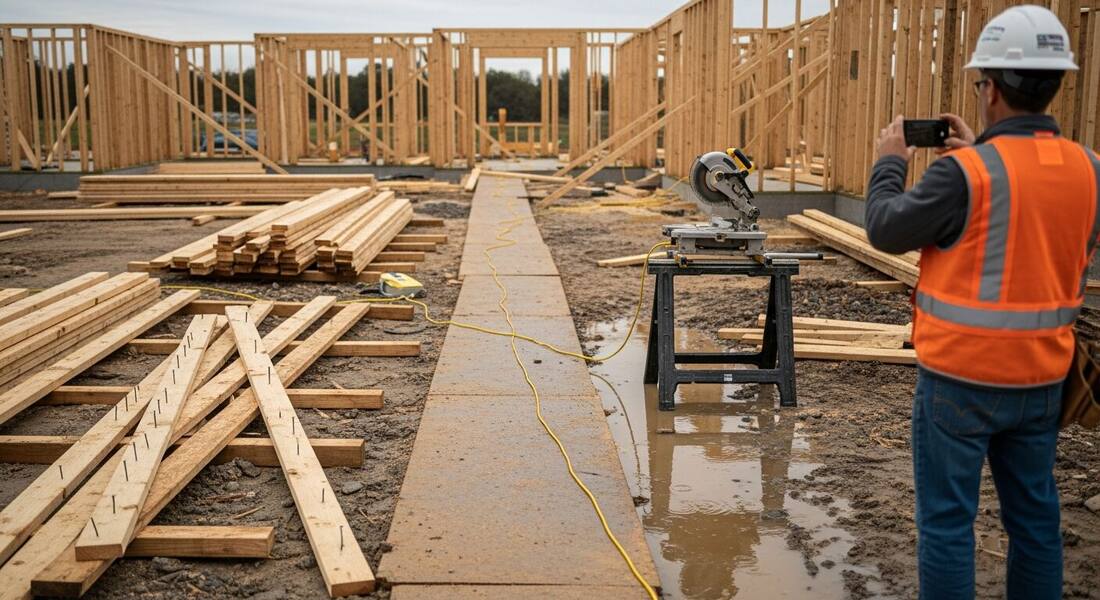
Every US job site already runs on photos: progress shots for the GC, documentation for the owner, texts between the super and the PM. But those photos only become safety records when someone sits down and studies them, and nobody has that hour. Hazards that were captured in pixels — the cord through the puddle, the nail-studded scrap in the walkway — stay invisible because the picture was taken for a different reason.
A photo inspection closes that gap without adding a task. The same walk that produces the progress shots produces the inspection: each photo comes back in seconds with the visible hazards named, the OSHA standard each may relate to, a suggested fix, and a score for the area. The superintendent's judgment goes where it belongs — verifying findings, deciding priority, and catching what the camera missed — instead of into recalling what a clean site is supposed to look like.
Over a project, the record compounds. Dated, scored photo inspections of the same areas show a GC, an owner, or an insurer that hazards were found and corrected as the site changed — the kind of good-faith documentation that matters when questions get asked after an incident.
OSHA's recordkeeping rule (29 CFR 1904) requires employers with 11 or more employees in covered industries to log work-related injuries and illnesses on an OSHA 300 log. But the log is a lagging indicator — it captures what happened after an incident, not what was identified and prevented beforehand. The leading-indicator documentation that matters most in post-incident OSHA investigations is the inspection record: what hazardous conditions were identified, when they were identified, and how they were corrected. A construction site that can produce dated photo inspections of the same work area before and after corrective action has a qualitatively different defense posture than a site that can only produce a 300 log showing the incident occurred.
Several 1926 construction standards require competent-person inspections at defined intervals — scaffold conditions before each work shift (1926.451), excavations daily and after any condition change (1926.651), and equipment on regular schedules. These standards specify who must inspect and how often; employers determine how to document compliance. Dated photo records of these inspection walks — time-stamped and tied to the specific work area — are one way to demonstrate that required inspections occurred, and they are far more specific than handwritten notes made hours after the fact.
General contractors face liability for hazardous conditions created by subcontractors under OSHA's multi-employer citation policy: a controlling employer — typically the GC — can be cited for conditions it had the authority to correct, even if the exposed workers belonged to a sub. Managing that exposure requires active oversight of sub work areas, not just the assumption that subs are managing their own compliance. A systematic job site photo inspection program that covers all work areas, including sub zones, creates the documented oversight record that supports a controlling-employer defense.
The most effective multi-employer photo inspection programs run on a predictable schedule — morning walk, after crew change, before high-risk tasks — and cover every active area on the site, not just the areas managed by GC employees. When findings in a sub's area are documented, shared with the sub in writing, and followed up to confirm correction, the record demonstrates the active control that OSHA's controlling-employer standard requires. This level of systematic coverage is difficult to achieve with paper checklists and straightforward with a camera-based approach that produces shareable, dated records.
One frame, every visible hazard family on an active site — this is what the scan looks for.
Scrap and debris in walkways, protruding nails, materials staged where people move, and blocked access routes.
Extension cords run through water or traffic paths, damaged insulation, and daisy-chained or overloaded connections.
Open slab edges, missing guardrails, uncovered floor holes, and ladder angle, extension, and tie-off setup.
Hard hats, eye protection, and hi-vis on everyone in the frame, judged against the work happening around them.
Scan a photo like the one above and this is the report you get — score, findings, OSHA references, and fixes. It is an illustrative example, clearly marked — not live scan data.
Compliance score
46
Lower means more potential hazards found
5 potential hazards found
1Scrap lumber with protruding nails in the walking path
HighPossibly related to construction housekeeping (29 CFR 1926.25)
Observed condition: Form and scrap lumber with nails left in work areas is one of construction's most-cited housekeeping conditions — a puncture or trip is one step away for everyone crossing the site.
Corrective action: Pull or bend the nails, clear the scrap to a debris pile, and keep the designated walking path clear through the pour and framing sequence.
High confidence
2Extension cord run through standing water to the saw station
HighPossibly related to temporary wiring on construction sites (29 CFR 1926.405)
Observed condition: A cord lying in a puddle feeds any insulation damage straight into a shock path — wet-condition cord runs are exactly where GFCI protection and routing rules earn their keep.
Corrective action: Re-route the cord overhead or around the wet area, confirm GFCI protection on the circuit, and inspect the cord jacket before returning it to service.
High confidence
Upload a photo like the one above and get a compliance score and hazard count in seconds. No account needed to scan — create a free account to unlock the full report.
Use the real site or facility name. If you save the scan after signup, it becomes the report name.
Three angles, one deeper scan
Only the wide shot is required — every extra angle gives the AI more places to look.
Required: Set the scene — one wide shot lets the AI sweep the whole area at once
Stand at the entry point and capture corner to corner: floors, ladders, scaffolds, and everyone at work
Drop a job-site photo or walkthrough video
Click to upload, drag & drop, or snap a photo on site. Photos scan free in about 15 seconds — no signup, no card. Video walkthroughs (up to 3 min) run on a free account.
Small habits, sharper scans
Set the scene
Start with context
Fill the frame
2–3 ft for close-ups; keep ladders, cords and workers fully in view.
Capture clearly
Make the frame usable
Light it right
Keep the sun or lights behind you — glare and shadows hide hazards.
Tap to focus
Tap the hazard on screen and hold still one second — blur can't be flagged.
Choose the useful view
Give the AI room to understand
Go landscape
Turn your phone sideways — a wider frame catches more of the scene.
Only upload photos you have permission to use, and avoid images showing personal, customer, or confidential information. Demo photos and results are held privately for up to 48 hours so you can save them to a free account; unclaimed photos are deleted automatically. Results are an AI-assisted preliminary review, not an official OSHA determination.
New: Video walkthrough scans
Record up to 3 minutes of your site — the AI extracts frames and flags every hazard with exact timestamps. Free account required.
Get the best results
Wide shot first
Stand at the entrance and photograph the entire work area so AI sees the full context
Hazard areas
Photograph elevated surfaces, equipment, electrical panels, and anywhere workers are active
Close-ups last
Move in close on anything damaged, missing, or that looks risky — the AI catches more detail
How to walk a site with a camera so every photo doubles as an inspection record. The first four points are free — create a free account to unlock the full checklist and start scanning your own site photos.
Follow the same route every time
A fixed walk — gate, laydown, each floor, roof — makes photo sets comparable across days and keeps areas from being skipped when the site gets busy.
Shoot wide before you shoot close
The wide establishing shot catches relationships — the cord near the water, the stack beside the path — that close-ups crop out.
Get the ground in every frame
Angle down enough to include walking surfaces; housekeeping and cord-routing findings live at boot level, not eye level.
Photograph every edge and opening
Slab edges, stair openings, and floor holes get one frame each — guardrail and cover condition is a top construction citation year after year.
OSHA Scan reads a single photo. That makes it fast and easy for anyone on site — but it also means it has real limits. Here's an honest look at both.
A scan is a fast first look, not the final word. Before treating this kind of area as safe, a competent person should still confirm:
It is a safety inspection performed from photographs of the site. You photograph work areas the way you already do for progress documentation, and the AI reviews each frame for visible hazards — housekeeping, cords, edges, ladders, PPE — returning findings with the OSHA standard each may relate to, suggested fixes, and a 0-100 score. A competent person verifies the findings on site.
No. It gives the walk a head start and a record. OSHA's construction standards put specific duties on a competent person that no photo can satisfy — soil classification, fall-protection anchorage, scaffold sign-off. The scan surfaces the visible conditions fast; the person verifies, prioritizes, and covers what the camera cannot see.
Yes — each scan saves as a dated, scored report with findings and corrective actions, exportable as PDF or Excel. Superintendents use the week-over-week scores of the same areas as safety documentation for GC prequalification and owner reporting.
Yes: upload a job site photo and see the compliance score and hazard count with no account. A free account unlocks the full finding-by-finding report with OSHA references, plus 5 free scans, saved history, and export.
Reviewed by OSHA Scan Editorial
Last updated August 29, 2026
This content is produced by the OSHA Scan Editorial team and reviewed with AI assistance. It is general safety information, not legal or compliance advice. OSHA Scan is an independent tool and is not affiliated with, endorsed by, or certified by OSHA or the U.S. Department of Labor.
Free PDF checklist
33 critical checks across 7 categories — the same visible gaps the AI scanner looks for. Sent to your inbox as a free PDF.
More ways to see what an AI OSHA scan can do for your site.
The overview hub — how the scanner works and every job, site, and hazard it covers.
The same camera-first inspection applied to any facility.
Falls, PPE, struck-by, and edge hazards on active sites.
Grade the site 0-100 from a photo and track the trend.
The full self-inspection walkthrough the scan powers.
One scan across every hazard family in a single photo.
Turn inspection photos into a dated, defensible hazard record.
See a complete labelled example of everything a scan returns.
Start with 5 included AI site scans plus a one-time 10-scan signup bonus — no credit card. Build JHA-ready reports and catch changing conditions sooner.
Start your free trial