
1
Set the scene
Start with context
Fill the frame
2–3 ft for close-ups; keep ladders, cords and workers fully in view.
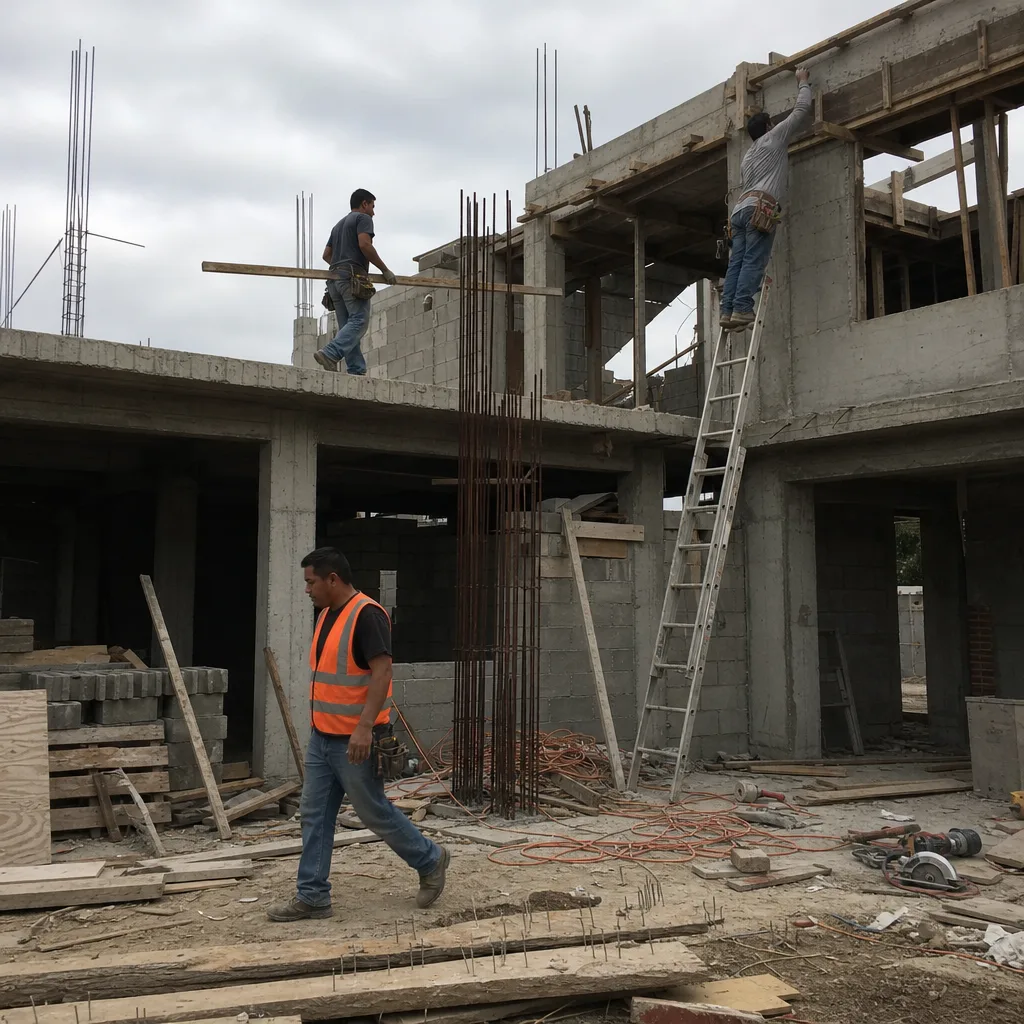
This is what OSHA Scan returns after a single photo. The example below is illustrative — clearly labelled, not live scan data — so you can see the structure before you run one of your own.
Compliance score
46
Lower means more potential hazards found
3 potential hazards found
Worker without a hard hat in an active overhead-work zone
HighPossibly related to head protection (29 CFR 1926.100)
Observed condition: Struck-by and falling-object injuries are among the most common serious incidents on construction sites.
Corrective action: Provide and require a hard hat before re-entering the area; confirm overhead work is controlled.
High confidence
Unprotected leading edge with no guardrail
CriticalPossibly related to fall protection (29 CFR 1926.501)
Observed condition: Falls are the leading cause of construction fatalities; an open edge above six feet is a critical exposure.
Corrective action: Install a compliant guardrail or use a personal fall arrest system before work continues near the edge.
Medium confidenceNot fully clear from the photo — verify on site.
Exposed rebar without protective caps
MediumPossibly related to impalement / rebar protection (29 CFR 1926.701)
Observed condition: Uncapped rebar can cause impalement injuries during a slip, trip, or fall onto the bars.
Corrective action: Cap or bend exposed rebar ends and keep the area around it clear.
High confidence
Four parts, designed so anyone can read it and know what to do next.
A single 0-100 number derived from the hazards found, so you can gauge a site at a glance and track it over time.
Each visible hazard listed with a risk level, why it matters, and an AI confidence level for that specific finding.
Each finding references the OSHA standard it may relate to — a starting point for follow-up, phrased as a possibility rather than a verdict.
A suggested fix for each hazard, so the report is something you can act on, not just a list of problems.
Walk the area, take one photo, and use the hazard list as the agenda for the morning huddle. The corrective-action checklist becomes the punch list: assign each item, fix it, check it off.
Each report is a timestamped record of what a site looked like, what was flagged, and what was done about it. Exported to PDF or Excel, it slots into the documentation you already keep for audits and incident reviews.
Most small crews cannot keep a full-time safety professional on staff. A scan is not a substitute for one — but it puts a structured, OSHA-referenced review within reach on every job, not just the ones big enough to justify a consultant.
Aisles, racking, charging stations, and loading docks drift out of compliance gradually. A monthly photo scan per zone catches the drift — blocked egress, missing guarding, damaged racking — while it is still a five-minute fix.
A report is a strong starting point, not the last word. Before treating a site as safe, a person should still confirm:
Reviewed by OSHA Scan Editorial
Last updated August 29, 2026
This content is produced by the OSHA Scan Editorial team and reviewed with AI assistance. It is general safety information, not legal or compliance advice. OSHA Scan is an independent tool and is not affiliated with, endorsed by, or certified by OSHA or the U.S. Department of Labor.
Upload a job-site photo and get a compliance score and hazard count in seconds. No account needed to scan — create a free account to unlock the full report.
Use the real site or facility name. If you save the scan after signup, it becomes the report name.
Three angles, one deeper scan
Only the wide shot is required — every extra angle gives the AI more places to look.
Required: Set the scene — one wide shot lets the AI sweep the whole area at once
Stand at the entry point and capture corner to corner: floors, ladders, scaffolds, and everyone at work
Drop a job-site photo or walkthrough video
Click to upload, drag & drop, or snap a photo on site. Photos scan free in about 15 seconds — no signup, no card. Video walkthroughs (up to 3 min) run on a free account.
Small habits, sharper scans
Set the scene
Start with context
Fill the frame
2–3 ft for close-ups; keep ladders, cords and workers fully in view.
Capture clearly
Make the frame usable
Light it right
Keep the sun or lights behind you — glare and shadows hide hazards.
Tap to focus
Tap the hazard on screen and hold still one second — blur can't be flagged.
Choose the useful view
Give the AI room to understand
Go landscape
Turn your phone sideways — a wider frame catches more of the scene.
Only upload photos you have permission to use, and avoid images showing personal, customer, or confidential information. Demo photos and results are held privately for up to 48 hours so you can save them to a free account; unclaimed photos are deleted automatically. Results are an AI-assisted preliminary review, not an official OSHA determination.
New: Video walkthrough scans
Record up to 3 minutes of your site — the AI extracts frames and flags every hazard with exact timestamps. Free account required.
Get the best results
Wide shot first
Stand at the entrance and photograph the entire work area so AI sees the full context
Hazard areas
Photograph elevated surfaces, equipment, electrical panels, and anywhere workers are active
Close-ups last
Move in close on anything damaged, missing, or that looks risky — the AI catches more detail
Start with 5 included AI site scans plus a one-time 10-scan signup bonus — no credit card. Build JHA-ready reports and catch changing conditions sooner.
Start your free trial