
1
Set the scene
Start with context
Fill the frame
2–3 ft for close-ups; keep ladders, cords and workers fully in view.
A job hazard analysis (JHA) breaks a job into steps, identifies the hazards in each step, and sets a control for every hazard before work starts. OSHA also calls it a job safety analysis (JSA) — same technique, different name. The slow part has always been hazard identification, and that is the part a photo now accelerates: photograph the task and its work area, and the AI drafts the visible-hazard list with the OSHA standard each may relate to and a suggested control, in seconds. The competent person still walks the steps, verifies the findings, and covers what a camera cannot see.
Free · No account needed to scan · Results in seconds
OSHA's own guidance (publication 3071) is straightforward: pick the job, break it into steps, identify the hazards in each step, and control them — starting with the jobs that have injured someone before, the ones with high severity potential, and the ones new to the crew. The technique is not complicated. The reason JHAs go stale or unwritten is time: a thorough hazard walk for one task can take longer than the task, so the analysis gets copied from last year's form and signed.
Putting a camera at the front of the process changes the economics. Photograph the task setup — the grinding station, the trench edge, the panel work — and the scan returns the visible hazards in that frame with the OSHA standard each may relate to, why it matters, and a suggested control. That is a drafted hazards-and-controls list for the step, produced in the time it took to take the picture. The supervisor's effort moves from staring at a blank worksheet to verifying, prioritizing, and adding what the photo cannot show.
The result is a JHA that reflects the site as it is today, not as it was when the template was written. When the setup changes — new equipment position, new material staged in the area — a new photo updates the analysis the same day, and the dated, scored reports become the record that hazard reviews actually happened.
No federal standard orders every US employer to write a JHA for every task — but the hazard-identification work a JHA documents shows up all over the regulations. The clearest example is 29 CFR 1910.132(d): before assigning PPE you must assess the workplace for hazards and certify that assessment in writing, with the workplace, the assessor, and the date. Beyond specific standards, the General Duty Clause requires a workplace free of recognized serious hazards — and a documented JHA is how you show a hazard was recognized and controlled rather than ignored.
That documentation matters most on the worst day. When OSHA opens an inspection — after a complaint, an incident, or a programmed visit — dated hazard analyses are among the first things a compliance officer asks about, and they are concrete evidence of good faith. Penalties are adjusted for inflation every January and run to five figures per serious violation, with willful and repeated violations roughly ten times higher. A folder of current, dated, task-specific JHAs is cheap insurance against the argument that nobody was looking.
Roughly half of US states run their own OSHA-approved plans instead of federal OSHA — California, Washington, Oregon, Michigan, and Virginia among them. State plans must be at least as effective as federal OSHA and several go further: Cal/OSHA requires every employer to maintain a written Injury and Illness Prevention Program, and some states have standards federal OSHA still lacks, like enforceable outdoor heat rules.
The good news for a multi-state contractor: the JHA technique itself doesn't change at the state line. Break the job into steps, find the hazards, control them, keep the dated record — that satisfies the hazard-identification core everywhere. What changes is which standards the findings map to, so verify state-specific requirements where you work. A photo scan helps here too: it flags the visible condition and the federal standard it may relate to, and your competent person applies the stricter local rule where one exists.
At a five-person shop the JHA lives with one supervisor and the challenge is finding the hour to write it. At fifty crews the challenge flips: consistency. Two foremen analyzing the same task will name different hazards in different words, and the safety manager inherits a drawer of forms that can't be compared, trended, or audited. This is the point where most US contractors either hire more safety staff or let the program go stale.
Photo-first analysis attacks both ends. The small shop gets a drafted hazard list in the time it takes to photograph the setup. The larger contractor gets consistency for free: every scan names hazards the same way, cites the same standards, scores on the same scale, and lands in one dashboard — so the safety manager can see which sites are drifting before the incident report says so. Start with a free scan below and see what your own task photo comes back with.
Photograph the task and its surroundings — this is what the scan drafts for the hazard-identification column.
Sparks and heat near combustibles, unsecured gas cylinders, and missing fire watch equipment around welding, cutting, and grinding.
Housekeeping, debris and offcuts underfoot, blocked movement around the task, and slip and trip conditions in the step's footprint.
Guard position, cord condition and routing, ladder setup, and machine or equipment state visible in the frame.
PPE judged against the specific work — face and eye protection at grinding, gloves at sharp material handling, hi-vis near traffic.
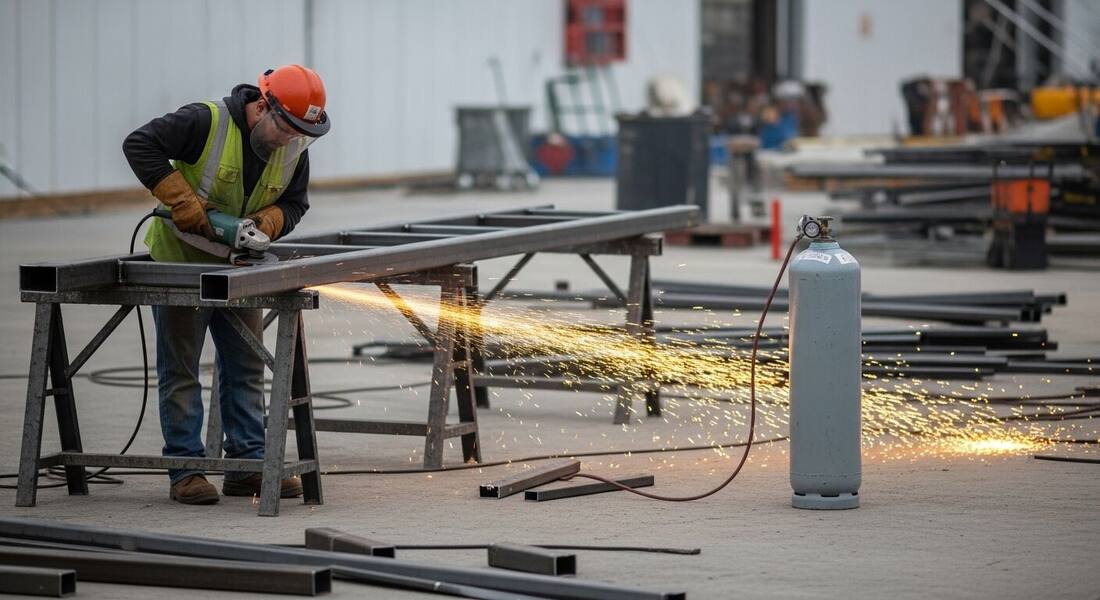
Scan a photo like the one above and this is the report you get — score, findings, OSHA references, and fixes. It is an illustrative example, clearly marked — not live scan data.
Compliance score
44
Lower means more potential hazards found
5 potential hazards found
1Unsecured propane cylinder in the spark stream of grinding work
HighPossibly related to fire prevention during hot work (29 CFR 1926.352)
Observed condition: Grinding sparks travel farther than they look, and a compressed-gas cylinder in that path combines an ignition source with stored fuel and pressure — the exact combination a JHA exists to catch before the first cut.
Corrective action: Relocate the cylinder outside the spark path and secure it upright, or move the grinding to a designated hot-work area with combustibles cleared to a safe radius.
High confidence
2Steel offcuts and scrap accumulated around the work position
MediumPossibly related to construction housekeeping (29 CFR 1926.25)
Observed condition: Scrap around a standing work position turns a stumble into contact with a running tool — a step-level hazard the JHA should control with a clearing routine, not a reminder to be careful.
Corrective action: Clear offcuts into a scrap bin at set intervals during the task and keep the operator's footing area clean before each cut.
High confidence
Upload a photo like the one above and get a compliance score and hazard count in seconds. No account needed to scan — create a free account to unlock the full report.
Use the real site or facility name. If you save the scan after signup, it becomes the report name.
Three angles, one deeper scan
Only the wide shot is required — every extra angle gives the AI more places to look.
Required: Set the scene — one wide shot lets the AI sweep the whole area at once
Stand at the entry point and capture corner to corner: floors, ladders, scaffolds, and everyone at work
Drop a job-site photo or walkthrough video
Click to upload, drag & drop, or snap a photo on site. Photos scan free in about 15 seconds — no signup, no card. Video walkthroughs (up to 3 min) run on a free account.
Small habits, sharper scans
Set the scene
Start with context
Fill the frame
2–3 ft for close-ups; keep ladders, cords and workers fully in view.
Capture clearly
Make the frame usable
Light it right
Keep the sun or lights behind you — glare and shadows hide hazards.
Tap to focus
Tap the hazard on screen and hold still one second — blur can't be flagged.
Choose the useful view
Give the AI room to understand
Go landscape
Turn your phone sideways — a wider frame catches more of the scene.
Only upload photos you have permission to use, and avoid images showing personal, customer, or confidential information. Demo photos and results are held privately for up to 48 hours so you can save them to a free account; unclaimed photos are deleted automatically. Results are an AI-assisted preliminary review, not an official OSHA determination.
New: Video walkthrough scans
Record up to 3 minutes of your site — the AI extracts frames and flags every hazard with exact timestamps. Free account required.
Get the best results
Wide shot first
Stand at the entrance and photograph the entire work area so AI sees the full context
Hazard areas
Photograph elevated surfaces, equipment, electrical panels, and anywhere workers are active
Close-ups last
Move in close on anything damaged, missing, or that looks risky — the AI catches more detail
How to conduct a JHA the way OSHA's guidance describes — with a camera making the hazard-identification step fast. The first four points are free — create a free account to unlock the full checklist and start drafting hazard lists from photos.
Pick the jobs that earn a JHA first
Start with tasks that have caused injuries or near misses, tasks with severity potential (energy, height, pressure), new tasks, and ones the crew rarely performs.
Break the job into observable steps
Watch the task and list what the worker actually does, in order — not the procedure as written. Six to ten steps is typical; more means the job is really two jobs.
Photograph the setup before work starts
One wide frame of the work area plus a frame per station catches the environment hazards — staging, cords, adjacent work — that step-by-step thinking misses.
Scan the photos to draft the hazard list
The AI returns the visible hazards per frame with the standard each may relate to and a suggested control — a drafted hazard column instead of a blank one.
OSHA Scan reads a single photo. That makes it fast and easy for anyone on site — but it also means it has real limits. Here's an honest look at both.
A scan is a fast first look, not the final word. Before treating this kind of area as safe, a competent person should still confirm:
A job hazard analysis is a technique that focuses on one job at a time: break it into steps, identify what could go wrong in each step, and set a control for each hazard before the work is performed. OSHA describes the method in publication 3071 and also refers to it as a job safety analysis (JSA) — the two terms describe the same technique.
There is no general OSHA standard that says every employer must write JHAs for every task. But OSHA requires hazard assessment in specific contexts — for example, a written PPE hazard assessment under 29 CFR 1910.132(d) — and JHAs are the recognized way to demonstrate the hazard-identification effort behind your safety program. Many GCs and owners require them contractually.
In practice, nothing — job hazard analysis and job safety analysis are two names for the same step-hazard-control technique, and OSHA's own materials use both. Some companies use JSA for the daily pre-task version and JHA for the formal documented one, but that is convention, not regulation.
It can draft the part that takes the longest — hazard identification. Photograph the task area and the scan returns the visible hazards with suggested controls and the OSHA standard each may relate to. Breaking the job into steps, verifying findings, adding non-visible hazards, and approving controls remain the competent person's work. Treat the scan as a fast first pass, not a finished analysis.
OSHA's guidance points to three triggers: after an incident or near miss involving the task, whenever the process, equipment, or environment changes, and periodically even without a change — because sites drift. In practice most stale JHAs are stale because the review cost an hour; when a fresh photo scan re-drafts the hazard list in a minute, reviewing quarterly or at every setup change becomes realistic instead of aspirational.
They can. Cal/OSHA, for example, requires every employer to maintain a written Injury and Illness Prevention Program — a full program with responsibilities, training, and hazard-correction procedures, of which hazard analysis is one input. A JHA feeds those programs but doesn't replace them. If you work in a state-plan state, check the state's program requirements; the hazard-identification records a photo scan produces slot into any of them.
Reviewed by OSHA Scan Editorial
Last updated August 29, 2026
This content is produced by the OSHA Scan Editorial team and reviewed with AI assistance. It is general safety information, not legal or compliance advice. OSHA Scan is an independent tool and is not affiliated with, endorsed by, or certified by OSHA or the U.S. Department of Labor.
Free PDF checklist
33 critical checks across 7 categories — the same visible gaps the AI scanner looks for. Sent to your inbox as a free PDF.
More ways to see what an AI OSHA scan can do for your site.
The overview hub — how the scanner works and every job, site, and hazard it covers.
Draft the hazards-and-controls list from a task photo.
The worksheet structure, plus the AI-drafted shortcut.
A JHA applied to a whole active site — falls, struck-by, and edges.
The JHA method worked through a specific trade's tasks.
The same technique under its other name, pre-task style.
Start any hazard analysis from a picture, not a blank form.
OSHA's own JHA booklet — the method, worked examples, and blank worksheets, free from OSHA.
Official resource — osha.govSee a complete labelled example of everything a scan returns.
Start with 5 included AI site scans plus a one-time 10-scan signup bonus — no credit card. Build JHA-ready reports and catch changing conditions sooner.
Start your free trial