
SDS management for property management — one shared chemical library across every property
SDS management for property management means keeping a safety data sheet on file for every maintenance chemical scattered across your portfolio — pool sheds, boiler rooms, janitor closets, and maintenance shops at dozens or hundreds of buildings — and making each sheet reachable by the tech standing in that room. The hard part isn't the chemicals themselves; it's that they're everywhere and your techs rotate between buildings, so no single binder ever travels with them. OSHA Scan turns a phone into an SDS scanner: photograph a product label and the AI reads the product name, manufacturer, signal word, GHS pictograms, and hazards to build one shared library the whole team searches from any phone. Print a QR poster for every maintenance room so a tech scans it on site and sees that room's chemicals and attached SDS PDFs. It builds and organizes the library — it does not fetch sheets from a database or track revisions for you.
Free · No account needed to scan · Results in seconds
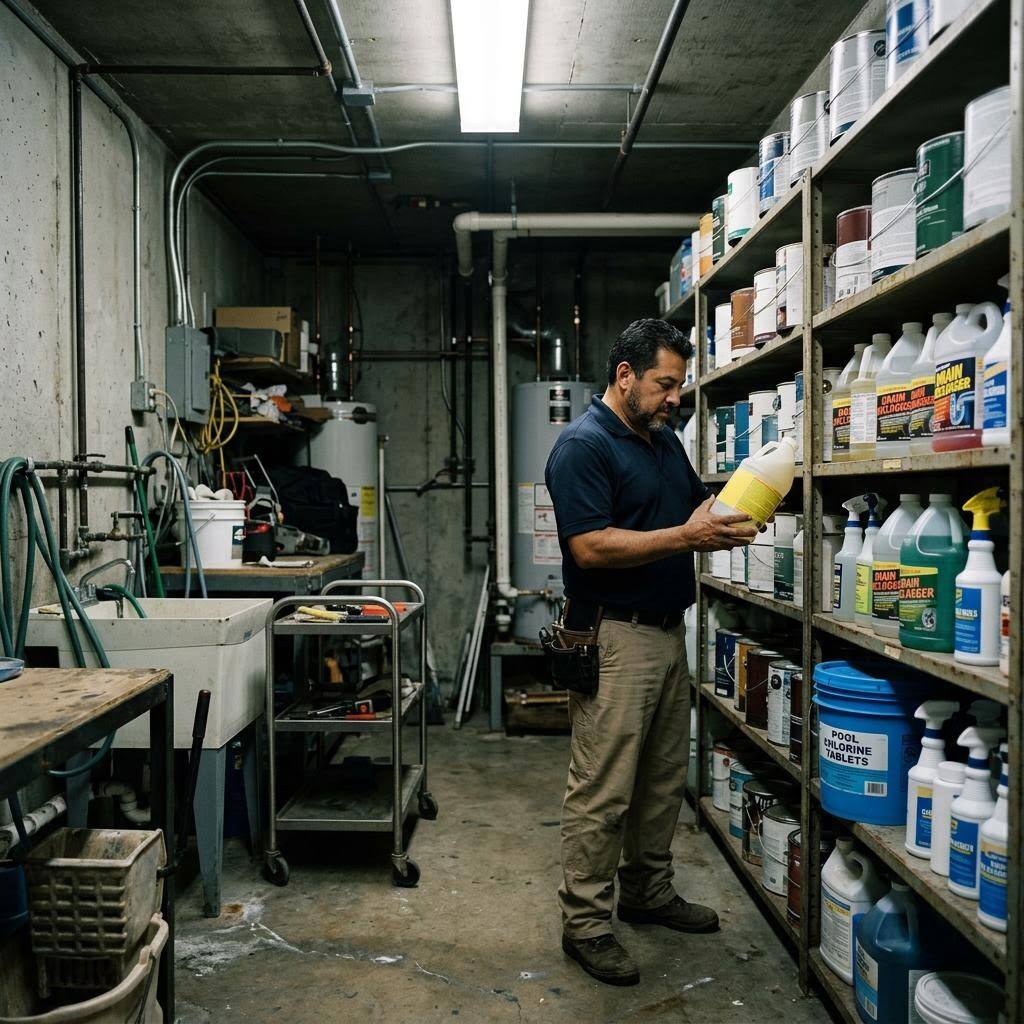
The chemicals are scattered, and the techs keep moving
A property management company doesn't have one chemical storage area — it has hundreds. Every building has a maintenance shop with cleaners, adhesives, and lubricants; a pool shed with chlorine and muriatic acid; a boiler or mechanical room with water-treatment chemicals; and a janitor closet with concentrates and disinfectants. Multiply that by every property under management and the SDS problem stops being about the chemicals and starts being about geography. A binder in the leasing office at Property A does nothing for the tech opening a drain in the pool shed at Property C.
It gets harder because techs rotate. The person who covers a building today may be somewhere else tomorrow, and they can't carry a paper binder for every property they might touch. The answer is one shared library on the phone plus a QR poster in every maintenance room: scan the label of each chemical once to build the entry, and a tech standing anywhere in the portfolio pulls up that room's chemicals — signal word, pictograms, hazards, attached SDS PDF — by scanning the poster on the wall. The honest limit: OSHA Scan organizes and stores the library, but it won't go find a manufacturer's sheet for you or tell you when a revision drops, so sourcing current sheets stays a person's job.
Multi-property maintenance and OSHA's 'readily accessible' requirement
Property management companies sit in an awkward spot under hazard communication: their maintenance workforce handles genuinely hazardous chemicals — chlorine and muriatic acid in pool operations, caustic drain openers, solvent-based paints and adhesives during turnovers — but that workforce is spread thin across many buildings and rotates between them. OSHA's requirement under 29 CFR 1910.1200(g) that safety data sheets be 'readily accessible during each work shift to employees when they are in their work area' is deceptively hard to meet in this model, because the 'work area' changes daily and a binder in a central office serves nobody standing in a pool shed across town. Citations in this space typically involve missing sheets, sheets that don't match the product on the shelf, and access that depends on reaching someone with a key or a login.
Property managers also carry multi-employer obligations. Turnover crews, outside cleaning companies, and specialty contractors routinely bring chemicals onto managed properties, and as the controlling employer the property manager has a duty to coordinate hazard information both ways — knowing what vendors bring in and giving vendors access to the site's own chemical hazards. A single shared library that any authorized worker can search from a phone, backed by per-room QR access for the workers who aren't authorized to log in, is a practical way to satisfy the accessibility requirement across a scattered portfolio. What the employer still owns is sourcing each manufacturer's current sheet and keeping training current — no software does those parts automatically.
What the SDS scanner reads off a maintenance-room label
Photograph a product label in any maintenance room, pool shed, or janitor closet — the AI extracts the fields that build the shared entry.
Product name and manufacturer
Reads the exact product and manufacturer off the label so a turnover-day paint and a similar-looking primer each become their own entry, not one vague line.
Signal word and GHS pictograms
Captures the signal word and GHS pictograms on the container — the at-a-glance hazard picture a rotating tech needs before opening a drain opener or pool chemical.
Hazard and precautionary statements
Pulls the label's hazard and precautionary statements into a searchable entry any tech can open from the phone in their pocket, at any property.
Per-room QR access
Assign each chemical to a maintenance room and print a QR poster; a tech scans it on site and gets that room's chemicals and attached SDS PDFs with no login.
Demo: the library entry a scanned label comes back with
An illustrative example for this trade — product identity, signal word, GHS pictograms, and hazard statements, filed and searchable.
Sodium hydroxide liquid drain opener
Example manufacturer
Maintenance techs keep this drain opener on the cart across every building, so the person pouring it into a clogged sink needs the severe-burn hazard on their phone.
- H314 — Causes severe skin burns and eye damage
- H290 — May be corrosive to metals
Now scan your own label — free
Photograph any chemical product on your shelf. The AI transcribes the label in seconds — no account needed to try it.
- A shared library entry from each label scan — product name, manufacturer, signal word, GHS pictograms, and hazards
- A QR poster for every maintenance room so a rotating tech reaches that room's chemicals and SDS PDFs on any phone
- One inventory across the whole portfolio, so a chemical in a pool shed at one property isn't invisible to the tech covering it today
Free · No account needed to scan · Results in seconds
The 12-point multi-property SDS management checklist
The full workflow for chemicals scattered across a portfolio and techs who rotate between them. The first four are free — enter your email to unlock the rest and start scanning your own maintenance-room labels.
Free checklist — 12 points
Enter your email to unlock the full checklist
We'll also send you a printable PDF copy — no account required.
One email with the checklist, one follow-up. Unsubscribe anytime.
What the AI can and can't detect
OSHA Scan reads a single photo. That makes it fast and easy for anyone on site — but it also means it has real limits. Here's an honest look at both.
What it can catch from a photo
- Product name and manufacturer printed on a chemical label
- Signal word and GHS pictograms on the container
- Hazard and precautionary statements shown on the label
- Whether a scanned chemical has an SDS PDF attached in the shared library
What a photo can't tell it
- Whether the attached SDS is the manufacturer's current revision
- Chemicals sitting in a pool shed or closet that were never scanned in
- The contents of an unlabeled or decanted container
- Whether the tech covering a property today has been trained on its chemicals
Always confirmed by a person on site
A scan is a fast first look, not the final word. Before treating this kind of area as safe, a competent person should still confirm:
- The shared library covers every chemical location at every property you manage
- Each attached SDS is the current version from the current supplier
- A rotating tech can actually reach the QR posters at a property they don't normally cover
- Contractor chemicals brought on site for turnovers are accounted for and their sheets shared
People also ask
How do I manage SDSs across dozens or hundreds of properties?
Stop thinking one binder per building and build one shared library on the phone. Scan each chemical's label once to create the entry, attach the manufacturer's SDS PDF, and print a QR poster for each maintenance room. A tech covering any property scans the poster on the wall and gets that room's chemicals and sheets — no login, no binder to carry. OSHA Scan builds and stores the library; it does not fetch sheets automatically or track revisions, so an owner still sources current sheets on a schedule.
Does OSHA's HazCom standard apply to apartment and property maintenance?
Yes. Maintenance employees who handle hazardous chemicals — pool chemicals, drain openers, paints, disinfectant concentrates — are covered by 29 CFR 1910.1200. That means an SDS on file for each chemical, readily accessible during the shift, plus a chemical inventory, GHS labels on secondary containers, a written program, and training. The 'readily accessible' piece is what trips up multi-property operations, because the tech is rarely in the same building as the binder.
How do rotating maintenance techs reach an SDS at a property they don't normally cover?
That's exactly what the QR posters solve. Each maintenance room, pool shed, and janitor closet has a poster on the wall; a tech scans it with their phone and immediately sees that room's chemicals with signal words, pictograms, hazards, precautions, and the attached SDS PDFs, without logging in. The information travels with the property, not with the person who usually works there, so a covering tech is never stranded without a sheet.
What about turnover-day chemicals that are only on site for a few days?
Scan them anyway. Make-ready work brings paints, stains, drain openers, and adhesives into a unit temporarily, and 'temporary' is exactly when they get overlooked. A quick label scan puts them in the shared library and on the relevant room's QR poster while they're actually present, and you can retire the entry when the turnover is done. It keeps the library honest about what's on the property today.
Will OSHA Scan find or write an SDS for a product I can't locate a sheet for?
No. It doesn't fetch sheets from manufacturer databases, and it doesn't author official SDSs — that's the chemical manufacturer's or importer's responsibility. If no sheet is on file, the app can hold an AI-drafted chemical profile, always labeled as an internal draft and never a substitute for the manufacturer's authoritative SDS. You still source the real sheet from the manufacturer or the distributor you buy from.
Reviewed by OSHA Scan Editorial
Last updated August 29, 2026
This content is produced by the OSHA Scan Editorial team and reviewed with AI assistance. It is general safety information, not legal or compliance advice. OSHA Scan is an independent tool and is not affiliated with, endorsed by, or certified by OSHA or the U.S. Department of Labor.
Keep exploring
More ways to see what an AI OSHA scan can do for your site.
The AI OSHA inspection tool
The overview hub — how the scanner works and every job, site, and hazard it covers.
SDS scanner
Scan any chemical label to build the shared library entry the whole portfolio searches.
Property management safety inspection checklist
Run a common-area and utility-space safety scan from a photo.
SDS management for cleaning companies
The same shared-library approach for janitorial crews working across sites.
SDS accessibility requirements
What 'readily accessible during the shift' means and how QR access meets it.
OSHA 1910.1200 — Hazard Communication
The federal standard requiring an SDS for every hazardous chemical, readily accessible to workers.
Official resource — osha.govA full sample report
See a complete labelled example of everything a scan returns.
Ready to secure your job sites?
Start with 5 included AI site scans plus a one-time 10-scan signup bonus — no credit card. Build JHA-ready reports and catch changing conditions sooner.
Start your free trial