
1
Set the scene
Start with context
Fill the frame
2–3 ft for close-ups; keep ladders, cords and workers fully in view.
A slip, trip, and fall hazard scanner finds the floor-level conditions that cause same-level falls in a photo. Upload an image of a floor, walkway, or work area and OSHA Scan flags spills and wet surfaces, trailing cords and hoses, clutter and materials in the path, and uneven or changing surfaces — then references the OSHA standard each may relate to and suggests a fix. Slips, trips, and falls on the same level are among the most frequent workplace injuries in every industry, and almost all of them come from conditions you can see. It is an AI-assisted preliminary review of what is visible in the frame, not a substitute for an on-site check.
Free · No account needed to scan · Results in seconds
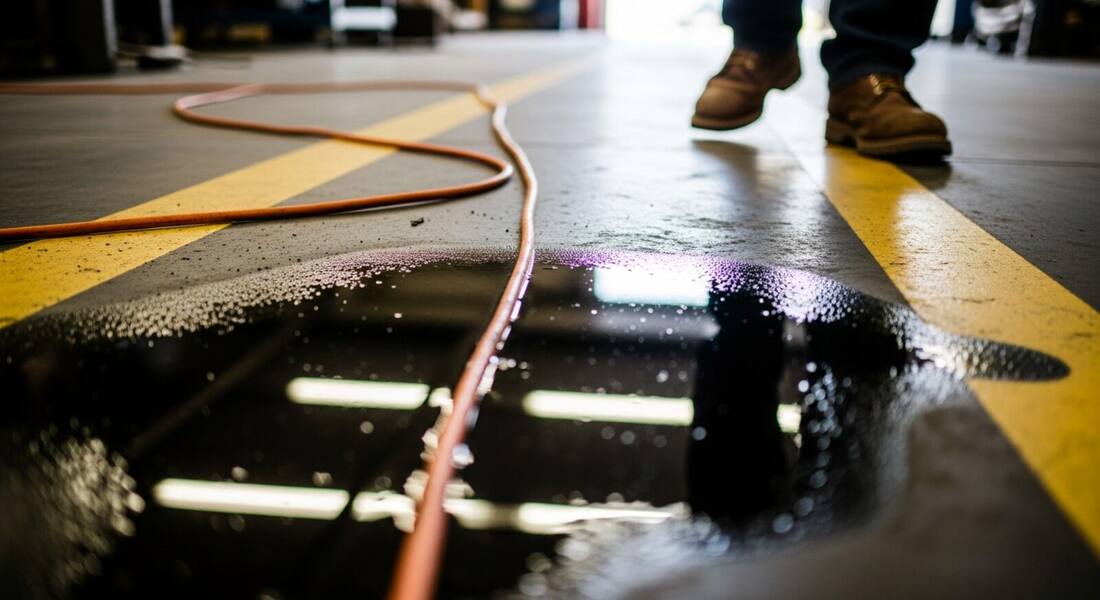
Same-level slips, trips, and falls are among the most frequent injuries at work, and they are unusual in that almost every cause is visible: a spill someone meant to clean, a cord run across a path, a box left in a walkway, a mat curling at the edge. The problem is not that the hazards are hidden — it is that they blend into a busy environment and stop being noticed.
A scanner makes noticing them deliberate again. Photograph a floor, an entryway, a dish area, or a walkway and it flags the wet surfaces, obstructions, and uneven conditions in the frame, so they get addressed before someone goes down. Because the causes are so consistent across industries, the same check works in a kitchen, a warehouse, an office, or a job site.
OSHA's walking-working surfaces standard (29 CFR 1910.22 for general industry) requires that floors, aisles, and walkways be kept clean, orderly, and in good repair — which is an administrative requirement, not just a physical one. The standard was significantly updated in 2016, adding new requirements for personal fall protection systems, ladder safety, and rope descent systems, while retaining the core housekeeping requirements that address same-level slip, trip, and fall hazards. Same-level falls account for the largest share of workers' compensation claims in many industries, with the Bureau of Labor Statistics consistently showing them as a leading cause of days-away-from-work injuries.
The general duty clause supplements specific standards where housekeeping or surface conditions create recognized hazards not addressed by 1910.22 directly — wet kitchen floors, sloping outdoor surfaces, irregular terrain at construction sites, and transition zones between floor materials all fall into enforcement gap areas where OSHA cites based on general duty rather than a specific paragraph. Workers' compensation loss data shows that foodservice, healthcare, and retail have the highest same-level fall incidence rates — precisely the environments where routine photo checks of floor conditions have the most claim-prevention value.
The visible conditions behind most same-level falls.
Spills, standing water, grease, and freshly cleaned floors without a warning or mat.
Power cords, air hoses, and cables run across walkways where they create a trip hazard.
Materials, tools, and debris left in walkways and work areas where people move on foot.
Changes in level, curled mats, damaged flooring, and transitions that are easy to catch a foot on.
Scan a photo like the one above and this is the report you get — score, findings, OSHA references, and fixes. It is an illustrative example, clearly marked — not live scan data.
Compliance score
59
Lower means more potential hazards found
5 potential hazards found
1Cord run across a walking path
MediumPossibly related to walking-working surfaces (29 CFR 1910.22)
Observed condition: A cord or hose across a walkway is a leading cause of same-level trips and falls.
Corrective action: Reroute or cover the cord and keep walkways free of materials and debris.
High confidence
2Wet surface with no warning or mat
HighPossibly related to walking-working surfaces (29 CFR 1910.22)
Observed condition: Wet or slippery floors without warning are a frequent cause of slip injuries.
Corrective action: Dry the area, place a warning sign or anti-slip mat, and clean spills immediately.
Medium confidenceNot fully clear from the photo — verify on site.
Upload a photo like the one above and get a compliance score and hazard count in seconds. No account needed to scan — create a free account to unlock the full report.
Use the real site or facility name. If you save the scan after signup, it becomes the report name.
Three angles, one deeper scan
Only the wide shot is required — every extra angle gives the AI more places to look.
Required: Set the scene — one wide shot lets the AI sweep the whole area at once
Stand at the entry point and capture corner to corner: floors, ladders, scaffolds, and everyone at work
Drop a job-site photo or walkthrough video
Click to upload, drag & drop, or snap a photo on site. Photos scan free in about 15 seconds — no signup, no card. Video walkthroughs (up to 3 min) run on a free account.
Small habits, sharper scans
Set the scene
Start with context
Fill the frame
2–3 ft for close-ups; keep ladders, cords and workers fully in view.
Capture clearly
Make the frame usable
Light it right
Keep the sun or lights behind you — glare and shadows hide hazards.
Tap to focus
Tap the hazard on screen and hold still one second — blur can't be flagged.
Choose the useful view
Give the AI room to understand
Go landscape
Turn your phone sideways — a wider frame catches more of the scene.
Only upload photos you have permission to use, and avoid images showing personal, customer, or confidential information. Demo photos and results are held privately for up to 48 hours so you can save them to a free account; unclaimed photos are deleted automatically. Results are an AI-assisted preliminary review, not an official OSHA determination.
New: Video walkthrough scans
Record up to 3 minutes of your site — the AI extracts frames and flags every hazard with exact timestamps. Free account required.
Get the best results
Wide shot first
Stand at the entrance and photograph the entire work area so AI sees the full context
Hazard areas
Photograph elevated surfaces, equipment, electrical panels, and anywhere workers are active
Close-ups last
Move in close on anything damaged, missing, or that looks risky — the AI catches more detail
Walk the routes people actually take with these points. The first four are free — create a free account to unlock the full checklist and scan your own walkway photos.
Spills cleaned immediately, signed until dry
A spill response people actually follow: contain, sign, clean, and remove the sign only when the floor is dry — signs left out permanently get ignored.
Cords and hoses out of walkways
Rerouted overhead, along walls, or under rated ramp covers — never bare across a path people use, even 'just for today'.
Floor surfaces in good repair
Cracked concrete, broken tiles, curled mats, and lifted thresholds fixed or clearly guarded until they are.
Walkways clear of clutter
Boxes, pallets, tools, and packaging staged in designated areas — the travel path is not a staging area.
OSHA Scan reads a single photo. That makes it fast and easy for anyone on site — but it also means it has real limits. Here's an honest look at both.
A scan is a fast first look, not the final word. Before treating this kind of area as safe, a competent person should still confirm:
Visible floor-level conditions: wet or greasy surfaces, trailing cords, clutter in walkways, and uneven or changing surfaces. Because the causes are almost always something you can see, a photo-based scan is well suited to catching them before someone falls.
No. Slip resistance is a physical measurement a photo cannot capture. The scanner flags visible risk factors — standing water, missing mats, spills — as prompts to act, but confirming actual slip resistance requires an on-site check.
All of them. Same-level falls are among the most common injuries everywhere people work, and the causes are consistent, so the scanner is just as useful in a restaurant kitchen, a warehouse, an office, or a construction site.
Reviewed by OSHA Scan Editorial
Last updated August 29, 2026
This content is produced by the OSHA Scan Editorial team and reviewed with AI assistance. It is general safety information, not legal or compliance advice. OSHA Scan is an independent tool and is not affiliated with, endorsed by, or certified by OSHA or the U.S. Department of Labor.
Free PDF checklist
33 critical checks across 7 categories — the same visible gaps the AI scanner looks for. Sent to your inbox as a free PDF.
More ways to see what an AI OSHA scan can do for your site.
The overview hub — how the scanner works and every job, site, and hazard it covers.
How AI finds hazards of every category in one photo.
Floor, aisle, and housekeeping checks at scale.
Slip and floor checks for food-service teams.
Setup, angle, and footing checks before the climb.
Focused detection for egress and walkway obstructions.
The fall hazards above floor level — edges, ladders, and openings.
See a complete labelled example of everything a scan returns.
Start with 5 included AI site scans plus a one-time 10-scan signup bonus — no credit card. Build JHA-ready reports and catch changing conditions sooner.
Start your free trial