
1
Set the scene
Start with context
Fill the frame
2–3 ft for close-ups; keep ladders, cords and workers fully in view.
Safety management software helps organizations find hazards, fix them, and document both happened. The category spans heavyweight EHS suites and single-purpose apps — the honest buying question is which failure you are trying to prevent. OSHA Scan is photo-first safety management software: photograph a work area and the AI identifies visible hazards, references the OSHA standard each may relate to, suggests corrective actions, and returns a 0-100 compliance score in seconds. No forms, no template to fill. A person verifies each finding on the floor before it becomes the record. Free to try with no account needed.
Free · No account needed to scan · Results in seconds
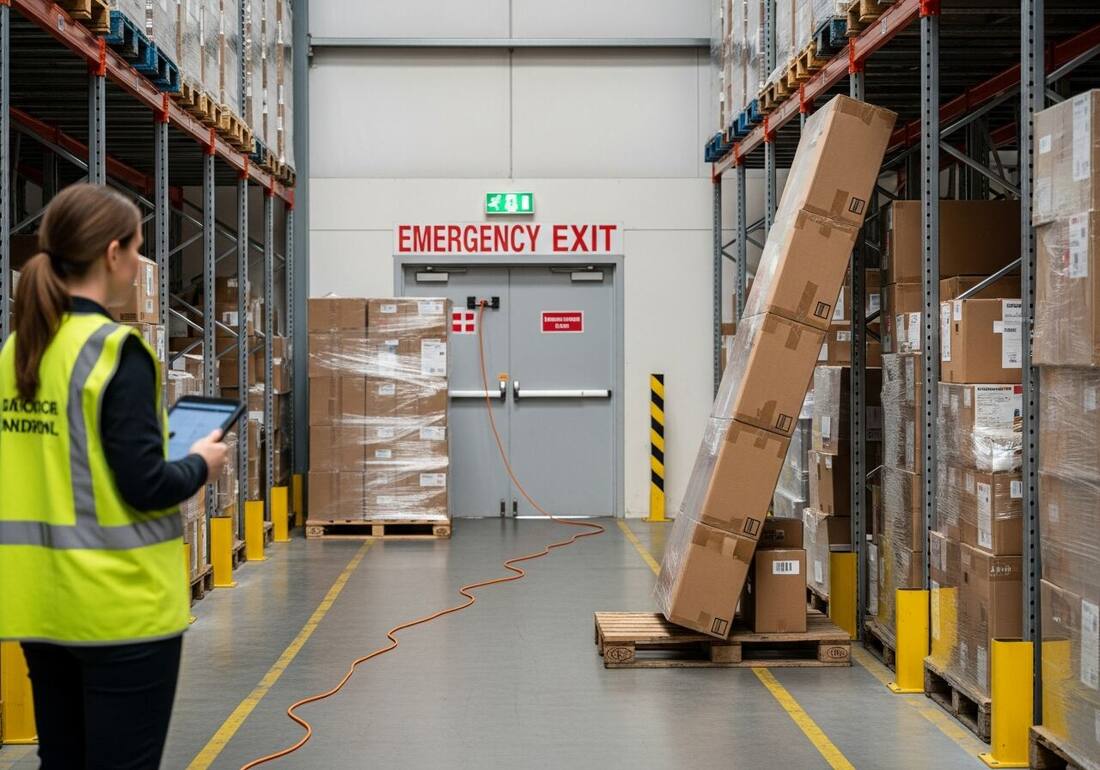
Safety management software is often bought to solve an output problem — better reports, better dashboards, better audit trails. But the real gap is almost always earlier: hazards that are present in work areas every day but never make it into the system because the input step — the inspection — requires too much time, too much setup, or someone who is already stretched thin. Software built for the output problem does not fix a pipeline that is feeding it nothing.
Photo-first safety management software starts at the input. A supervisor photographs a work area. The AI reads the photo — identifying visible hazards, referencing the OSHA standard each may relate to, suggesting a corrective action, and scoring the area — before the phone goes back in the pocket. The documentation is done. The corrective-action checklist is live. The dashboard is updated. All from one photo, in seconds.
OSHA Scan is built for this constraint: not enough safety staff, too many areas to cover formally every day, and a team that will use software that is genuinely easier than not using it. Anyone on site — a foreman, a shift lead, a charge nurse, a facilities tech — can run a scan. The safety professional's time goes to verification, judgment calls, and program oversight.
The find-fix-prove loop describes every legitimate safety management system: find hazards systematically, fix them with assigned corrective actions, and prove both happened with a dated record. Where products diverge is where in that loop they help most. Full EHS platforms start from prove — audit trails, compliance calendars, incident management — and assume the findings are already in the system. Checklist tools help find, but finding quality depends entirely on who is filling the form. Photo-first software generates the finding from evidence: the photo is the record, the AI reads it, and the person verifies on the floor. The record is complete before anyone types a word.
OSHA Scan is explicit about its scope: OSHA 300 logs, training management, chemical inventories, and formal permits are not included. For many operations — especially SMBs and multi-site teams that need consistent field execution rather than another enterprise implementation — that is the right trade. Build the inspection program first. The dated, scored, exportable record you accumulate is portable to any platform you adopt later.
The hardest safety management problem is consistency across locations. A safety manager covering multiple buildings, a regional EHS lead across dozens of sites, or a facilities director over a property portfolio cannot be everywhere — but they can set a photo-scan standard that every location follows. OSHA Scan's multi-site dashboard gives a consistent compliance view regardless of industry or location: per-area scores, trend lines, open corrective actions, and pending re-scans, all in one place.
Every scan runs the same AI analysis, producing the same report structure — findings, citations, corrective actions, compliance score — whether the photo came from a framing site, a factory floor, or a hotel corridor. Management review becomes a chart reading rather than a call to each site asking what the walkthrough found.
In the US market, the pressure to adopt safety management software rarely comes from a single source. General contractors run prequalification that asks subs to show a written safety program, inspection records, and evidence that hazards get corrected — not just a certificate on file. Insurers and their loss-control teams ask similar questions at renewal, because a documented, active program is what supports a favorable experience mod. And OSHA enforcement sits underneath all of it: citations carry per-violation penalties that escalate for repeat and willful findings, and the qualitative cost — a stop-work, a client relationship, an incident that a paper trail could have prevented — usually dwarfs the fine itself. No software makes those numbers disappear, but a dated, scored inspection record is the evidence that answers the question every one of these parties is really asking: can you show that you looked, and that you fixed what you found?
This is where photo-first safety management software earns its place. A GC prequalification packet or an insurer review does not want a promise; it wants artifacts. When each scan produces a report with the visible hazards, the OSHA standard each may relate to, the corrective action, and a re-scan closing the loop, the packet assembles itself from a filtered export instead of a scramble. The record is honest about its limits — findings are AI-assisted drafts a competent person verified on the floor, and OSHA Scan is not affiliated with OSHA — but honesty is exactly what a loss-control reviewer trusts more than a glossy claim.
Treat the record as the deliverable. The compounding value of safety management software is not any single inspection; it is the accumulation of dated, scored scans that lets you answer a prequalification questionnaire, a renewal review, or a post-incident inquiry with a document rather than a reconstruction.
Form-first safety management software assumes the bottleneck is organizing findings. For most small crews the bottleneck is earlier: the inspection that would generate those findings never happens, because the person who could run it is already framing a wall or covering a floor. A template does not fix that — it adds a task. A photo does: a foreman points a phone at a work area, and the AI returns visible hazards, the OSHA standard each may relate to, a corrective action, and a 0-100 score in about 15 seconds. The friction that kept the inspection from happening is gone, so the record finally starts to accumulate.
Photo-first also solves the consistency problem that sinks small-crew programs. Different people fill forms differently; the same AI analysis runs the same way on every photo, so a scan from a new hire's phone carries the same structure as one from the safety lead's. That consistency is what makes per-area scores comparable over time and what lets a working owner review a trend line instead of chasing each crew for what the walkthrough found.
Rollout is deliberately light. Pick a handful of high-traffic or high-hazard areas, set a standard viewpoint for each, and have supervisors run scans on a cadence — daily for the riskiest zones, weekly elsewhere. The safety lead spends their time verifying drafts and closing corrective actions rather than doing every walkthrough. Start with the free scan on one real work area today; no account is needed to see the first score, and you can decide on a paid plan only once the record proves its worth.
Run through these steps before crews start — each one covers a visible gap the AI can help you catch.
List the handful of work areas that carry the most traffic or the most hazard. For each one, choose a standard camera viewpoint — same corner, same direction — so scores stay comparable over time. Keep the list short enough that a busy crew can actually cover it.
Photograph each area from its chosen viewpoint and upload it to OSHA Scan. Read the visible hazards, the OSHA standard each may relate to, and the 0-100 score so you know where the crew is starting the week.
Walk the floor and confirm or dismiss each AI-assisted draft finding before it becomes the record. Keep accepted checklist items pending until a person verifies the fix, then mark them completed.
Decide how often each area gets scanned — daily for high-hazard zones, weekly elsewhere — and have supervisors run the scans while the safety lead verifies findings. Export the PDF or Excel report when a GC, insurer, or manager asks for it.
Photograph one real work area and upload it to OSHA Scan. You will see the visible-hazard count and the compliance score in about 15 seconds with no account needed — the first dated, scored inspection in a record you build across the crew.
The full inspection loop — capture, analysis, corrective actions, report — without a form.
Photograph any work area — construction, manufacturing, warehouse, office — and receive a structured inspection report with hazards, citations, and corrective actions in seconds.
Each visible hazard is severity-rated and referenced to the OSHA standard it may relate to — giving every finding the regulatory context a supervisor or auditor needs.
Accepted findings become checklist items with pending or completed status, keeping verified progress with the inspection report.
Per-area scores and trend lines across every location give safety managers and EHS leads a real-time program view without scheduling a site visit.
This illustrative public sample of the real report interface shows the photo-based findings, score, suggested actions, and checklist status that support a focused safety workflow.
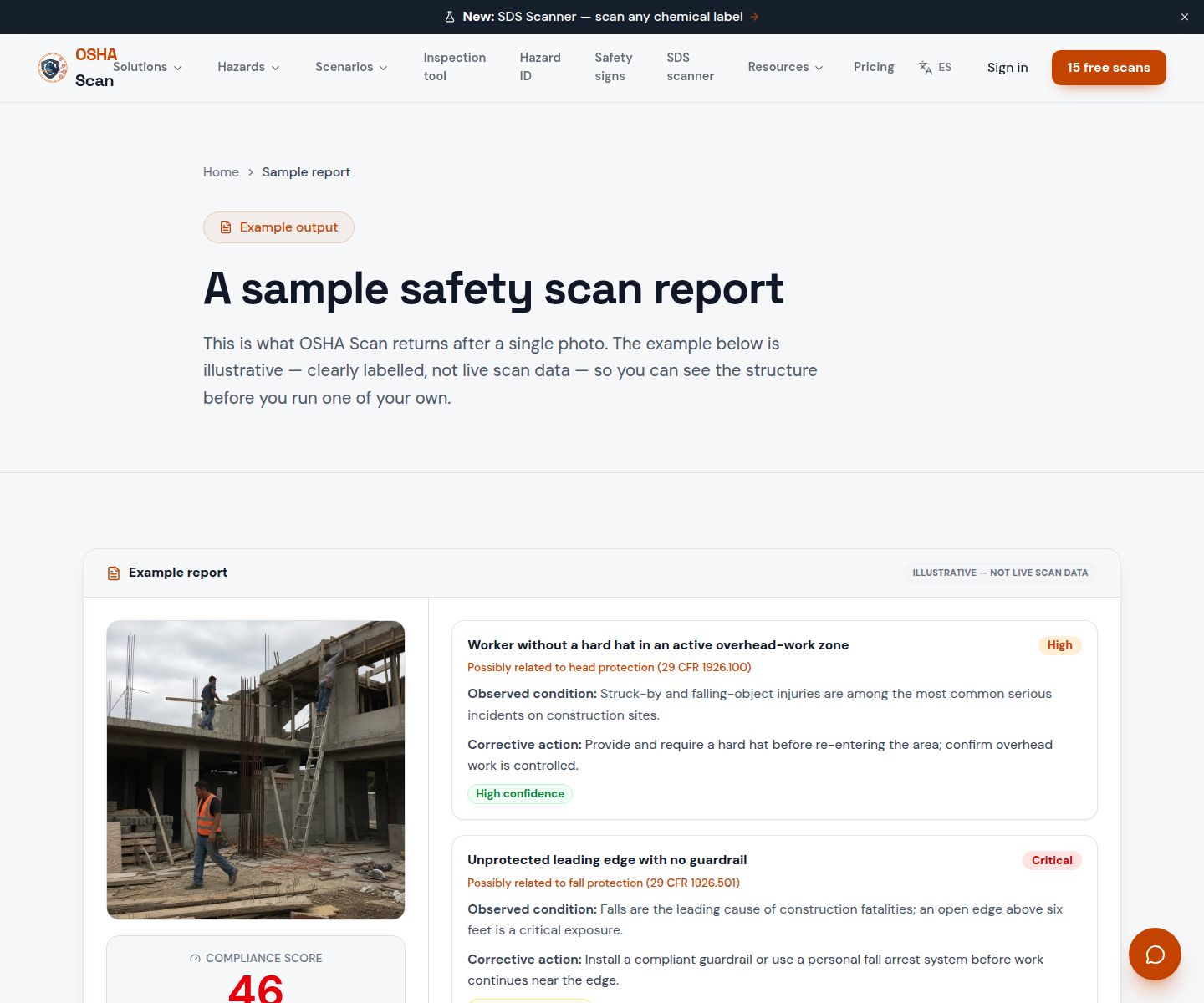
Scan a photo like the one above and this is the report you get — score, findings, OSHA references, and fixes. It is an illustrative example, clearly marked — not live scan data.
Compliance score
61
Lower means more potential hazards found
5 potential hazards found
1Aerial lift platform in use without guardrails on open side
CriticalPossibly related to aerial lift fall-protection requirements (29 CFR 1926.453)
Observed condition: An open platform edge at height is a fatal fall risk — OSHA requires standard guardrails on all open sides of aerial work platforms in the elevated position.
Corrective action: Lower the platform immediately; reinstall the gate or chain before re-elevating; verify all operators have received platform-specific fall-protection training.
High confidence
2Chemical drum unlabeled and stored near ignition sources
HighPossibly related to hazard communication labeling requirements (29 CFR 1910.1200)
Observed condition: An unlabeled container next to a heat source combines a fire risk with a first-responder information gap — emergency personnel cannot identify the hazard without a legible label.
Corrective action: Label the drum immediately with the product name and GHS hazard pictograms; move it to the designated flammables storage area away from ignition sources.
High confidence
Upload a photo like the one above and get a compliance score and hazard count in seconds. No account needed to scan — create a free account to unlock the full report.
Use the real site or facility name. If you save the scan after signup, it becomes the report name.
Three angles, one deeper scan
Only the wide shot is required — every extra angle gives the AI more places to look.
Required: Set the scene — one wide shot lets the AI sweep the whole area at once
Stand at the entry point and capture corner to corner: floors, ladders, scaffolds, and everyone at work
Drop a job-site photo or walkthrough video
Click to upload, drag & drop, or snap a photo on site. Photos scan free in about 15 seconds — no signup, no card. Video walkthroughs (up to 3 min) run on a free account.
Small habits, sharper scans
Set the scene
Start with context
Fill the frame
2–3 ft for close-ups; keep ladders, cords and workers fully in view.
Capture clearly
Make the frame usable
Light it right
Keep the sun or lights behind you — glare and shadows hide hazards.
Tap to focus
Tap the hazard on screen and hold still one second — blur can't be flagged.
Choose the useful view
Give the AI room to understand
Go landscape
Turn your phone sideways — a wider frame catches more of the scene.
Only upload photos you have permission to use, and avoid images showing personal, customer, or confidential information. Demo photos and results are held privately for up to 48 hours so you can save them to a free account; unclaimed photos are deleted automatically. Results are an AI-assisted preliminary review, not an official OSHA determination.
New: Video walkthrough scans
Record up to 3 minutes of your site — the AI extracts frames and flags every hazard with exact timestamps. Free account required.
Get the best results
Wide shot first
Stand at the entrance and photograph the entire work area so AI sees the full context
Hazard areas
Photograph elevated surfaces, equipment, electrical panels, and anywhere workers are active
Close-ups last
Move in close on anything damaged, missing, or that looks risky — the AI catches more detail
What to ask before you buy — and what to do on day one. First four points free; a free account unlocks the rest.
Start with the input step, not the output
If your inspections are not happening consistently, workflow and reporting software will automate an empty pipeline. Fix the capture step first — make hazard identification nearly effortless — and the documentation features finally have something real to run on.
Match the tool to the team who will actually use it
An EHS suite requiring training will not get used by a foreman between tasks. The right field tool is one anyone on site can run in 30 seconds with no setup.
Confirm the inspection loop closes, not just opens
Software that logs findings but does not track corrective actions to closure only solves half the problem. The record of the fix matters as much as the record of the hazard.
Check that reports travel to the people who need them
GC prequalification, insurer reviews, and management meetings each need a different format — PDF for compliance stakeholders, Excel for roll-ups — both should export in one click.
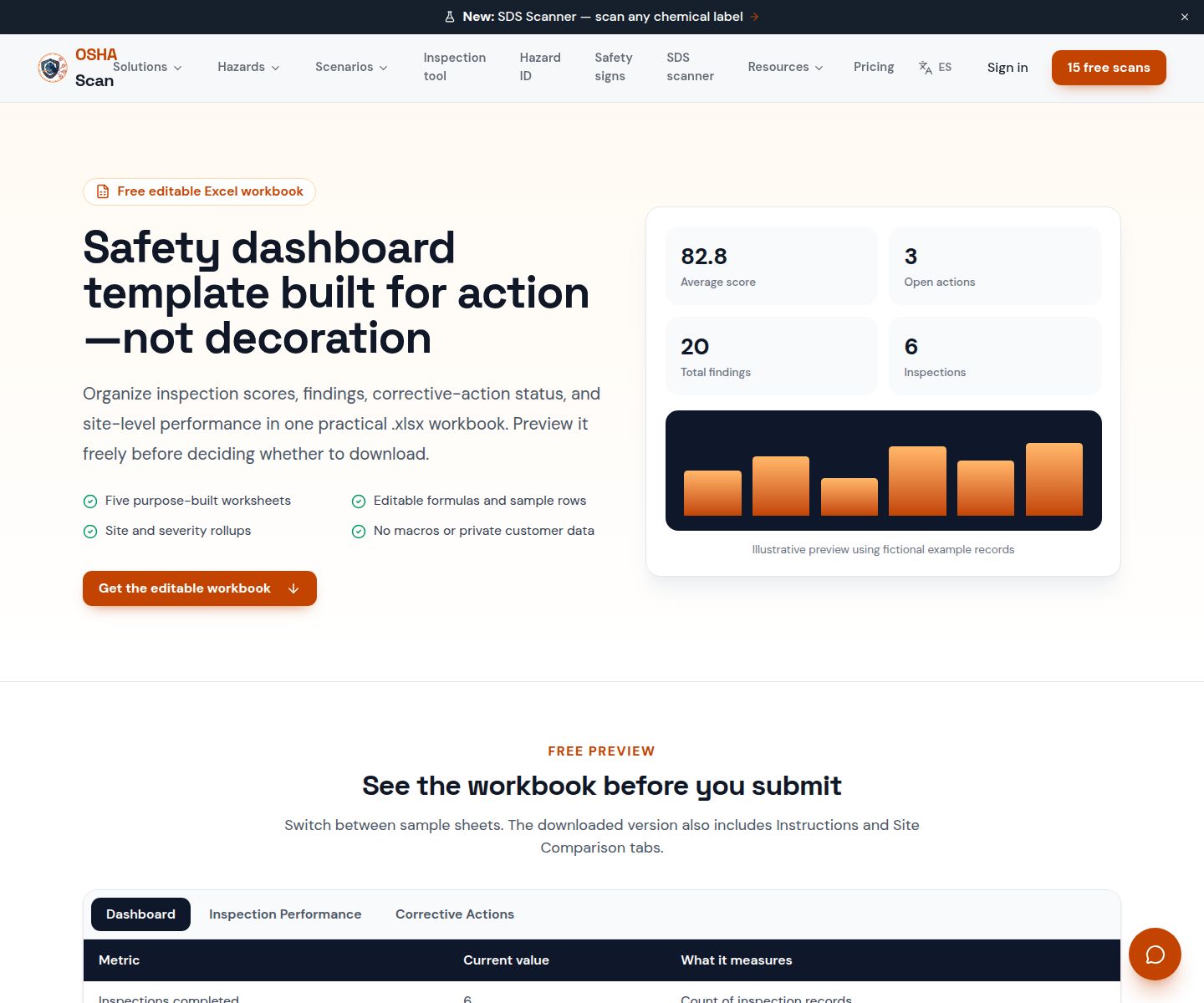
Preview the illustrative Excel layout for inspection scores, findings, and action status.
View the safety dashboard templateOSHA Scan reads a single photo. That makes it fast and easy for anyone on site — but it also means it has real limits. Here's an honest look at both.
A scan is a fast first look, not the final word. Before treating this kind of area as safe, a competent person should still confirm:
Safety management software is any tool that helps organizations find workplace hazards, fix them with corrective actions, and document both with a dated record. The category spans full EHS platforms, checklist apps, and photo-first tools like OSHA Scan that generate inspection findings from a work-area photo — no form required. The right choice depends on which part of the find-fix-prove loop is thinnest in your current program.
Traditional EHS suites are strong on process and documentation but assume findings are already in the system. Photo-first software focuses on making the input step — hazard identification — nearly effortless for anyone on site, so the pipeline is actually full. The two approaches are complementary: many organizations use photo scanning for daily field inspections and a suite for incident management and compliance calendaring.
Yes. OSHA Scan lets you organize scans by site, zone, department, or area, and the dashboard shows per-area compliance scores and trend lines across every location. A safety manager covering multiple buildings or a regional EHS lead over dozens of sites gets a consistent view without manual consolidation.
OSHA Scan works across construction, manufacturing, warehousing, distribution, healthcare, hospitality, food processing, property management, HVAC, auto repair, laboratories, schools, offices, and more. The AI reads the work area from the photo and applies relevant OSHA general industry or construction standards without requiring an industry-specific template.
No. OSHA Scan gives every supervisor a fast, consistent second set of eyes for the visible half of hazard detection so the safety professional's time goes to verification, complex judgment calls, and program oversight. Every generated finding is a draft that a person confirms on the floor before it becomes the record.
Yes — upload a photo and see the hazard count and compliance score in about 15 seconds with no account needed. A free account unlocks the full report with OSHA standard references and corrective actions, 5 included site scans plus a 10-scan signup bonus, saved history, and PDF and Excel export. Paid plans add unlimited scans, multi-user access, multi-site dashboards, and team corrective-action tracking.
The first scan needs no account: you upload a work-area photo and see the visible-hazard count and a 0-100 score in about 15 seconds. A free account adds 5 scans, saved history, the full report with OSHA references and corrective actions, and PDF and Excel export. Paid plans are for teams that need unlimited scans, multiple users, and the multi-site dashboard — you can build a real inspection record on the free tier before deciding.
Form-based apps digitize the clipboard: someone still has to know what to look for and type each finding into a template. Photo-first software generates the finding from the photo — visible hazards, the OSHA standard each may relate to, and a suggested corrective action — so the person's job shifts from data entry to verifying drafts on the floor. If your inspections stall because filling the form is too slow, the photo-first approach removes that friction; if your program depends on structured question sets, a form tool may still have a place alongside it.
Each scan produces a structured report — site photo, 0-100 score, findings with severity and the OSHA standard each may relate to, corrective actions, and verification notes. On a free account you can export a branded, sectioned PDF for compliance stakeholders and an Excel file for roll-ups, both in one click. The format a GC, insurer, or risk manager expects is generated from the scan rather than typed up afterward.
It reads visible conditions in a photo — guards, PPE, exits, labels, housekeeping — so it cannot measure atmosphere, noise, or energy state, confirm equipment certification or structural adequacy, or see what is behind stored material or outside the frame. It does not manage OSHA 300 logs, chemical inventories, training records, or formal permits. Every finding is an AI-assisted preliminary draft that a competent person verifies on the floor before it becomes the record, and OSHA Scan is not affiliated with OSHA.
Reviewed by OSHA Scan Editorial
Last updated August 29, 2026
This content is produced by the OSHA Scan Editorial team and reviewed with AI assistance. It is general safety information, not legal or compliance advice. OSHA Scan is an independent tool and is not affiliated with, endorsed by, or certified by OSHA or the U.S. Department of Labor.
Free PDF checklist
33 critical checks across 7 categories — the same visible gaps the AI scanner looks for. Sent to your inbox as a free PDF.
More ways to see what an AI OSHA scan can do for your site.
The overview hub — how the scanner works and every job, site, and hazard it covers.
Review location-organized scores, hazards, dated trends, recent inspections, and action progress.
See the focused pending-to-completed workflow for accepted inspection findings.
The full feature overview: photo-first inspection workflow, report format, and multi-site dashboard.
Every industry and hazard type the scanner covers, from construction to food processing.
The buyer's guide to compliance tools: what each category covers and where photo-first fits.
How the software generates a complete inspection report from one photo.
The mobile side of the software — run a photo scan and manage corrective actions from any phone on site.
Multi-site workplace safety software for teams that cannot stop to fill out a form.
See a complete labelled example of everything a scan returns.
Talk through photo inspections, saved reports, location organization, and current product scope.
Book a DemoStart with 5 included AI site scans plus a one-time 10-scan signup bonus — no credit card. Build JHA-ready reports and catch changing conditions sooner.
Start your free trial