
1
Set the scene
Start with context
Fill the frame
2–3 ft for close-ups; keep ladders, cords and workers fully in view.
A trenching and excavation safety inspection verifies protective systems before anyone enters: sloping, shoring, or a trench box for excavations 5 feet or deeper, spoil piles kept back from the edge, safe access and egress within 25 feet of workers, and no water accumulation or visible tension cracks. OSHA Scan gives crews a fast first pass — photograph the excavation and the AI flags visible issues like an unprotected trench, spoil dumped at the edge, or missing ladder access, referencing the OSHA standard each finding may relate to. It reviews visible conditions only and does not replace the competent-person inspection OSHA requires before each shift.
Free · No account needed to scan · Results in seconds
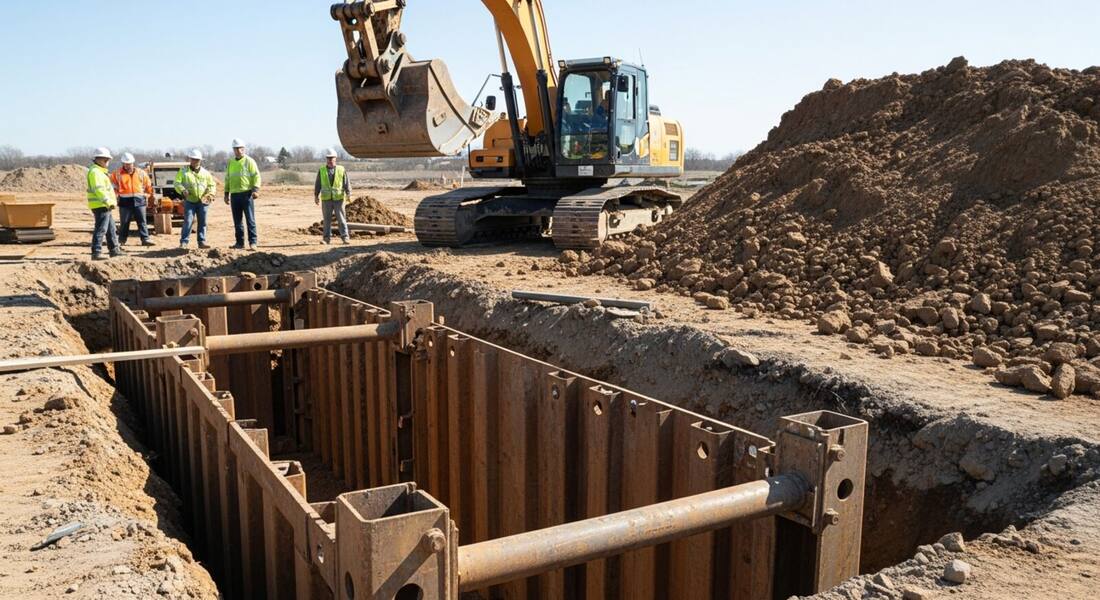
Soil conditions change with weather, vibration, and time — a trench inspected at 7 a.m. can develop tension cracks or water seepage by noon. OSHA requires a competent person to inspect excavations daily and as conditions change, and cave-ins remain one of the deadliest construction events because the warning signs are easy to miss from inside the cut.
A photo scan adds cheap repetition between formal inspections: any crew member can photograph the excavation from the surface and get an instant read on what is visible — protection in place, spoil setback, access ladders, standing water — with the OSHA standard each issue may relate to. It also creates a time-stamped visual record of the trench condition, which is exactly what you want on file if conditions later change.
Cave-ins are among the deadliest construction hazards — a cubic yard of soil weighs between 1,200 and 3,000 pounds — and OSHA's excavation standard (29 CFR 1926 Subpart P) reflects that lethality with specific, enforceable requirements. The competent person designation is the cornerstone: a qualified person must classify the soil before any protective system is selected, inspect the excavation before each shift and after any event that could affect conditions, and have the authority to stop work. OSHA inspectors verify the competent person can explain the soil classification basis on the spot — not just point to a certificate on file.
Cave-in protection options under the standard are not equivalent: sloping depends on the classified soil type, shoring must meet tabulated data or engineering specifications, and trench boxes must match the depth and soil conditions. Many citation cases involve a trench box installed in a soil type that required additional protection, or a protective system that did not extend to the excavation bottom as required. OSHA has targeted excavation and trenching in focused inspection initiatives, including emphasis programs in multiple regions. State-plan states like California and Washington impose additional competent-person documentation requirements that go beyond federal minimums.
Visible protective-system and edge conditions the AI checks in an excavation photo.
Workers visible in trenches with no apparent sloping, benching, shoring, or trench box.
Excavated material and equipment stored at the trench edge instead of the required setback.
No visible ladder, ramp, or steps for workers in the excavation.
Standing water in the cut, visible edge cracking, and undermined adjacent structures or pavement.
This illustrative public sample of the real report interface shows how visible photo findings and suggested actions are documented. A competent person still performs the required excavation inspection.
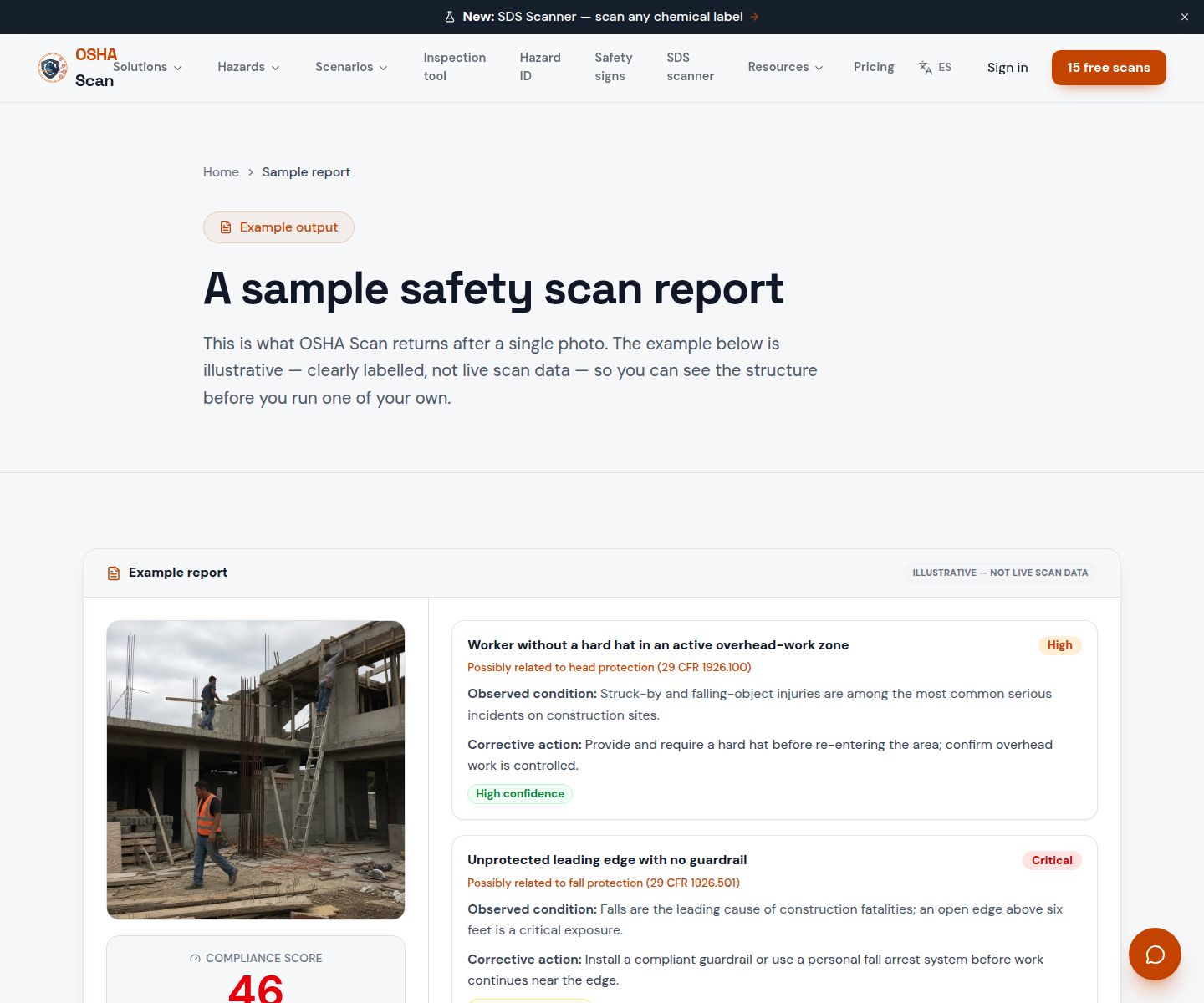
Scan a photo like the one above and this is the report you get — score, findings, OSHA references, and fixes. It is an illustrative example, clearly marked — not live scan data.
Compliance score
40
Lower means more potential hazards found
5 potential hazards found
1No visible ladder or egress inside the shored excavation
CriticalPossibly related to means of egress (29 CFR 1926.651(c)(2))
Observed condition: Workers must be within 25 feet of a ladder or ramp — without one, a cave-in, flooding, or injury leaves no quick way out.
Corrective action: Place a secured ladder inside the excavation within 25 feet of every worker before entry.
High confidence
2Spoil pile placed directly at the excavation edge
HighPossibly related to protection from falling loads and materials (29 CFR 1926.651(j))
Observed condition: Edge surcharge adds load to the trench wall and material can roll back onto workers below.
Corrective action: Move spoil and equipment at least 2 feet back from the edge, or use retaining devices.
Medium confidenceNot fully clear from the photo — verify on site.
Upload a photo like the one above and get a compliance score and hazard count in seconds. No account needed to scan — create a free account to unlock the full report.
Use the real site or facility name. If you save the scan after signup, it becomes the report name.
Three angles, one deeper scan
Only the wide shot is required — every extra angle gives the AI more places to look.
Required: Set the scene — one wide shot lets the AI sweep the whole area at once
Stand at the entry point and capture corner to corner: floors, ladders, scaffolds, and everyone at work
Drop a job-site photo or walkthrough video
Click to upload, drag & drop, or snap a photo on site. Photos scan free in about 15 seconds — no signup, no card. Video walkthroughs (up to 3 min) run on a free account.
Small habits, sharper scans
Set the scene
Start with context
Fill the frame
2–3 ft for close-ups; keep ladders, cords and workers fully in view.
Capture clearly
Make the frame usable
Light it right
Keep the sun or lights behind you — glare and shadows hide hazards.
Tap to focus
Tap the hazard on screen and hold still one second — blur can't be flagged.
Choose the useful view
Give the AI room to understand
Go landscape
Turn your phone sideways — a wider frame catches more of the scene.
Only upload photos you have permission to use, and avoid images showing personal, customer, or confidential information. Demo photos and results are held privately for up to 48 hours so you can save them to a free account; unclaimed photos are deleted automatically. Results are an AI-assisted preliminary review, not an official OSHA determination.
New: Video walkthrough scans
Record up to 3 minutes of your site — the AI extracts frames and flags every hazard with exact timestamps. Free account required.
Get the best results
Wide shot first
Stand at the entrance and photograph the entire work area so AI sees the full context
Hazard areas
Photograph elevated surfaces, equipment, electrical panels, and anywhere workers are active
Close-ups last
Move in close on anything damaged, missing, or that looks risky — the AI catches more detail
Run these points before anyone enters the excavation and again as conditions change. The first four are free — create a free account to unlock the full checklist and scan your own trench photos.
Competent person on site and in charge
A competent person classifies the soil, selects the protective system, and inspects the excavation daily and after every rainstorm or vibration event.
Protective system for trenches 5 feet or deeper
Sloping, benching, shoring, or a trench box for any trench five feet or deeper — and for shallower trenches when the competent person sees instability.
Spoil pile set back at least 2 feet
Excavated material, tools, and equipment stay at least two feet from the edge, so nothing rolls in and the extra weight does not load the trench wall.
Access within 25 feet of workers
A ladder, ramp, or steps in trenches four feet or deeper, positioned so no worker travels more than 25 feet laterally to reach it.
Jump to this page's downloadable checklist for excavation and trenching review.
View the trenching checklistOSHA Scan reads a single photo. That makes it fast and easy for anyone on site — but it also means it has real limits. Here's an honest look at both.
A scan is a fast first look, not the final word. Before treating this kind of area as safe, a competent person should still confirm:
Under 29 CFR 1926.652, excavations 5 feet or deeper generally require sloping, benching, shoring, or a shield system unless the cut is entirely in stable rock. Under 5 feet, a competent person must still judge whether protection is needed. The scan flags visibly unprotected trenches; the soil-type call that drives the design stays with the competent person.
No — soil classification requires manual and sometimes lab testing by a competent person, and it decides which protective system is legal. The scan is limited to what is visible: protection present or absent, spoil setback, access, water, and edge cracking. Soil typing is always listed under what to verify manually.
Daily before work begins, and again as conditions change — after rain, vibration, or any sign of instability. Because a photo scan takes seconds, crews use it to add checks through the day between the competent person's formal inspections, with a time-stamped record each time.
Reviewed by OSHA Scan Editorial
Last updated August 29, 2026
This content is produced by the OSHA Scan Editorial team and reviewed with AI assistance. It is general safety information, not legal or compliance advice. OSHA Scan is an independent tool and is not affiliated with, endorsed by, or certified by OSHA or the U.S. Department of Labor.
Free PDF checklist
33 critical checks across 7 categories — the same visible gaps the AI scanner looks for. Sent to your inbox as a free PDF.
More ways to see what an AI OSHA scan can do for your site.
The overview hub — how the scanner works and every job, site, and hazard it covers.
Use the free safety dashboard template for scores, findings, severity, site, and action status.
The complete hazard guide for excavation work.
The other below-grade entry that demands pre-checks.
How cave-ins develop and how to prevent them.
Full-site scanning beyond the excavation.
See a complete labelled example of everything a scan returns.
Start with 5 included AI site scans plus a one-time 10-scan signup bonus — no credit card. Build JHA-ready reports and catch changing conditions sooner.
Start your free trial