
1
Set the scene
Start with context
Fill the frame
2–3 ft for close-ups; keep ladders, cords and workers fully in view.
A forklift safety inspection covers both the truck and the environment it operates in: pre-shift equipment checks, clear travel paths, separated pedestrian routes, stable and secured loads, and safe parking. OSHA Scan handles the environment side from a photo — upload an image of your dock, aisle, or yard and the AI flags visible issues like pedestrians in a forklift travel lane, obstructed aisles, unstable-looking loads, or blocked exits, referencing the OSHA standard each finding may relate to. It is an AI-assisted preliminary review of visible conditions, not a formal compliance determination or a substitute for the operator's daily equipment check.
Free · No account needed to scan · Results in seconds
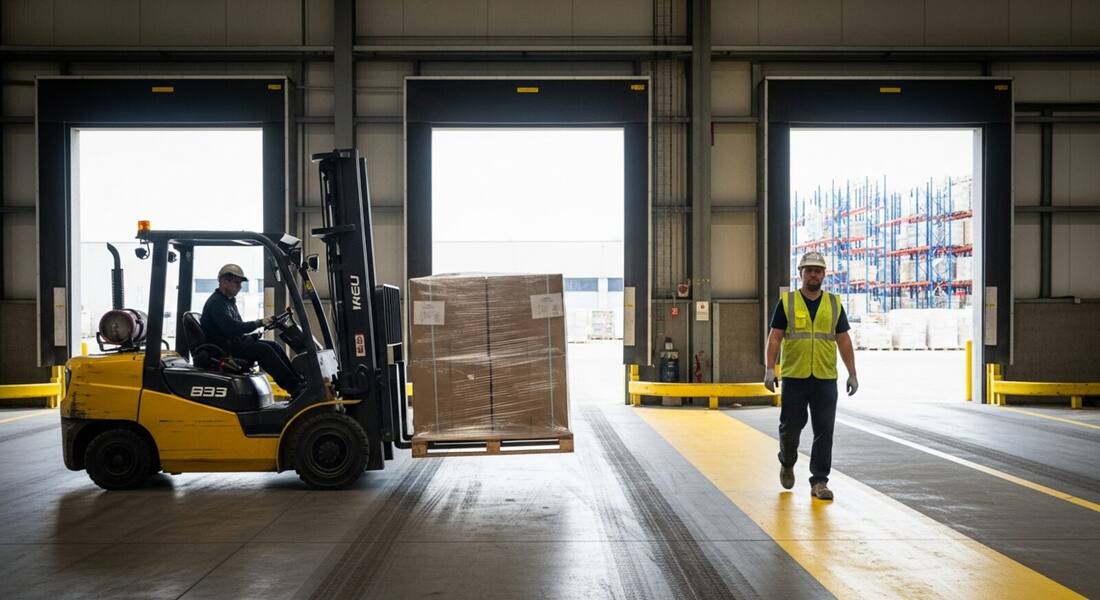
Most forklift programs are good about the pre-shift truck checklist — brakes, forks, horn, hydraulics. What slips is the environment the truck drives through: a pallet staged into the travel lane at 10 a.m., a pedestrian shortcut that crosses the dock, racking with visible damage nobody logged. Those conditions change hour by hour, faster than any scheduled walkthrough.
A photo scan makes the environment check as routine as the truck check: photograph the aisle, dock, or staging area and get an instant read on visible conflicts — people in travel lanes, blocked routes, loads that look unstable — with a suggested fix for each. Supervisors use it before shift changes and after big receiving days, when the floor looks the least like the plan.
Powered industrial trucks (29 CFR 1910.178) appear on OSHA's most-cited list for general industry every year, and the citations cluster around two areas: operator qualifications and the operating environment. Many employers assume a general forklift certificate covers all equipment — it does not. OSHA requires formal training and evaluation specific to each truck type in each operating environment, conducted by a person qualified to train that combination. Inspectors verify the training records and, when they are absent or generic, the citation is straightforward.
OSHA has run national and regional emphasis programs specifically targeting warehouse and distribution-center powered industrial truck hazards, meaning documentation of pre-shift checks and aisle conditions carries practical enforcement weight beyond just good practice. At multi-employer worksites — construction sites, distribution facilities with third-party logistics contractors — general contractors and site managers can be cited when a subcontractor's forklift operations expose other employers' workers, even if the host employer operates no forklifts directly. That shared-liability exposure is the reason environmental conditions (clear travel lanes, pedestrian separation, stable rack) deserve the same routine documentation as the pre-shift truck checklist.
Visible conditions the AI checks in a forklift work-area photo.
People walking in visible forklift travel lanes, blind corners without mirrors, and missing walkway markings.
Leaning or unwrapped pallet stacks, loads raised during travel, and materials stored beyond visible rack damage.
Aisles, dock doors, and emergency exits obstructed by staged pallets, equipment, or debris.
Trucks parked with forks raised, units left on ramps, and dock edges without visible protection.
Scan a photo like the one above and this is the report you get — score, findings, OSHA references, and fixes. It is an illustrative example, clearly marked — not live scan data.
Compliance score
50
Lower means more potential hazards found
5 potential hazards found
1Pedestrian walking through an active forklift travel lane
HighPossibly related to powered industrial trucks (29 CFR 1910.178)
Observed condition: Struck-by incidents between forklifts and pedestrians are among the most severe warehouse injuries, especially near blind corners.
Corrective action: Separate pedestrian routes with marked walkways and physical barriers where traffic crosses.
High confidence
2Pallet load carried high enough to obstruct the operator's view
MediumPossibly related to powered industrial truck operation (29 CFR 1910.178(n))
Observed condition: A raised or bulky load blocks the forward view, and the operator may not see a pedestrian crossing the lane.
Corrective action: Travel with the load lowered, or drive in reverse with a spotter when the load blocks the view.
Medium confidenceNot fully clear from the photo — verify on site.
Upload a photo like the one above and get a compliance score and hazard count in seconds. No account needed to scan — create a free account to unlock the full report.
Use the real site or facility name. If you save the scan after signup, it becomes the report name.
Three angles, one deeper scan
Only the wide shot is required — every extra angle gives the AI more places to look.
Required: Set the scene — one wide shot lets the AI sweep the whole area at once
Stand at the entry point and capture corner to corner: floors, ladders, scaffolds, and everyone at work
Drop a job-site photo or walkthrough video
Click to upload, drag & drop, or snap a photo on site. Photos scan free in about 15 seconds — no signup, no card. Video walkthroughs (up to 3 min) run on a free account.
Small habits, sharper scans
Set the scene
Start with context
Fill the frame
2–3 ft for close-ups; keep ladders, cords and workers fully in view.
Capture clearly
Make the frame usable
Light it right
Keep the sun or lights behind you — glare and shadows hide hazards.
Tap to focus
Tap the hazard on screen and hold still one second — blur can't be flagged.
Choose the useful view
Give the AI room to understand
Go landscape
Turn your phone sideways — a wider frame catches more of the scene.
Only upload photos you have permission to use, and avoid images showing personal, customer, or confidential information. Demo photos and results are held privately for up to 48 hours so you can save them to a free account; unclaimed photos are deleted automatically. Results are an AI-assisted preliminary review, not an official OSHA determination.
New: Video walkthrough scans
Record up to 3 minutes of your site — the AI extracts frames and flags every hazard with exact timestamps. Free account required.
Get the best results
Wide shot first
Stand at the entrance and photograph the entire work area so AI sees the full context
Hazard areas
Photograph elevated surfaces, equipment, electrical panels, and anywhere workers are active
Close-ups last
Move in close on anything damaged, missing, or that looks risky — the AI catches more detail
Cover the truck and the environment it runs in. The first four points are free — create a free account to unlock the full checklist and scan your own dock and aisle photos.
Free checklist — 12 points
Enter your email to unlock the full checklist
We'll also send you a printable PDF copy — no account required.
One email with the checklist, one follow-up. Unsubscribe anytime.
OSHA Scan reads a single photo. That makes it fast and easy for anyone on site — but it also means it has real limits. Here's an honest look at both.
A scan is a fast first look, not the final word. Before treating this kind of area as safe, a competent person should still confirm:
Two halves: the truck (daily pre-shift check of brakes, steering, horn, hydraulics, forks, and tires, required by 29 CFR 1910.178) and the environment (clear travel lanes, separated pedestrian routes, stable loads, undamaged racking, open exits). A photo scan covers the visible environment half instantly; the truck half stays with the operator.
Only what is visible — a truck parked with forks raised or left on a ramp will get flagged. Mechanical condition like brakes and hydraulics cannot be judged from a photo, which is why the daily operator check remains required and appears in our what-to-verify-manually list.
The truck needs a documented check each shift. The work area has no fixed OSHA interval, but conditions change constantly — many teams photograph high-traffic zones at shift start and after heavy receiving windows. A scan takes about 15 seconds, so frequency stops being the bottleneck.
Reviewed by OSHA Scan Editorial
Last updated August 29, 2026
This content is produced by the OSHA Scan Editorial team and reviewed with AI assistance. It is general safety information, not legal or compliance advice. OSHA Scan is an independent tool and is not affiliated with, endorsed by, or certified by OSHA or the U.S. Department of Labor.
More ways to see what an AI OSHA scan can do for your site.
The overview hub — how the scanner works and every job, site, and hazard it covers.
The full-facility checklist this fits into.
The complete hazard guide for dock work.
How blind-spot struck-by incidents happen.
See a complete labelled example of everything a scan returns.
Start with 5 included AI site scans plus a one-time 10-scan signup bonus — no credit card. Build JHA-ready reports and catch changing conditions sooner.
Start your free trial