
1
Set the scene
Start with context
Fill the frame
2–3 ft for close-ups; keep ladders, cords and workers fully in view.
OSHA compliance automation means letting software do the compliance work that is mechanical — finding visible hazards in photos, matching them to the OSHA standards they may relate to, generating inspection reports, tracking corrective actions to closure, and building trend lines — so people can do the work that is not: verifying conditions, making judgment calls, and fixing things. OSHA Scan automates from a photo: scan, get referenced findings and a 0-100 score in seconds, assign owners, export the report. Free to try, no account. What it deliberately does not automate: the human verification every finding gets.
Free · No account needed to scan · Results in seconds
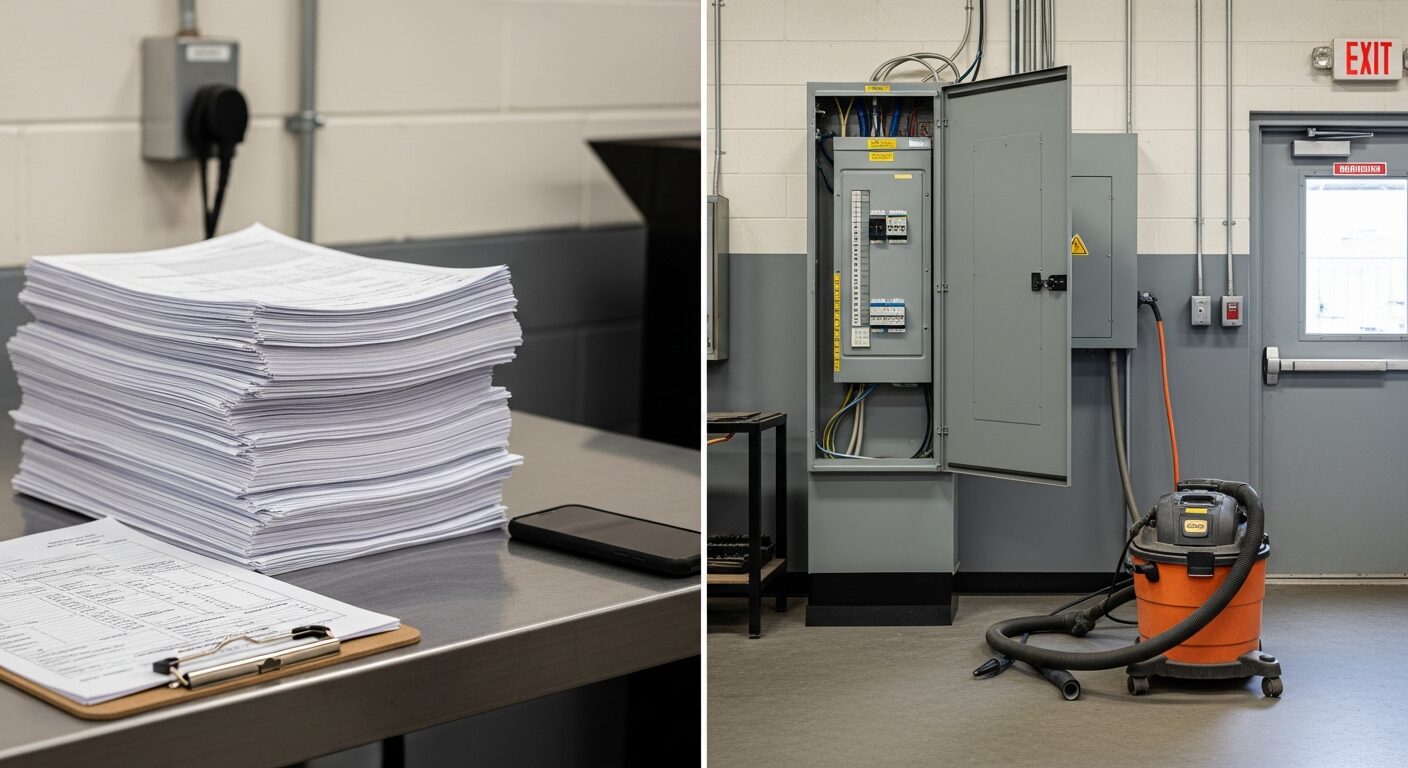
Every safety program is two jobs wearing one name. Job one is mechanical: walk, look, write down, cross-reference standards, type up, file, chase corrections, compile trends, produce the binder when someone asks. Job two is human: judge whether the guard is adequate, decide if the taped cord comes out of service, verify that the fix actually fixed, know which crew needs the extra conversation. Programs drown because job one consumes the hours that job two needed.
Automation done honestly takes job one and only job one. A photo replaces the write-up: the AI names the visible hazards, references the OSHA standard family each may relate to, weights severity into a 0-100 score, drafts the corrective actions, and files the report — dated, exportable, trend-ready — in seconds. The safety lead's calendar gets its hours back, and those hours belong to verification, judgment, and the floor.
The stack of paper forms in the photo above is the before picture. Nothing in that stack required a human to produce — and everything the shop actually needed a human for (the open panel, the blocked exit) was waiting while the paperwork got done.
Hazard capture: a photo is the input, so documentation starts complete instead of being reconstructed from memory at a desk. Standards referencing: each finding arrives tagged with the OSHA standard family it may relate to — the lookup a person would have done in a browser tab, done already. Report assembly: findings, severity, photo, score, executive summary, corrective-action table — generated, not typed, and exported to PDF or Excel in one click. Correction tracking: accepted findings carry owners and completion states, and the record chases itself — open items stay visible until closed with re-scan evidence. Trending: every scan is a dated data point, so per-area trend lines build with zero additional effort. That is a large fraction of a safety lead's week, and all of it is mechanical.
Verification: an AI finding is a draft until a person confirms it at the spot — the flagged 'spill' may be a shadow, and the shadow may hide worse. Judgment: whether the guarding is adequate for this machine, this task, this operator is a competent-person call, not a pattern match. Physical correction: nothing about software moves the vacuum away from the exit door. Training and competence: OSHA requires trained people, and required trainings have human elements no workflow replaces. Formal recordkeeping: the OSHA 300 log and incident reporting are a separate regime with their own criteria — inspection automation feeds the proactive record, not the injury log. Any vendor promising 'fully automated compliance' is promising to skip the parts OSHA actually holds you to. The honest pitch — and the one OSHA Scan is built on — is that automating the mechanical 80% is precisely what funds the human 20%.
Week one: pick one area and one owner, scan on day one, and let the first generated report replace that area's paper form immediately — parallel-running old and new paperwork is how automation dies. Week two: set the cadence (each area weekly plus every changed condition) and route every accepted finding to a named owner the same day it is found. Week three: close the first corrections with re-scans and check the area trend line — this is where the score becomes a management artifact instead of a curiosity. Week four: export the month's record as PDF and put it in front of whoever asks for compliance evidence — GC, insurer, corporate — and count the hours the old process would have taken. The automation case makes itself or it does not; a month of real use on the free tier is enough to know, before any budget conversation.
The mechanical compliance work, done by the time you have walked to the next area.
Findings, OSHA references, severity, score, summary, and corrective-action table — assembled from the photo, exported in one click.
Owners, deadlines, completion states — open items stay visible until closed, with re-scan evidence attached.
Every dated, scored scan extends the per-area trend line — drift surfaces in the chart, not in the incident log.
Findings carry confidence levels and wait for floor verification — the automation drafts; the competent person decides.
Scan a photo like the one above and this is the report you get — score, findings, OSHA references, and fixes. It is an illustrative example, clearly marked — not live scan data.
Compliance score
49
Lower means more potential hazards found
5 potential hazards found
1Electrical panel standing open with breakers exposed
HighPossibly related to electrical equipment enclosure integrity (29 CFR 1910.303)
Observed condition: An open panel puts energized parts one unplanned contact away from anyone passing with a tool, a hose, or a cart — enclosure doors exist for exactly this aisle.
Corrective action: Close and latch the panel now; if work is in progress, it needs a qualified person present and the work zone controlled — an open unattended panel is neither.
High confidence
2Shop vacuum and hose staged in the exit door path
MediumPossibly related to exit route obstruction (29 CFR 1910.37)
Observed condition: The exit route is the one path that must work on the worst day — equipment staged against the exit door is a delay measured in exactly the seconds an emergency does not have.
Corrective action: Move the vacuum and hose clear of the door swing and approach, and mark a keep-clear zone so the space stops reading as storage.
High confidence
Upload a photo like the one above and get a compliance score and hazard count in seconds. No account needed to scan — create a free account to unlock the full report.
Use the real site or facility name. If you save the scan after signup, it becomes the report name.
Three angles, one deeper scan
Only the wide shot is required — every extra angle gives the AI more places to look.
Required: Set the scene — one wide shot lets the AI sweep the whole area at once
Stand at the entry point and capture corner to corner: floors, ladders, scaffolds, and everyone at work
Drop a job-site photo or walkthrough video
Click to upload, drag & drop, or snap a photo on site. Photos scan free in about 15 seconds — no signup, no card. Video walkthroughs (up to 3 min) run on a free account.
Small habits, sharper scans
Set the scene
Start with context
Fill the frame
2–3 ft for close-ups; keep ladders, cords and workers fully in view.
Capture clearly
Make the frame usable
Light it right
Keep the sun or lights behind you — glare and shadows hide hazards.
Tap to focus
Tap the hazard on screen and hold still one second — blur can't be flagged.
Choose the useful view
Give the AI room to understand
Go landscape
Turn your phone sideways — a wider frame catches more of the scene.
Only upload photos you have permission to use, and avoid images showing personal, customer, or confidential information. Demo photos and results are held privately for up to 48 hours so you can save them to a free account; unclaimed photos are deleted automatically. Results are an AI-assisted preliminary review, not an official OSHA determination.
New: Video walkthrough scans
Record up to 3 minutes of your site — the AI extracts frames and flags every hazard with exact timestamps. Free account required.
Get the best results
Wide shot first
Stand at the entrance and photograph the entire work area so AI sees the full context
Hazard areas
Photograph elevated surfaces, equipment, electrical panels, and anywhere workers are active
Close-ups last
Move in close on anything damaged, missing, or that looks risky — the AI catches more detail
How to automate the mechanical work without automating away the program. First four points free; a free account unlocks the rest.
List what your program does by hand today
Write-ups, standard lookups, report typing, correction chasing, trend compiling — the automation candidates are the tasks with no judgment in them.
Automate capture first
The photo-to-findings step replaces the most hours and improves the most quality — start there, not with workflow diagrams.
Keep verification human, always
Every generated finding gets a floor check before it becomes the record. This is the line automation must never cross.
Retire the paper form the same week
Running old and new documentation in parallel doubles the work and kills the rollout — cut over per area, immediately.
OSHA Scan reads a single photo. That makes it fast and easy for anyone on site — but it also means it has real limits. Here's an honest look at both.
A scan is a fast first look, not the final word. Before treating this kind of area as safe, a competent person should still confirm:
The mechanical parts: identifying visible hazards from photos, referencing the OSHA standards each may relate to, generating inspection reports, tracking corrective actions to closure, and building per-area trend lines. That is a large share of a safety lead's week — and none of it requires judgment. It is also the honest scope of AI for compliance today: the paperwork, not the decisions.
The parts OSHA actually holds you to: verifying conditions on the floor, competent-person judgment calls, physically fixing hazards, training people, and formal recordkeeping like the OSHA 300 log. Any tool promising 'fully automated compliance' is promising to skip those — OSHA Scan is built around keeping them explicitly human.
No — it gives them their calendar back. Automation absorbs the write-ups, lookups, report assembly, and correction-chasing; the manager's time moves to verification, judgment, and the floor, which is what the role was supposed to be.
Every finding is a draft until a person verifies it at the location. Findings carry confidence levels, dismissals record a reason, and closures attach re-scan evidence — the automation drafts fast, and the human steps make the record defensible.
One area, one owner, one month, free tier. Scan weekly, route findings to owners same-day, close with re-scans, then export the month's record and compare it to what the paper process produced. The case makes itself or it does not — before any spend.
Yes — upload a photo and get the score and hazard count with no account. A free account unlocks full reports with OSHA references and corrective-action tracking, 5 free scans, saved history, and PDF/Excel export.
Reviewed by OSHA Scan Editorial
Last updated August 29, 2026
This content is produced by the OSHA Scan Editorial team and reviewed with AI assistance. It is general safety information, not legal or compliance advice. OSHA Scan is an independent tool and is not affiliated with, endorsed by, or certified by OSHA or the U.S. Department of Labor.
Free PDF checklist
33 critical checks across 7 categories — the same visible gaps the AI scanner looks for. Sent to your inbox as a free PDF.
More ways to see what an AI OSHA scan can do for your site.
The overview hub — how the scanner works and every job, site, and hazard it covers.
The report-generation half of the automation, in depth.
The buyer's guide to the category this automation lives in.
The program checklist the automation should accelerate.
Why findings-in-seconds changes what gets caught.
The hub for every photo-scanning use case.
Where automated scans, scores, and records live in one place.
OSHA's training hub — the human program element no automation replaces, and the natural pairing for the hours automation gives back.
Official resource — osha.govSee a complete labelled example of everything a scan returns.
Start with 5 included AI site scans plus a one-time 10-scan signup bonus — no credit card. Build JHA-ready reports and catch changing conditions sooner.
Start your free trial