
1
Set the scene
Start with context
Fill the frame
2–3 ft for close-ups; keep ladders, cords and workers fully in view.
A restaurant safety inspection checklist focuses on the hazards that injure food-service workers most: wet or greasy floors, blocked or locked exits, cluttered back-of-house walkways, and unsafe conditions around hot equipment and storage. OSHA Scan lets a manager photograph the kitchen, the dish area, a walk-in, or an exit corridor and get an instant read — the AI flags visible slip, egress, and housekeeping hazards, references the OSHA standard each may relate to, scores the area, and suggests a fix. It gives shift managers a fast pre-service check that anyone can run. It covers workplace safety hazards visible in a photo and is an AI-assisted first look, not food-hygiene grading and not a replacement for a qualified inspection.
Free · No account needed to scan · Results in seconds
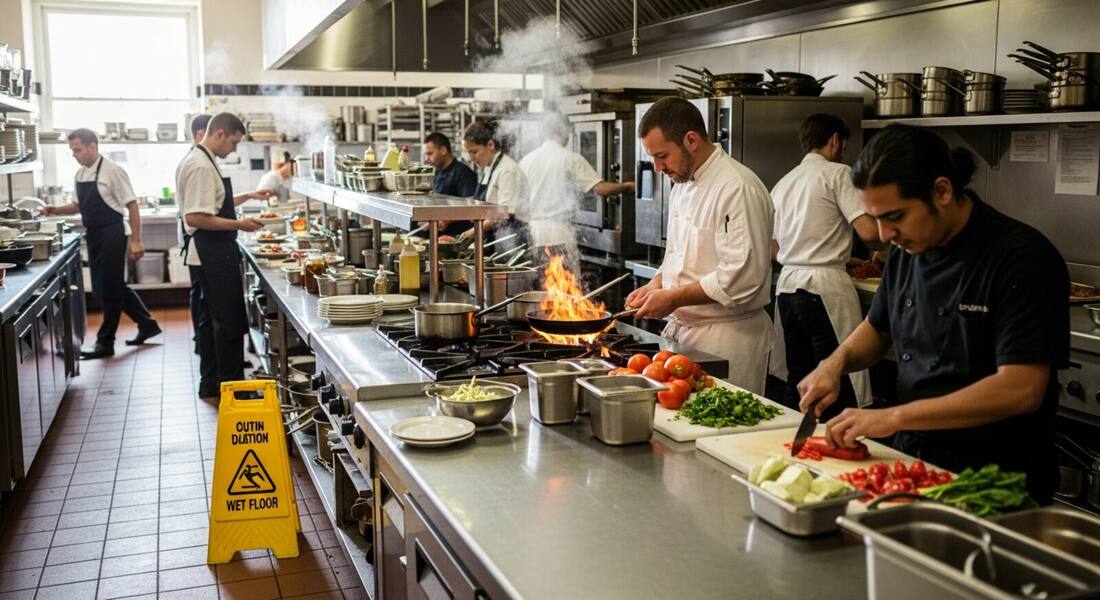
Restaurant injuries cluster around a few predictable hazards — slips on wet or greasy floors, strains and burns in tight kitchens, and blocked exits that turn dangerous in an emergency. These conditions build up during a busy shift, exactly when no one has time for a paper checklist. Photographing the space instead lets a manager run a real safety check in the minutes before or during service.
The scanner reads a kitchen line, a dish pit, a storage room, or an exit corridor and flags what it can see: standing water and spills, mats out of place, clutter in walkways, and obstructed or blocked exits. It focuses on worker-safety hazards visible in the frame — not food-hygiene scoring, which is a separate health-department process.
The foodservice industry has some of the highest injury rates in the service sector, driven by three hazard categories: slips and falls (wet floors, grease accumulation, mat placement), cuts and lacerations (knives, slicers, mandolines, broken glassware), and burns and scalds (hot surfaces, steam, hot liquids, deep fryer oil). OSHA's general industry walking-working surfaces standard (1910.22) applies to restaurant floor conditions, and inspectors evaluating kitchen incidents consistently look at mat placement, drainage adequacy, spill response procedures, and footwear requirements. Burns are addressed primarily through engineering controls (splash guards, auto-lift fryers, insulated surfaces) and PPE, with OSHA citing the general duty clause when burns are recurring and no abatement program is documented.
Commercial kitchen equipment maintenance — particularly locking out energy sources before servicing slicers, mixers, and dishwashers — is addressed by 1910.147, but many small restaurant operators are unaware that LOTO applies to their kitchen equipment. The consequences are severe: food processor blade injuries are among the most common serious injuries in foodservice. OSHA has also increasingly cited restaurant operators for workplace violence preparedness, particularly for late-night operations where robbery risk is elevated and employee emergency procedures are often undocumented. State-plan states including California have adopted specific workplace violence prevention requirements that apply to restaurants and retail operations.
The worker-safety core of a food-service checklist, read from an image.
Standing water, spills, grease, and missing or displaced anti-slip mats on kitchen and dish-area floors.
Exits obstructed by deliveries or storage, and egress paths that are cluttered or hard to reach quickly.
Clutter in tight back-of-house walkways, trailing cords, and items stored where staff move and carry.
Unsafe clearance and clutter around hot equipment and cooking lines that raise burn and fire risk.
Scan a photo like the one above and this is the report you get — score, findings, OSHA references, and fixes. It is an illustrative example, clearly marked — not live scan data.
Compliance score
61
Lower means more potential hazards found
5 potential hazards found
1Standing water on the kitchen floor without a mat
HighPossibly related to walking-working surfaces (29 CFR 1910.22)
Observed condition: Slips on wet or greasy floors are the most common cause of injury in food-service work.
Corrective action: Dry the floor, place anti-slip mats, and clean spills immediately as part of the routine.
High confidence
2Congested walking path behind an active open-flame line
HighPossibly related to fire protection and egress (29 CFR 1910.36)
Observed condition: Workers crossing behind open flame and hot pans in a tight aisle risk burns and collisions, and congestion slows evacuation.
Corrective action: Keep the line behind cooks clear, establish a passing call-out protocol, and stage prep away from the flame.
Medium confidenceNot fully clear from the photo — verify on site.
Upload a photo like the one above and get a compliance score and hazard count in seconds. No account needed to scan — create a free account to unlock the full report.
Use the real site or facility name. If you save the scan after signup, it becomes the report name.
Three angles, one deeper scan
Only the wide shot is required — every extra angle gives the AI more places to look.
Required: Set the scene — one wide shot lets the AI sweep the whole area at once
Stand at the entry point and capture corner to corner: floors, ladders, scaffolds, and everyone at work
Drop a job-site photo or walkthrough video
Click to upload, drag & drop, or snap a photo on site. Photos scan free in about 15 seconds — no signup, no card. Video walkthroughs (up to 3 min) run on a free account.
Small habits, sharper scans
Set the scene
Start with context
Fill the frame
2–3 ft for close-ups; keep ladders, cords and workers fully in view.
Capture clearly
Make the frame usable
Light it right
Keep the sun or lights behind you — glare and shadows hide hazards.
Tap to focus
Tap the hazard on screen and hold still one second — blur can't be flagged.
Choose the useful view
Give the AI room to understand
Go landscape
Turn your phone sideways — a wider frame catches more of the scene.
Only upload photos you have permission to use, and avoid images showing personal, customer, or confidential information. Demo photos and results are held privately for up to 48 hours so you can save them to a free account; unclaimed photos are deleted automatically. Results are an AI-assisted preliminary review, not an official OSHA determination.
New: Video walkthrough scans
Record up to 3 minutes of your site — the AI extracts frames and flags every hazard with exact timestamps. Free account required.
Get the best results
Wide shot first
Stand at the entrance and photograph the entire work area so AI sees the full context
Hazard areas
Photograph elevated surfaces, equipment, electrical panels, and anywhere workers are active
Close-ups last
Move in close on anything damaged, missing, or that looks risky — the AI catches more detail
Walk the kitchen, line, and back of house with these points. The first four are free — create a free account to unlock the full checklist and scan your own kitchen photos.
Free checklist — 12 points
Enter your email to unlock the full checklist
We'll also send you a printable PDF copy — no account required.
One email with the checklist, one follow-up. Unsubscribe anytime.
OSHA Scan reads a single photo. That makes it fast and easy for anyone on site — but it also means it has real limits. Here's an honest look at both.
A scan is a fast first look, not the final word. Before treating this kind of area as safe, a competent person should still confirm:
No. OSHA Scan looks at worker-safety hazards visible in a photo — slips, exits, walkways, and equipment surroundings. Food hygiene and health-code grading are a separate process run by your local health department. The scan complements that; it does not replace it.
The visible, high-frequency ones: wet or greasy floors and missing mats, blocked or cluttered exits, and clutter in tight walkways. These are the conditions behind most restaurant worker injuries, so the scanner prioritizes them.
Anyone can run it — that is the point. If a team member can take a photo, they can flag a hazard. No safety training is required, and the report is written in plain language with a suggested fix for each item.
Reviewed by OSHA Scan Editorial
Last updated August 29, 2026
This content is produced by the OSHA Scan Editorial team and reviewed with AI assistance. It is general safety information, not legal or compliance advice. OSHA Scan is an independent tool and is not affiliated with, endorsed by, or certified by OSHA or the U.S. Department of Labor.
More ways to see what an AI OSHA scan can do for your site.
The overview hub — how the scanner works and every job, site, and hazard it covers.
Focused detection for exits and egress paths.
Catch wet floors and floor-level hazards.
First-aid response done right when kitchen cuts and burns happen.
Housekeeping, kitchen, and common-area hazards for hotel operations.
Machine guarding, LOTO, and wet-floor hazards in food manufacturing.
See a complete labelled example of everything a scan returns.
Start with 5 included AI site scans plus a one-time 10-scan signup bonus — no credit card. Build JHA-ready reports and catch changing conditions sooner.
Start your free trial