
1
Set the scene
Start with context
Fill the frame
2–3 ft for close-ups; keep ladders, cords and workers fully in view.
A job safety analysis (JSA) walks through a job step by step, names the hazards in each step, and agrees the controls before anyone starts — OSHA's training materials describe exactly this method, and it is the same technique OSHA elsewhere calls a job hazard analysis. On most crews the JSA is a daily pre-task talk, and its weak point is that hazard-spotting depends on whoever is standing there. Photograph the task area instead: the AI drafts the visible-hazard list with the OSHA standard each may relate to and a suggested control in seconds, and the huddle starts from findings, not from memory. A competent person still verifies everything.
Free · No account needed to scan · Results in seconds
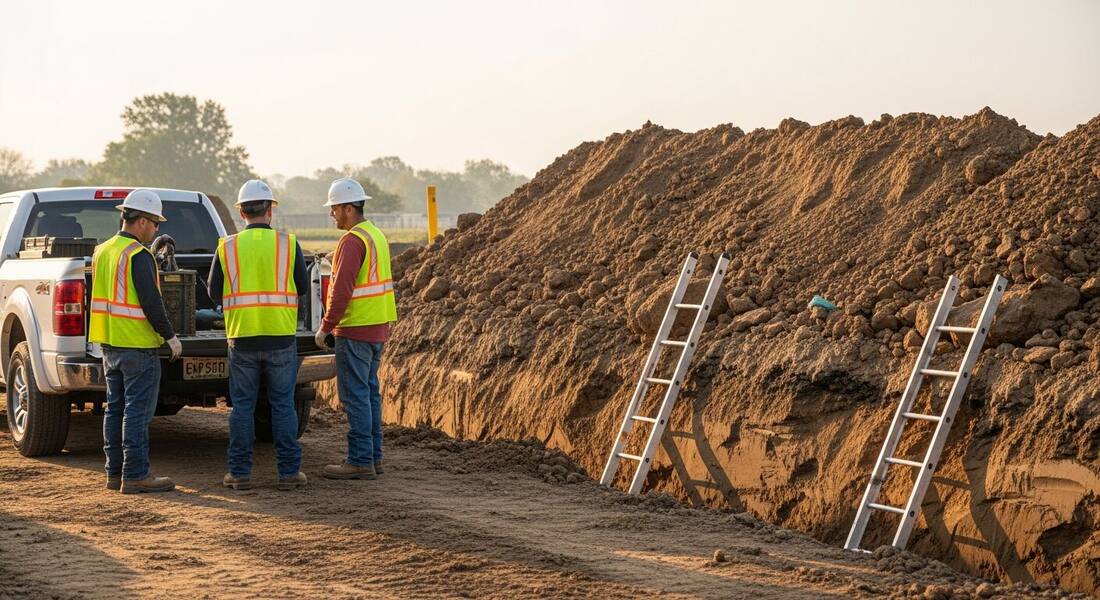
The JSA lives closer to the work than any other safety document: on many US sites it is filled out at the tailgate every morning, signed by the crew, and expected to reflect today's conditions — not the generic version of the task. That is also its weakness. At 6:45 with the crew waiting, hazard identification compresses into what the foreman happens to notice and what last week's form already said. The trench that gained a spoil pile overnight looks a lot like yesterday's trench.
A photo puts fresh eyes on the task at the moment it matters. Photograph the work area during setup — the excavation, the lift zone, the panel — and the scan returns the visible hazards in the frame: the spoil piled at the trench edge, the missing egress, the cord in the path. Each finding carries the OSHA standard it may relate to and a suggested control, so the pre-task talk starts from a drafted list specific to this morning, and the crew's experience goes into verifying and adding to it rather than recalling it from scratch.
Because every scan saves as a dated, scored report, the JSA also stops being a signature ritual and becomes a record: which hazards were identified before work started, what controls were agreed, and how the same task's conditions trended across the project — the documentation that matters to a GC, an insurer, or an incident review.
On most US commercial and industrial projects the JSA is not an annual document — it is a daily ritual. The pre-task plan gets written or reviewed at the morning huddle, the crew signs it, and the GC's safety staff collect and spot-check the forms. Many general contractors make the daily JSA contractual: no signed pre-task plan, no work. The intent is sound, but the volume creates the known failure mode — pencil-whipping, where the same hazards get copied every morning regardless of what the day actually holds.
The fix is making the honest version faster than the copied one. Photograph the task area during setup and the scan hands the huddle a drafted hazard list for today's actual conditions — the staged material, the cords run this morning, the trade working overhead that wasn't there yesterday. The crew verifies and signs a form that describes the day, and the foreman spent less time than the copy-paste took.
US enforcement has a wrinkle every subcontractor should understand: OSHA's multi-employer citation policy. On a shared site, the employer who created a hazard, the one who controlled the area, the one responsible for correcting it, and the one whose workers were exposed can all be cited — meaning your crew can be written up for exposure to a hazard another trade left behind, and your hazard could put the GC's citation on someone else's incident.
A daily photo-backed JSA is your evidence on both sides of that policy. It documents that you looked for hazards in your work area before exposing your crew — including the ones other trades created — and it dates what the area looked like when you started. When the question is 'who knew what, when' on a multi-employer site, the sub with dated, scored reports of every work area is the sub with answers.
OSHA's construction Focus Four — falls, struck-by, caught-in/between, and electrocution — account for the majority of construction fatalities in the US, and fall protection has been the most-cited OSHA standard year after year. A JSA program that wants to prevent deaths rather than produce paper weights its attention accordingly: every elevated task gets hard questions about anchorage and edges, every lift and load path gets a struck-by review, every trench and rotating machine gets a caught-in review, every cord and panel gets an electrical one.
This is where a photo scan naturally concentrates too, because the Focus Four are heavily visible: open edges, missing guardrails, loads over people, unprotected trenches, damaged cords, missing PPE. Scan the task area, and the highest-fatality hazard classes are exactly what the draft flags first — so the two minutes at the huddle get spent on what kills, not on formatting.
One photo of the task area during setup — this is what the scan brings to the tailgate talk.
Spoil piles at the trench edge, missing visible egress, water in the cut, and equipment working close to the excavation.
Mud, debris, cords, and materials in the paths the crew will actually walk during the task.
Machines, vehicles, and suspended or staged loads sharing space with people during the step being planned.
Hard hats, hi-vis, eye protection, and task-specific gear judged against the work about to start.
This illustrative public sample of the real report interface shows photo findings and suggested actions that can inform a job safety analysis; it does not replace task planning.
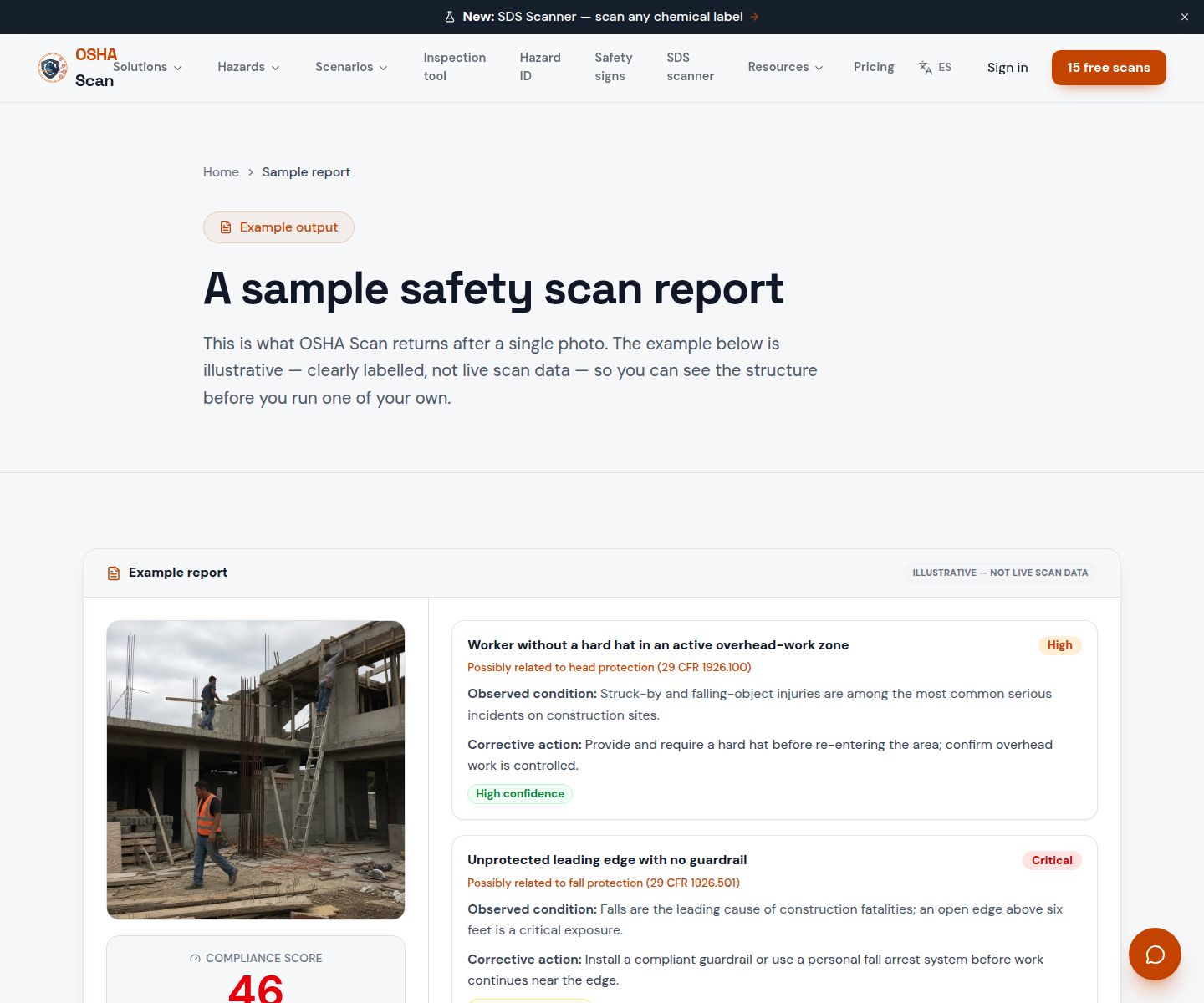
Scan a photo like the one above and this is the report you get — score, findings, OSHA references, and fixes. It is an illustrative example, clearly marked — not live scan data.
Compliance score
51
Lower means more potential hazards found
5 potential hazards found
1Spoil pile placed at the edge of the open trench
HighPossibly related to protection from excavated materials (29 CFR 1926.651)
Observed condition: Excavated material at the edge adds surcharge load to the trench wall and can roll back onto workers below — OSHA expects spoil and equipment kept back from the edge, and it is one of the most-cited excavation conditions.
Corrective action: Pull the spoil pile back from the trench edge before entry, and confirm the setback with the competent person during the pre-task walk.
High confidence
2Access ladders footed on loose, sloped excavated material
HighPossibly related to ladder support and stability requirements (29 CFR 1926.1053)
Observed condition: A ladder set on loose spoil shifts as the material settles under load — and when it is the crew's way out of the excavation, an unstable ladder turns any problem in the trench into an entrapment.
Corrective action: Re-set the access ladders on firm, stable footing clear of the spoil, confirm placement with the competent person, and make egress position a named step in the JSA.
Medium confidenceNot fully clear from the photo — verify on site.
Upload a photo like the one above and get a compliance score and hazard count in seconds. No account needed to scan — create a free account to unlock the full report.
Use the real site or facility name. If you save the scan after signup, it becomes the report name.
Three angles, one deeper scan
Only the wide shot is required — every extra angle gives the AI more places to look.
Required: Set the scene — one wide shot lets the AI sweep the whole area at once
Stand at the entry point and capture corner to corner: floors, ladders, scaffolds, and everyone at work
Drop a job-site photo or walkthrough video
Click to upload, drag & drop, or snap a photo on site. Photos scan free in about 15 seconds — no signup, no card. Video walkthroughs (up to 3 min) run on a free account.
Small habits, sharper scans
Set the scene
Start with context
Fill the frame
2–3 ft for close-ups; keep ladders, cords and workers fully in view.
Capture clearly
Make the frame usable
Light it right
Keep the sun or lights behind you — glare and shadows hide hazards.
Tap to focus
Tap the hazard on screen and hold still one second — blur can't be flagged.
Choose the useful view
Give the AI room to understand
Go landscape
Turn your phone sideways — a wider frame catches more of the scene.
Only upload photos you have permission to use, and avoid images showing personal, customer, or confidential information. Demo photos and results are held privately for up to 48 hours so you can save them to a free account; unclaimed photos are deleted automatically. Results are an AI-assisted preliminary review, not an official OSHA determination.
New: Video walkthrough scans
Record up to 3 minutes of your site — the AI extracts frames and flags every hazard with exact timestamps. Free account required.
Get the best results
Wide shot first
Stand at the entrance and photograph the entire work area so AI sees the full context
Hazard areas
Photograph elevated surfaces, equipment, electrical panels, and anywhere workers are active
Close-ups last
Move in close on anything damaged, missing, or that looks risky — the AI catches more detail
How to run a JSA that reflects this morning's site, not last month's form. The first four points are free — create a free account to unlock the full checklist and start every pre-task talk from a scanned photo.
Do the JSA at the task location
Fill it out standing where the work happens, not in the trailer. The gap between the form and the floor is where incidents live.
Photograph the setup first
One wide frame of the task area during setup catches overnight changes — new spoil, new water, new staging — that memory of yesterday's site misses.
Scan the photo before the huddle
The drafted hazard list, with standards and suggested controls, turns the tailgate talk from recall into review — faster and harder to skip.
Walk the steps in work order
Name each step the crew will actually perform, in sequence. Hazards attach to steps, not to the job title.
Jump to this page's downloadable job safety analysis checklist.
View the JSA checklistOSHA Scan reads a single photo. That makes it fast and easy for anyone on site — but it also means it has real limits. Here's an honest look at both.
A scan is a fast first look, not the final word. Before treating this kind of area as safe, a competent person should still confirm:
A job safety analysis breaks a specific job into its steps, identifies the hazards in each step, and establishes the safest way to perform it — OSHA training materials describe the method as analyzing each job step, identifying hazards, and recommending the safest procedure. On most crews it takes the form of a documented pre-task review signed by the crew.
No — job safety analysis and job hazard analysis are two names for the same technique, and OSHA uses both. Site convention often uses JSA for the daily pre-task version and JHA for the formal library copy, but the method — steps, hazards, controls — is identical.
For field crews the working answer is daily, per task, plus any time conditions change — new location, new equipment, weather, or an incident. The analysis describes conditions, and conditions change faster than paperwork; that is exactly why a photo-scan draft makes the daily cadence sustainable.
It drafts the hazard-identification core: photograph the task area and the scan returns visible hazards, the OSHA standard each may relate to, and suggested controls, saved as a dated report you can export. Steps, crew input, non-visible hazards, and sign-off stay with the competent person — the scan makes the JSA faster, it does not make it automatic.
On US commercial projects, very commonly — many GCs make a signed pre-task plan a contractual condition of starting work each day, and their safety staff collect and spot-check the forms. There's no federal OSHA standard mandating a daily JSA, but on those sites the contract is the enforcement. The practical challenge is volume: a daily requirement rewards whatever makes the honest version fast, which is exactly what drafting the hazard list from a morning photo does.
The crew performing the task and the supervisor who led the review. The signatures are what turn the form from one person's paperwork into a briefing record — evidence the hazards and controls were communicated to the people exposed to them. OSHA's own guidance on hazard analysis stresses involving the workers who do the job; they know the shortcuts and near misses the form would otherwise miss.
Reviewed by OSHA Scan Editorial
Last updated August 29, 2026
This content is produced by the OSHA Scan Editorial team and reviewed with AI assistance. It is general safety information, not legal or compliance advice. OSHA Scan is an independent tool and is not affiliated with, endorsed by, or certified by OSHA or the U.S. Department of Labor.
Free PDF checklist
33 critical checks across 7 categories — the same visible gaps the AI scanner looks for. Sent to your inbox as a free PDF.
More ways to see what an AI OSHA scan can do for your site.
The overview hub — how the scanner works and every job, site, and hazard it covers.
Use the free dashboard template to organize findings, severity, site, and corrective-action status.
The JSA worksheet structure and the AI-drafted shortcut.
Digital JSAs — what actually improves over the clipboard.
The same technique under its other name, in full.
Draft hazards and controls from one photo of the task.
The excavation-specific checks behind this page's example.
The analysis worked through a specific trade's tasks.
OSHA's booklet covers exactly the method sites run as a JSA — same technique, OSHA's name for it.
Official resource — osha.govSee a complete labelled example of everything a scan returns.
Start with 5 included AI site scans plus a one-time 10-scan signup bonus — no credit card. Build JHA-ready reports and catch changing conditions sooner.
Start your free trial