
1
Set the scene
Start with context
Fill the frame
2–3 ft for close-ups; keep ladders, cords and workers fully in view.
An AI workplace safety audit uses computer vision to review a photo of any work area and produce a structured audit report: hazards identified and severity-rated, the OSHA standard each may relate to, a suggested corrective action, and a 0-100 compliance score — assembled from the photo in seconds, without a form to fill out. OSHA Scan delivers AI-assisted workplace safety audits for construction sites, factory floors, warehouses, distribution centers, healthcare facilities, offices, and more. Anyone on site can photograph a work area and get a preliminary audit finding that a supervisor verifies before it becomes the record. It is an AI-assisted audit tool that augments your safety program — not a replacement for a qualified safety professional or a formal regulatory audit.
Free · No account needed to scan · Results in seconds
A traditional workplace safety audit is a scheduled event. A safety professional or auditor walks the facility with a clipboard, checks items against a template, writes findings, assigns corrective actions, and compiles a report. It is thorough — when it happens. But it happens infrequently, it captures conditions at a single moment in time, and it produces a report that is already a week old by the time anyone acts on it.
In between formal audits, conditions change constantly. A machine guard comes off for a maintenance task and never goes back. A pallet blocks an exit that was clear during the audit. A new contractor introduces habits that were not there last quarter. Traditional audits catch the snapshot; the hazards live in the gaps.
An AI workplace safety audit compresses the audit cycle. Any supervisor can photograph a work area and receive a structured audit finding in seconds — hazards identified, standards cited, corrective actions suggested. The safety professional's role shifts from doing every audit to setting the program, verifying findings, and handling the judgment calls. The camera does the documentation; the person does the evaluation.
A traditional audit relies entirely on the auditor's availability, time, and consistency. Different auditors notice different things; the same auditor in a rush misses more. Every audit produces a written report that one person compiled — which means the record is only as complete as that person's attention on that day. The AI-assisted audit applies the same analysis every time: same hazard categories, same OSHA standard references, same report structure. A supervisor in a hurry gets the same output as a safety manager with two hours to spend — because the analysis is done by the software, not by whoever was available.
What does not change is the human verification step. Generated findings are drafts — accurate for what the camera saw, but the camera's view is limited. A person walks the floor, confirms each finding or dismisses it with a reason, and assigns corrective actions. That step is not a check on the AI; it is the step that gives the record its authority. An AI finding that has been verified by a person on site is a defensible audit finding. A finding that has only been read on a screen is a lead to follow up.
Each scan produces a complete audit record: the site photo, a 0-100 compliance score, every visible finding with its severity and confidence level, the OSHA standard family it may relate to, why it matters, a suggested corrective action, and the auditor's verification notes. Accepted findings become a live corrective-action checklist — each item with an owner, a due date, and a completion state — so the audit report is not a static document but a working file that closes itself out as fixes land.
Export is built in. Every audit report exports as a branded, sectioned PDF — meta panel, score, site photo, executive summary, findings table, corrective-action status — or as Excel for stakeholders who live in spreadsheets. The format a GC, an insurer, a risk manager, or a compliance officer expects is one click away, not an hour of reformatting.
The single-audit snapshot is useful; the accumulation of audits over time is powerful. Because every scan is scored and dated, each work area develops a compliance trend line: the dock's scores over twelve weeks, the effect of a new safety policy, the drift that started after a staffing change. A safety director reviewing those trends is doing evidence-based program management — not guessing which locations need attention based on the most recent incident.
When a formal audit, an insurance inspection, or a regulatory inquiry asks for the safety program, the answer is a filtered export, not a reconstruction from scattered notes. That is the compounding value of an AI audit program: not faster individual audits, but a record complete enough to answer hard questions.
Run through these steps before crews start — each one covers a visible gap the AI can help you catch.
List the physical work areas the audit must cover — production floor, storage, loading dock, break areas — and note the visible conditions each one is prone to. An AI-assisted audit works photo by photo, so a clear area list is the audit plan.
Take one clear, wide photo per area — same corner, same direction every audit cycle — so hazard counts and scores stay comparable over time. Good light and an uncluttered frame let the AI read guards, PPE, exits, and housekeeping conditions honestly.
Upload each photo to OSHA Scan and review the visible hazards it drafts: the description, the OSHA standard each finding may relate to, the severity, and the 0-100 compliance score. Results arrive in about 15 seconds per photo, so a full walkthrough's photos become a draft audit the same morning.
A competent person confirms or dismisses each AI-assisted draft finding at the actual location. The AI is a preliminary second set of eyes for visible conditions — it cannot measure air, noise, or energy state — so human verification is what turns drafts into an audit record.
Give every accepted finding an owner and a due date so the corrective-action list tracks each fix to closure, then export the dated PDF or Excel report for the manager, GC, or insurer who asked for the audit. Re-run the same photo route next cycle to show the trend.
Photo in, structured audit report out — with every component a safety program needs.
Photograph a production line, a clinic corridor, a warehouse aisle, or an office — the AI applies the same structured audit analysis regardless of setting.
Every visible hazard is severity-rated and referenced to the OSHA standard it may relate to — giving each finding the regulatory context an auditor or compliance officer needs.
Accepted findings become a live corrective-action checklist with owners and completion states — the audit report stays open until the fixes land.
Scored, dated audits accumulate into per-area compliance trends so you can see drift before it shows up in the incident log.
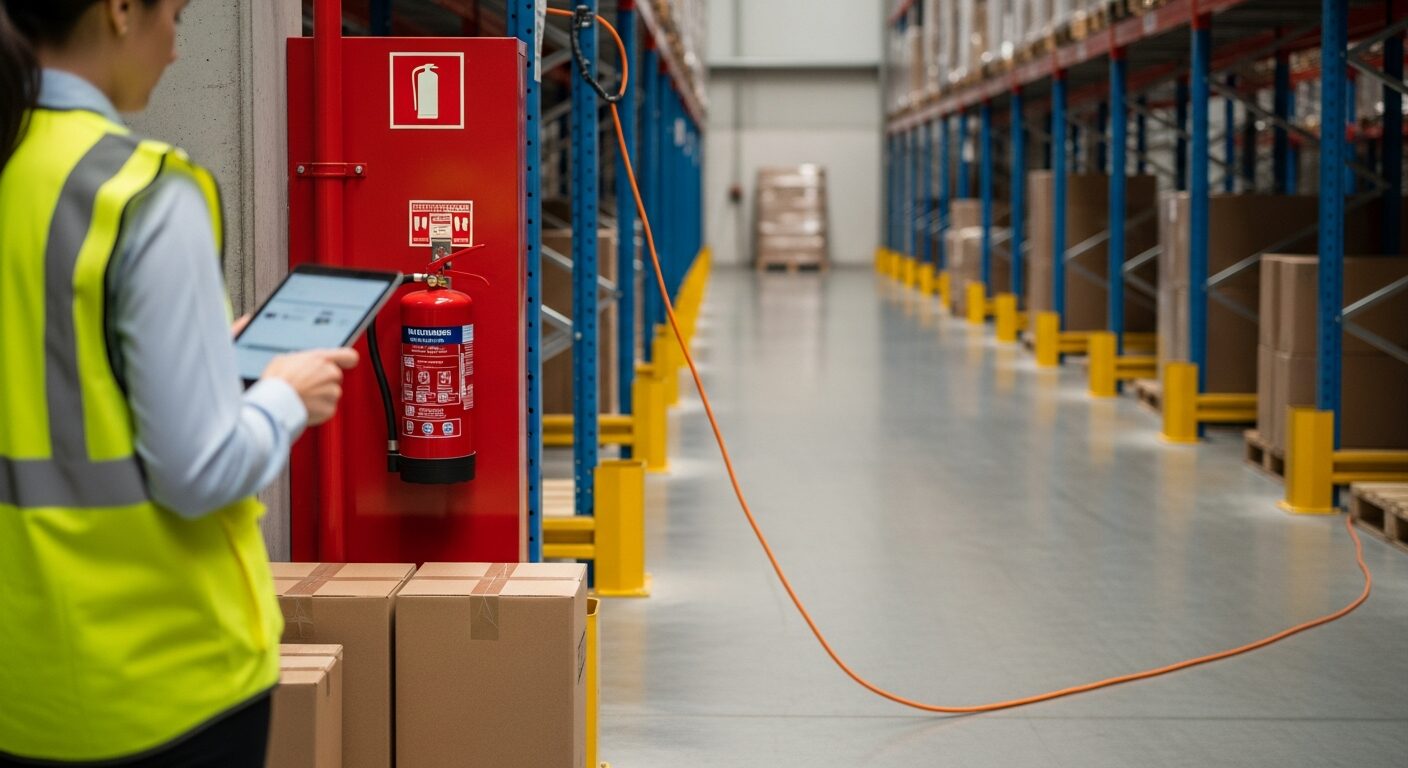
Scan a photo like the one above and this is the report you get — score, findings, OSHA references, and fixes. It is an illustrative example, clearly marked — not live scan data.
Compliance score
62
Lower means more potential hazards found
5 potential hazards found
1Extension cord run across a pedestrian pathway without protection
MediumPossibly related to walking-working surfaces and cord management (29 CFR 1910.22)
Observed condition: A cord across an active pathway is a trip point for every pass and an insulation-abrasion hazard under every wheel — the kind of temporary fix that quietly becomes permanent.
Corrective action: Re-route the cord overhead or along the wall, or protect the crossing with a rated cord cover; trace why power is being pulled across the pathway at all.
High confidence
2Portable fire extinguisher blocked by stored cartons
HighPossibly related to portable fire extinguisher access (29 CFR 1910.157)
Observed condition: An extinguisher that takes thirty seconds to reach is not the extinguisher the emergency plan assumed — the access requirement has to survive everyday operations, not just the audit.
Corrective action: Clear staging from the extinguisher station immediately, mark a keep-clear zone on the floor, and check whether the aisle needs a dedicated staging area to prevent recurrence.
High confidence
Upload a photo like the one above and get a compliance score and hazard count in seconds. No account needed to scan — create a free account to unlock the full report.
Use the real site or facility name. If you save the scan after signup, it becomes the report name.
Three angles, one deeper scan
Only the wide shot is required — every extra angle gives the AI more places to look.
Required: Set the scene — one wide shot lets the AI sweep the whole area at once
Stand at the entry point and capture corner to corner: floors, ladders, scaffolds, and everyone at work
Drop a job-site photo or walkthrough video
Click to upload, drag & drop, or snap a photo on site. Photos scan free in about 15 seconds — no signup, no card. Video walkthroughs (up to 3 min) run on a free account.
Small habits, sharper scans
Set the scene
Start with context
Fill the frame
2–3 ft for close-ups; keep ladders, cords and workers fully in view.
Capture clearly
Make the frame usable
Light it right
Keep the sun or lights behind you — glare and shadows hide hazards.
Tap to focus
Tap the hazard on screen and hold still one second — blur can't be flagged.
Choose the useful view
Give the AI room to understand
Go landscape
Turn your phone sideways — a wider frame catches more of the scene.
Only upload photos you have permission to use, and avoid images showing personal, customer, or confidential information. Demo photos and results are held privately for up to 48 hours so you can save them to a free account; unclaimed photos are deleted automatically. Results are an AI-assisted preliminary review, not an official OSHA determination.
New: Video walkthrough scans
Record up to 3 minutes of your site — the AI extracts frames and flags every hazard with exact timestamps. Free account required.
Get the best results
Wide shot first
Stand at the entrance and photograph the entire work area so AI sees the full context
Hazard areas
Photograph elevated surfaces, equipment, electrical panels, and anywhere workers are active
Close-ups last
Move in close on anything damaged, missing, or that looks risky — the AI catches more detail
How to run an AI-assisted audit that stands up to scrutiny and compounds in value over time. First four points free; a free account unlocks the rest and your own audit reports.
Audit on a cadence, not just when something happens
Weekly per area beats monthly site-wide. AI-assisted auditing makes frequency nearly free — use it to close the gap between formal inspections.
Photograph the hazard with its context
The cord AND the pathway it crosses, the machine AND its guard, the ladder AND its footing — the AI reads relationships, so the frame must contain them.
Verify every finding on the floor before it becomes the record
Generated findings are drafts. A person confirms or dismisses each one at the location — with a reason if dismissed — and that step is what makes the audit record defensible.
Record zero-finding audits too
A dated clean audit of an area is evidence the program looked — exactly what is missing when incidents happen in 'fine' locations.
OSHA Scan reads a single photo. That makes it fast and easy for anyone on site — but it also means it has real limits. Here's an honest look at both.
A scan is a fast first look, not the final word. Before treating this kind of area as safe, a competent person should still confirm:
An AI workplace safety audit uses computer vision to analyze a work-area photo and produce a structured audit report — hazards identified, OSHA standards cited, corrective actions suggested, and a 0-100 compliance score calculated — in seconds. Instead of completing a form during a walkthrough, a supervisor photographs the area and the AI generates the audit report. A person then verifies findings on the floor before they become the record.
A traditional audit is a scheduled event by a qualified person working from a checklist. AI-assisted auditing compresses the cycle: any supervisor can photograph a work area and get a preliminary audit finding in seconds. The safety professional's role shifts from doing every audit to setting the program, verifying findings, and handling the judgment calls. The output format — findings, OSHA references, corrective actions, compliance score — is the same; the time to get there is seconds, not hours.
No. An OSHA compliance inspection is conducted by a government inspector under formal legal procedures. AI-assisted safety audits support your proactive safety program — they generate the hazard identification, corrective-action documentation, and inspection trail that OSHA's recommended practices call for and that GC prequalification and insurers look for. They prepare you for formal inspections; they do not substitute for them.
OSHA Scan works across construction, manufacturing, warehousing, distribution, healthcare, hospitality, food processing, property management, auto repair, HVAC, laboratories, schools, offices, and more. The AI reads the work area from the photo and does not require an industry-specific template.
Accepted audit findings become checklist items on the audit record, each with an owner and completion state. The report stays live until actions close — and a re-scan of the same viewpoint attaches the recovered score as closing evidence. This turns the audit from a snapshot into a working document.
Yes — upload a photo and see the score and hazard count with no account. A free account unlocks the full audit report with OSHA references, corrective actions, 5 free scans, saved history, and PDF export.
Reviewed by OSHA Scan Editorial
Last updated August 29, 2026
This content is produced by the OSHA Scan Editorial team and reviewed with AI assistance. It is general safety information, not legal or compliance advice. OSHA Scan is an independent tool and is not affiliated with, endorsed by, or certified by OSHA or the U.S. Department of Labor.
Free PDF checklist
33 critical checks across 7 categories — the same visible gaps the AI scanner looks for. Sent to your inbox as a free PDF.
More ways to see what an AI OSHA scan can do for your site.
The overview hub — how the scanner works and every job, site, and hazard it covers.
The full software platform — features, industries, and multi-site dashboards.
Photo-first safety management software for the find-fix-prove loop — from single site to enterprise.
Multi-site workplace safety software for teams that can't stop to fill out a form.
How the AI generates a complete audit report from one photo.
The administrative side of compliance — programs, postings, logs, and training.
Falls, scaffold, and PPE audits on active construction sites.
OSHA's official guidance on proactive safety programs — the self-inspection and hazard identification framework that AI-assisted audits are designed to support.
Official resource — osha.govSee a complete labelled example of everything a scan returns.
Start with 5 included AI site scans plus a one-time 10-scan signup bonus — no credit card. Build JHA-ready reports and catch changing conditions sooner.
Start your free trial