
1
Set the scene
Start with context
Fill the frame
2–3 ft for close-ups; keep ladders, cords and workers fully in view.
Construction safety inspection AI reviews a photo of an active construction site and flags the hazards visible in it. Upload a shot of a work platform, an excavation edge, a crew, or a laydown area and OSHA Scan identifies issues like missing PPE, unprotected leading edges, exposed rebar, and struck-by exposures, references the OSHA construction standard each may relate to, scores the site, and suggests a fix for every finding. It gives foremen and crews a fast, consistent way to catch the hazards that cause the most construction injuries — falls, struck-by, and caught-in — before work continues. It is an AI-assisted preliminary review, not a substitute for a competent person's on-site inspection.
Free · No account needed to scan · Results in seconds
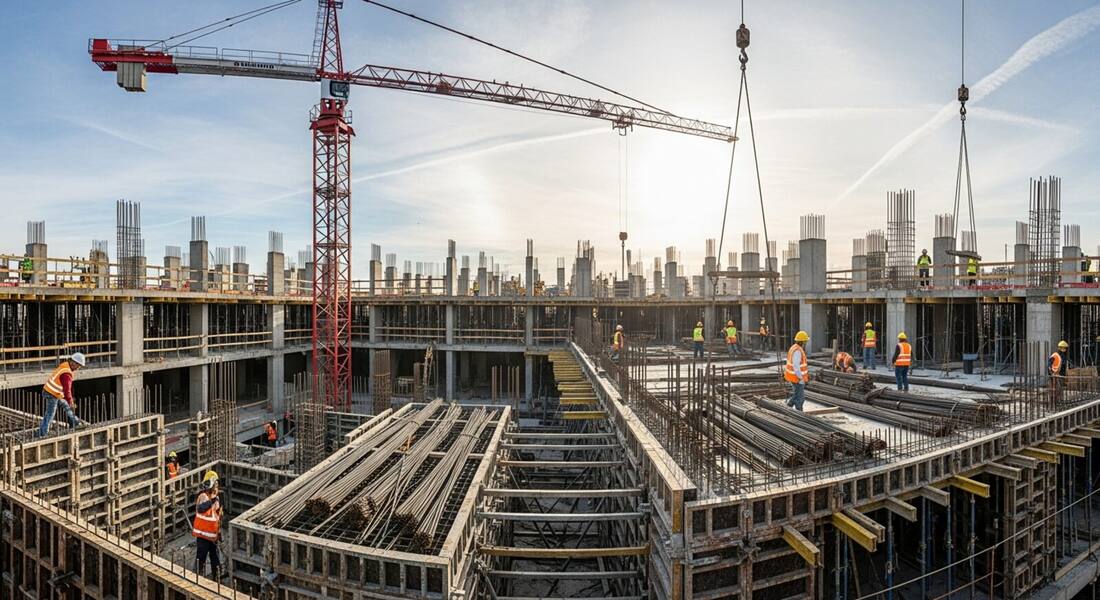
Construction conditions change hour to hour: a guardrail comes down to move material, a hole opens up, a crew rotates in without the right PPE. A scheduled weekly inspection can't keep up with that, and the superintendent can't be everywhere. Construction safety inspection AI lets whoever is closest to the work photograph it and get an instant read on the highest-consequence hazards.
The scanner is oriented around the leading causes of construction harm — OSHA's focus four of falls, struck-by, caught-in/between, and electrocution. A foreman can shoot a platform before the crew climbs on, capture an edge that lost its guardrail, or document a trench spoil pile, and get back a prioritized list with the relevant construction standard as a reference point.
It does not replace the competent person the standard requires. It makes their job easier by catching the obvious exposures early and giving the crew a shared, consistent baseline for what safe looks like.
OSHA's construction safety enforcement is organized around four hazard categories — falls, struck-by, caught-in/between, and electrocution — collectively known as the Focus Four because they account for the majority of construction fatalities each year. Falls alone represent over a third of all construction deaths annually, driven primarily by unprotected edges and openings, inadequate or missing fall protection systems, and unsafe ladder use. The Focus Four are not only the most lethal hazards; they are also the most frequently cited in 29 CFR 1926 inspections, which means an AI construction safety inspection that checks for visible fall, struck-by, electrocution, and caught-in exposures directly addresses the categories with the highest enforcement and liability exposure.
OSHA's construction standards (29 CFR 1926) apply across all construction, alteration, and repair work, including demolition, excavation, and renovation. Unlike general industry's 1910 standards, construction standards frequently specify a 'competent person' — someone who is capable of identifying existing and predictable hazards and who has authority to take prompt corrective action. The competent person requirement appears in over 100 separate provisions in 1926, covering everything from scaffold inspection to excavation classification to fall protection planning. An AI-assisted photo inspection supports the competent person's work by systematically surfacing visible conditions before and during the inspection walk, but it does not and cannot satisfy the competent person determination itself.
Construction sites are nearly always multi-employer environments, and OSHA's multi-employer citation policy determines which employers can be cited for a hazard — not just the employer whose workers are exposed. Under this policy, OSHA can cite a creating employer (the one who created the hazard), an exposing employer (whose workers face the hazard even if another employer created it), a correcting employer (who has responsibility for correcting a hazard), and a controlling employer (the general contractor or owner who has supervisory authority over the site). General contractors are frequently cited as controlling employers for hazardous conditions created by subcontractors because they had the authority to require compliance.
This multi-employer liability structure means that general contractors have a direct financial interest in running safety inspections that cover all subcontractor work areas, not just their own crews. A documented finding-and-correction record for a subcontractor's work area — showing that the GC identified a hazard and required corrective action — is the clearest available defense against a controlling-employer citation. Photo inspections of sub work areas, with the corrective actions logged and closed, create exactly this record.
Focused on the exposures that drive the most serious construction incidents.
Unprotected leading edges, open holes, missing guardrails, and ladder or scaffold use without visible fall protection.
Missing hard hats, eye protection, or hi-vis in zones where the photo shows they are needed.
Uncapped rebar, unsecured materials, and workers positioned near suspended loads or heavy equipment.
Cluttered walkways, trip hazards, and blocked access that raise the risk of a secondary incident.
Scan a photo like the one above and this is the report you get — score, findings, OSHA references, and fixes. It is an illustrative example, clearly marked — not live scan data.
Compliance score
38
Lower means more potential hazards found
6 potential hazards found
1Unprotected leading edge with no guardrail
CriticalPossibly related to fall protection (29 CFR 1926.501)
Observed condition: Falls are the leading cause of construction fatalities; an open edge above six feet is a critical exposure.
Corrective action: Install a compliant guardrail or use a personal fall arrest system before work continues near the edge.
High confidence
2Exposed rebar without protective caps
MediumPossibly related to impalement protection (29 CFR 1926.701)
Observed condition: Uncapped rebar can cause impalement injuries during a slip, trip, or fall onto the bars.
Corrective action: Cap or bend exposed rebar ends and keep the surrounding area clear.
High confidence
3Workers positioned beneath a suspended crane load
HighPossibly related to crane load handling (29 CFR 1926.1425)
Observed condition: A dropped load or rigging failure gives workers in the fall zone no time to react.
Corrective action: Keep all workers clear of the fall zone until the load is landed and released.
Medium confidenceNot fully clear from the photo — verify on site.
Upload a photo like the one above and get a compliance score and hazard count in seconds. No account needed to scan — create a free account to unlock the full report.
Use the real site or facility name. If you save the scan after signup, it becomes the report name.
Three angles, one deeper scan
Only the wide shot is required — every extra angle gives the AI more places to look.
Required: Set the scene — one wide shot lets the AI sweep the whole area at once
Stand at the entry point and capture corner to corner: floors, ladders, scaffolds, and everyone at work
Drop a job-site photo or walkthrough video
Click to upload, drag & drop, or snap a photo on site. Photos scan free in about 15 seconds — no signup, no card. Video walkthroughs (up to 3 min) run on a free account.
Small habits, sharper scans
Set the scene
Start with context
Fill the frame
2–3 ft for close-ups; keep ladders, cords and workers fully in view.
Capture clearly
Make the frame usable
Light it right
Keep the sun or lights behind you — glare and shadows hide hazards.
Tap to focus
Tap the hazard on screen and hold still one second — blur can't be flagged.
Choose the useful view
Give the AI room to understand
Go landscape
Turn your phone sideways — a wider frame catches more of the scene.
Only upload photos you have permission to use, and avoid images showing personal, customer, or confidential information. Demo photos and results are held privately for up to 48 hours so you can save them to a free account; unclaimed photos are deleted automatically. Results are an AI-assisted preliminary review, not an official OSHA determination.
New: Video walkthrough scans
Record up to 3 minutes of your site — the AI extracts frames and flags every hazard with exact timestamps. Free account required.
Get the best results
Wide shot first
Stand at the entrance and photograph the entire work area so AI sees the full context
Hazard areas
Photograph elevated surfaces, equipment, electrical panels, and anywhere workers are active
Close-ups last
Move in close on anything damaged, missing, or that looks risky — the AI catches more detail
The walk-through points that catch most site hazards. The first four are free — create a free account to unlock the full checklist and scan your own site photos.
PPE on every person in the work zone
Hard hats, eye protection, hi-vis, and footwear matched to the tasks underway — including visitors and delivery drivers.
Fall protection at 6 feet and above
Guardrails, covers, or personal fall arrest at every leading edge, floor opening, and elevated platform — with harnesses actually connected.
Ladders and scaffolds set up correctly
Ladder angles, extension above landings, scaffold planking, guardrails, and access — the height-access basics that fail most often.
Excavations protected and accessible
Protective systems in trenches at depth, spoil set back, ladder access in reach, and edges barricaded.
OSHA Scan reads a single photo. That makes it fast and easy for anyone on site — but it also means it has real limits. Here's an honest look at both.
A scan is a fast first look, not the final word. Before treating this kind of area as safe, a competent person should still confirm:
No. OSHA requires a competent person for construction inspections, and OSHA Scan does not replace that role. It is an AI-assisted preliminary review that helps crews catch obvious hazards fast and gives the competent person a head start — the formal inspection and any compliance decision still rest with a qualified person.
Clearly visible exposures tied to OSHA's focus four — unprotected edges and fall hazards, missing PPE, struck-by risks like uncapped rebar or unsecured loads, and housekeeping problems. It is weakest on anything requiring measurement or hidden from the camera.
It can flag visible trenching concerns like spoil piles too close to an edge or a missing ladder, but soil classification, sloping angles, and protective-system adequacy require an on-site competent person. Treat trench findings as prompts to verify, not conclusions.
Reviewed by OSHA Scan Editorial
Last updated August 29, 2026
This content is produced by the OSHA Scan Editorial team and reviewed with AI assistance. It is general safety information, not legal or compliance advice. OSHA Scan is an independent tool and is not affiliated with, endorsed by, or certified by OSHA or the U.S. Department of Labor.
Free PDF checklist
33 critical checks across 7 categories — the same visible gaps the AI scanner looks for. Sent to your inbox as a free PDF.
More ways to see what an AI OSHA scan can do for your site.
The overview hub — how the scanner works and every job, site, and hazard it covers.
Walk the site with a camera and keep a scored record.
The scanner tuned for roofing and work at height.
Pre-lift checks for the heaviest work on the site.
Catch missing hard hats and protective gear from a photo.
Work through the site's hazards task by task, not just spot them.
Grade the site 0-100 from a photo and track the trend.
Build a jobsite SDS library from label scans and post QR access on the trailer.
See a complete labelled example of everything a scan returns.
Start with 5 included AI site scans plus a one-time 10-scan signup bonus — no credit card. Build JHA-ready reports and catch changing conditions sooner.
Start your free trial