
1
Set the scene
Start with context
Fill the frame
2–3 ft for close-ups; keep ladders, cords and workers fully in view.
A hand and power tool inspection checks the tool, the cord, and the person: guards in place and working, cords and plugs undamaged, the right tool for the task, eye and face protection on anyone in the flying-particle zone, and a work area that is not fighting the operator. OSHA Scan adds a fast first pass — photograph the work and the AI flags visible problems like a grinder running without its wheel guard, a cord with exposed conductors on the bench, or an operator with no eye protection in frame, referencing the OSHA standard each issue may relate to. It is an AI-assisted preliminary review of what is visible in the photo, not a formal compliance determination.
Free · No account needed to scan · Results in seconds
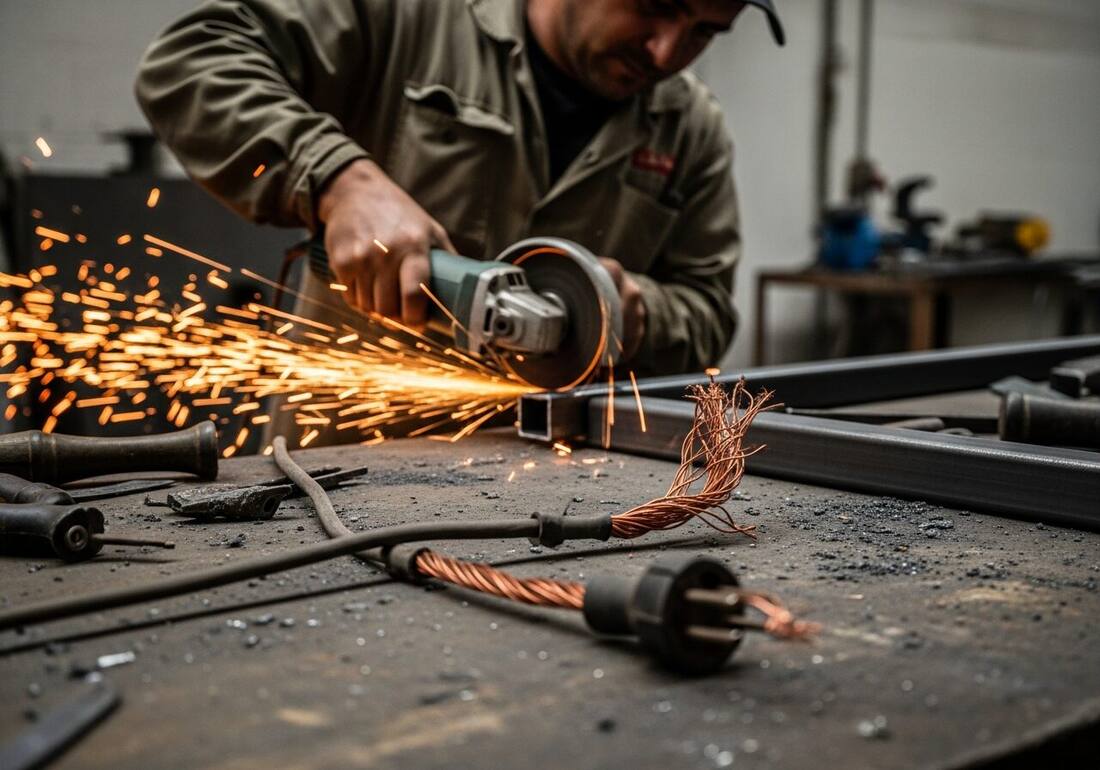
Tool injuries have a long paper trail of visible warnings: the grinder guard that came off for one awkward cut and never went back on, the cord repaired with tape three jobs ago, the chisel with a mushroomed head, the operator who put their glasses on the bench because they fogged. None of it stops the job — until the wheel bursts, the cord shorts, or the chip finds an eye.
A photo scan lowers the bar: snap the bench or the task and get an immediate second opinion on what is visible — missing guards, damaged cords, missing eye protection, clutter in the cut path — plus the checklist items a person still needs to verify by hand, like trigger and brake function, GFCI protection, and wheel ratings. It turns the tool check from a form nobody runs into a ten-second habit.
OSHA's hand and portable powered tools standards (29 CFR 1910.242 for general industry; 29 CFR 1926.300–307 for construction) establish requirements for tool design, guarding, grounding, and safe use. The general industry standard requires that all tools be maintained in safe condition, that guards be kept in place on tools designed to accommodate them, and that air tools, pneumatic equipment, and powder-actuated tools comply with specific design and use requirements. The construction standard adds angle grinder guard requirements, abrasive wheel speed matching requirements, and pneumatic tool safety-clip requirements for securing hose connections.
Hand and power tool incidents account for a significant share of emergency room visits and lost-time injuries in construction and manufacturing — cuts, abrasions, and punctures from cutting and shaping tools; strains and vibration-related disorders from sustained use of impact and rotary tools; and eye injuries from flying chips and sparks. Many of these injuries occur at the point of operation, where the guard was removed for a specific task and not reinstalled, or where an improper tool was used because the correct one wasn't immediately available. OSHA's approach to tool-specific hazards is primarily through machine guarding (1910.212) and the general duty clause for tool use practices — the tool-specific standards focus more on equipment design and maintenance than on work practice controls.
Visible tool-condition and use issues the AI checks in a photo of the work.
Grinders, saws, and other tools operating without their guards, and guards wired back or wedged open in the frame.
Frayed insulation, exposed conductors, taped repairs, and plugs with missing ground pins visible on cords in use.
Operators and helpers in the flying-particle zone without safety glasses, goggles, or face shields for the task.
Mushroomed striking tools, cracked handles, sparks directed at people or material, and clutter crowding the cut path.
Scan a photo like the one above and this is the report you get — score, findings, OSHA references, and fixes. It is an illustrative example, clearly marked — not live scan data.
Compliance score
41
Lower means more potential hazards found
5 potential hazards found
1Power cord with insulation stripped back and copper conductors fully exposed on the workbench
HighPossibly related to wiring and flexible cord condition (29 CFR 1926.404)
Observed condition: Exposed conductors on a metal bench put shock and short-circuit hazards inches from the operator's hands and the sparks of the work.
Corrective action: Take the damaged cord out of service immediately — replace it rather than taping it — and check the circuit's GFCI protection.
High confidence
2Angle grinder in use with no wheel guard visible between the disc and the operator
HighPossibly related to portable abrasive wheel guarding (29 CFR 1926.303)
Observed condition: An unguarded wheel that shatters at full speed sends fragments at the operator's hands and face with nothing in the way.
Corrective action: Stop the cut and refit the manufacturer's wheel guard positioned between the wheel and the operator before resuming.
Medium confidenceNot fully clear from the photo — verify on site.
Upload a photo like the one above and get a compliance score and hazard count in seconds. No account needed to scan — create a free account to unlock the full report.
Use the real site or facility name. If you save the scan after signup, it becomes the report name.
Three angles, one deeper scan
Only the wide shot is required — every extra angle gives the AI more places to look.
Required: Set the scene — one wide shot lets the AI sweep the whole area at once
Stand at the entry point and capture corner to corner: floors, ladders, scaffolds, and everyone at work
Drop a job-site photo or walkthrough video
Click to upload, drag & drop, or snap a photo on site. Photos scan free in about 15 seconds — no signup, no card. Video walkthroughs (up to 3 min) run on a free account.
Small habits, sharper scans
Set the scene
Start with context
Fill the frame
2–3 ft for close-ups; keep ladders, cords and workers fully in view.
Capture clearly
Make the frame usable
Light it right
Keep the sun or lights behind you — glare and shadows hide hazards.
Tap to focus
Tap the hazard on screen and hold still one second — blur can't be flagged.
Choose the useful view
Give the AI room to understand
Go landscape
Turn your phone sideways — a wider frame catches more of the scene.
Only upload photos you have permission to use, and avoid images showing personal, customer, or confidential information. Demo photos and results are held privately for up to 48 hours so you can save them to a free account; unclaimed photos are deleted automatically. Results are an AI-assisted preliminary review, not an official OSHA determination.
New: Video walkthrough scans
Record up to 3 minutes of your site — the AI extracts frames and flags every hazard with exact timestamps. Free account required.
Get the best results
Wide shot first
Stand at the entrance and photograph the entire work area so AI sees the full context
Hazard areas
Photograph elevated surfaces, equipment, electrical panels, and anywhere workers are active
Close-ups last
Move in close on anything damaged, missing, or that looks risky — the AI catches more detail
Run these points before tools come off the truck. The first four are free — create a free account to unlock the full checklist and scan your own tool work.
Free checklist — 12 points
Enter your email to unlock the full checklist
We'll also send you a printable PDF copy — no account required.
One email with the checklist, one follow-up. Unsubscribe anytime.
OSHA Scan reads a single photo. That makes it fast and easy for anyone on site — but it also means it has real limits. Here's an honest look at both.
A scan is a fast first look, not the final word. Before treating this kind of area as safe, a competent person should still confirm:
The core items are: guards in place, cords and plugs undamaged, GFCI protection, the right rated tool and accessory, inspected wheels and blades, eye and face protection, matched hearing and hand protection, working switches, sound striking tools, secured work, a clear cut path, and a tag-out process for damaged tools. A photo scan covers the visible condition items instantly; switch function and GFCI testing still need hands on the tool.
It checks what is visible: missing guards, damaged cords, missing eye protection, mushroomed heads, clutter in the cut path, and sparks directed at people or material. It cannot test a trigger, verify GFCI protection, or read an RPM rating at distance — treat the scan as a fast first pass that catches the obvious condition problems before the tool spins up.
Construction tool requirements live in 29 CFR 1926 Subpart I (1926.300 general, 1926.303 abrasive wheels), with cords and wiring in 1926.404; general industry tools are 29 CFR 1910 Subpart P. OSHA Scan references the standard each visible finding may relate to — the scan itself is a preliminary AI review, not an official determination.
Reviewed by OSHA Scan Editorial
Last updated August 29, 2026
This content is produced by the OSHA Scan Editorial team and reviewed with AI assistance. It is general safety information, not legal or compliance advice. OSHA Scan is an independent tool and is not affiliated with, endorsed by, or certified by OSHA or the U.S. Department of Labor.
More ways to see what an AI OSHA scan can do for your site.
The overview hub — how the scanner works and every job, site, and hazard it covers.
The noise those tools produce — and the bare ears a photo catches.
The eye-injury pattern grinding and cutting work produces.
A deep dive on damaged and misused cords on site.
Guarding for the fixed machines behind the portable tools.
See a complete labelled example of everything a scan returns.
Start with 5 included AI site scans plus a one-time 10-scan signup bonus — no credit card. Build JHA-ready reports and catch changing conditions sooner.
Start your free trial