
1
Set the scene
Start with context
Fill the frame
2–3 ft for close-ups; keep ladders, cords and workers fully in view.
Computer vision safety is the use of AI image analysis to find visible hazards in workplace photos. A vision model looks at a picture the way a trained inspector would — recognizing people, equipment, storage, floor conditions, and PPE — and flags what looks unsafe: a pallet left in a marked walking lane, a trailing power cord, a missing hard hat. Each finding names the OSHA standard it may relate to, a suggested fix, and a confidence level, rolled into a 0-100 score. You can try it free on one of your own photos, with no account. A person always verifies the findings — the model reads the frame, not the workplace.
Free · No account needed to scan · Results in seconds
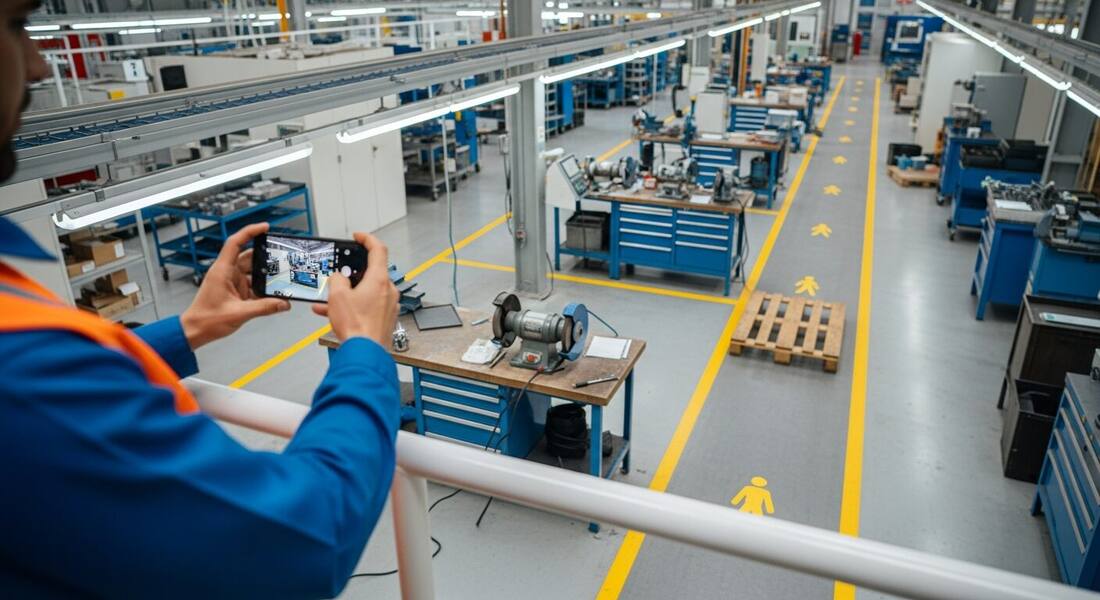
A vision model does not see pixels the way a spreadsheet sees numbers — it recognizes things. Trained on enormous volumes of imagery, it identifies the objects in a frame (a person, a ladder, a pallet, an electrical panel), their condition (leaning, open, damaged, blocked), and their relationships (the pallet is inside the marked lane; the person is under the load; the cord crosses the walkway). Safety analysis is built on that third layer: most hazards are not objects, they are relationships between objects and people.
That is why a photo is such a natural input for safety work. The frame captures those relationships exactly as they existed at one moment — no recall bias, no 'it was probably fine.' The model reads the frame, names each visible hazard, references the OSHA standard family it may relate to, and weights the findings into a single 0-100 score you can compare across areas and weeks.
The honest boundary matters just as much: computer vision reads what is visible from where the camera stood. It cannot hear a bearing failing, smell a solvent, measure air, or know your permit system. Every finding is phrased as 'possibly related to' a standard because the model proposes and a person disposes — the verified finding is the record, not the raw output.
For years, computer vision in safety meant narrow single-purpose detectors — a camera trained only to spot hard hats, or only to count people in a zone. Useful, but brittle: each new hazard type meant training a new model. The shift came with large multimodal models that understand scenes in general, the same class of AI that can describe an arbitrary photograph in plain language. Instead of one detector per hazard, one model reads the whole frame and reasons about it — which is why a single photo scan can surface a blocked exit, a damaged cord, and a missing guard in the same pass without anyone pre-defining those categories for your site.
General scene understanding also changes who can use it. A purpose-built detector needs an integrator, mounted cameras, and a project budget. A general vision model needs a photo — which every phone already takes. That collapses the cost of entry from a capital project to a camera roll, and moves computer vision safety from a plant-floor installation to something a three-person crew can use on a Tuesday.
Mounted-camera systems watch one place continuously — a gate, a press line, a yard — and alert on specific events. They excel at high-frequency, single-location risks, and they carry real costs: hardware, network, privacy policy work with your workforce, and a per-camera field of view that never changes. Photo-based analysis inverts the model: coverage goes wherever people already walk, any viewpoint, any site, with no installation — but only when someone takes a picture.
For most small and mid-size operations the photo is the practical starting point: the highest-risk moments (a new task, a changed condition, a subcontractor's setup) are exactly the moments someone can photograph, and the same analysis works across every site you visit. OSHA Scan is built on the photo model — upload, get findings in seconds, verify, assign the fix. If you later add fixed cameras for one chronic exposure, the photo record you built remains the baseline.
Asking 'how accurate is computer vision safety' has two honest answers. On clearly visible, common conditions — a spill in a lane, an open panel, a person without a hard hat where others wear them — modern vision models flag reliably, and each OSHA Scan finding carries a confidence level so you know which calls were clear and which were borderline. But a photo is one viewpoint at one moment: the model cannot see what is behind the racking, outside the frame, or what changed a minute later. Treat the scan the way you would treat a sharp-eyed new hire's walkthrough notes: a fast, thorough draft that a competent person confirms on the floor. That verification step is not a weakness of the technology — it is how the technology fits into a defensible safety program.
Objects, conditions, and the relationships between them — the same layered read a trained inspector does, in seconds.
People, equipment, ladders, storage, panels — and whether visible workers have the PPE the scene calls for: hard hats, hi-vis, eye protection.
Marked pedestrian lanes, aisles, and exits — and the pallets, carts, cords, and staged material sitting where people are told to walk.
Open covers, missing guards, damaged cords, leaning stacks — the condition cues that separate 'equipment present' from 'equipment unsafe.'
Findings are weighted by risk into a 0-100 score with per-finding confidence, so one number tracks the conditions that matter most.
Scan a photo like the one above and this is the report you get — score, findings, OSHA references, and fixes. It is an illustrative example, clearly marked — not live scan data.
Compliance score
47
Lower means more potential hazards found
5 potential hazards found
1Wooden pallet staged inside the marked pedestrian aisle
MediumPossibly related to walking-working surfaces (29 CFR 1910.22)
Observed condition: The marked lane is where the floor tells people it is safe to walk — an obstruction inside it forces foot traffic out into equipment space or over the obstacle itself.
Corrective action: Move the pallet to designated staging, and check why it was dropped there — a missing staging area near this aisle will put the next pallet in the same spot.
High confidence
2Power cord trailing from the grinder bench across the floor
MediumPossibly related to electrical cord management (29 CFR 1910.305)
Observed condition: A cord run along the floor near a work bench is both a trip point and an abrasion path — floor traffic grinds insulation down until the damage is electrical, not just tidiness.
Corrective action: Re-route the cord overhead or along the bench frame, and inspect the run for existing insulation damage before returning it to service.
Medium confidenceNot fully clear from the photo — verify on site.
Upload a photo like the one above and get a compliance score and hazard count in seconds. No account needed to scan — create a free account to unlock the full report.
Use the real site or facility name. If you save the scan after signup, it becomes the report name.
Three angles, one deeper scan
Only the wide shot is required — every extra angle gives the AI more places to look.
Required: Set the scene — one wide shot lets the AI sweep the whole area at once
Stand at the entry point and capture corner to corner: floors, ladders, scaffolds, and everyone at work
Drop a job-site photo or walkthrough video
Click to upload, drag & drop, or snap a photo on site. Photos scan free in about 15 seconds — no signup, no card. Video walkthroughs (up to 3 min) run on a free account.
Small habits, sharper scans
Set the scene
Start with context
Fill the frame
2–3 ft for close-ups; keep ladders, cords and workers fully in view.
Capture clearly
Make the frame usable
Light it right
Keep the sun or lights behind you — glare and shadows hide hazards.
Tap to focus
Tap the hazard on screen and hold still one second — blur can't be flagged.
Choose the useful view
Give the AI room to understand
Go landscape
Turn your phone sideways — a wider frame catches more of the scene.
Only upload photos you have permission to use, and avoid images showing personal, customer, or confidential information. Demo photos and results are held privately for up to 48 hours so you can save them to a free account; unclaimed photos are deleted automatically. Results are an AI-assisted preliminary review, not an official OSHA determination.
New: Video walkthrough scans
Record up to 3 minutes of your site — the AI extracts frames and flags every hazard with exact timestamps. Free account required.
Get the best results
Wide shot first
Stand at the entrance and photograph the entire work area so AI sees the full context
Hazard areas
Photograph elevated surfaces, equipment, electrical panels, and anywhere workers are active
Close-ups last
Move in close on anything damaged, missing, or that looks risky — the AI catches more detail
How to put vision analysis to work — from the first photo to a verified, documented program habit. The first four points are free; create a free account to unlock the rest and scan your own photos.
Photograph relationships, not just objects
Frame the person AND the load, the cord AND the walkway. Most hazards are spatial relationships, and the model can only read what one frame contains.
Stand where a person would be exposed
Shoot from the walking lane, the operator position, the access point — the viewpoint that matters is the one a worker actually occupies.
Let the model read the whole frame first
Do not pre-filter for the hazard you expect. The value of general vision is the finding you were not looking for — review everything it flags.
Use the confidence level to triage
High-confidence findings are usually visible outright; medium and low confidence mean 'go look' — which is exactly what an inspector's hunch means.
OSHA Scan reads a single photo. That makes it fast and easy for anyone on site — but it also means it has real limits. Here's an honest look at both.
A scan is a fast first look, not the final word. Before treating this kind of area as safe, a competent person should still confirm:
It is the use of AI image analysis to find visible hazards in workplace photos or video. A vision model recognizes the objects in a frame, their condition, and their relationships — a pallet in a walking lane, a person under a suspended load — and flags what looks unsafe. OSHA Scan applies this to photos: upload a picture and get findings with OSHA references, suggested fixes, confidence levels, and a 0-100 score in seconds.
No. Photo-based computer vision works with any picture a phone takes — there is nothing to mount, wire, or install. Fixed AI camera systems exist for continuous monitoring of one location, but they are a capital project; photo analysis moves with whoever is holding the phone.
Strong on clearly visible, common conditions — spills, blocked paths, missing hard hats, open panels — and every OSHA Scan finding carries a confidence level so you know which calls were clear. It only reads what is in the frame, so a person verifies findings on the floor before they become the record. That verification step is built into how the reports work.
No — it accelerates one. The scan produces a draft finding list in seconds, which a competent person verifies, completes with checks a camera cannot make (atmosphere, energy isolation, training), and converts into corrective actions. It is a second set of eyes, not a substitute for the walk.
Same underlying technology, different deployment. Mounted systems watch one fixed view continuously; photo analysis covers any viewpoint on demand with zero installation. For most teams the photo is the practical entry point — it works today, on every site, with the phone already in your pocket.
Yes. Upload a workplace photo and get the compliance score and hazard count with no account. A free account unlocks the full finding-by-finding report with OSHA references and corrective actions, plus 5 free scans, saved history, and PDF export.
Reviewed by OSHA Scan Editorial
Last updated August 29, 2026
This content is produced by the OSHA Scan Editorial team and reviewed with AI assistance. It is general safety information, not legal or compliance advice. OSHA Scan is an independent tool and is not affiliated with, endorsed by, or certified by OSHA or the U.S. Department of Labor.
Free PDF checklist
33 critical checks across 7 categories — the same visible gaps the AI scanner looks for. Sent to your inbox as a free PDF.
More ways to see what an AI OSHA scan can do for your site.
The overview hub — how the scanner works and every job, site, and hazard it covers.
The step-by-step pipeline from upload to finding list.
How fast photo analysis closes the find-to-fix gap.
The full guide to AI-assisted hazard ID and risk assessment.
What the AI extracts from a single workplace picture.
Running vision scans from the phone in your pocket.
OSHA's recommended practices — hazard identification and assessment is a core element vision scans can feed, and verification is part of the same framework.
Official resource — osha.govSee a complete labelled example of everything a scan returns.
Start with 5 included AI site scans plus a one-time 10-scan signup bonus — no credit card. Build JHA-ready reports and catch changing conditions sooner.
Start your free trial