
1
Set the scene
Start with context
Fill the frame
2–3 ft for close-ups; keep ladders, cords and workers fully in view.
Photo hazard detection means analyzing a single photograph to find safety hazards in it automatically. Upload an image of a work area and OSHA Scan's AI vision model reviews everything visible in the frame, flags each hazard it can identify, sorts it into a category, and references the OSHA standard it may relate to. You get back a plain-language list of what was found, a risk level for each item, and an overall compliance score — in seconds, with no measurements to take and no safety background needed. It works on whatever the camera captured; anything hidden or outside the shot is beyond what a photo can show.
Free · No account needed to scan · Results in seconds
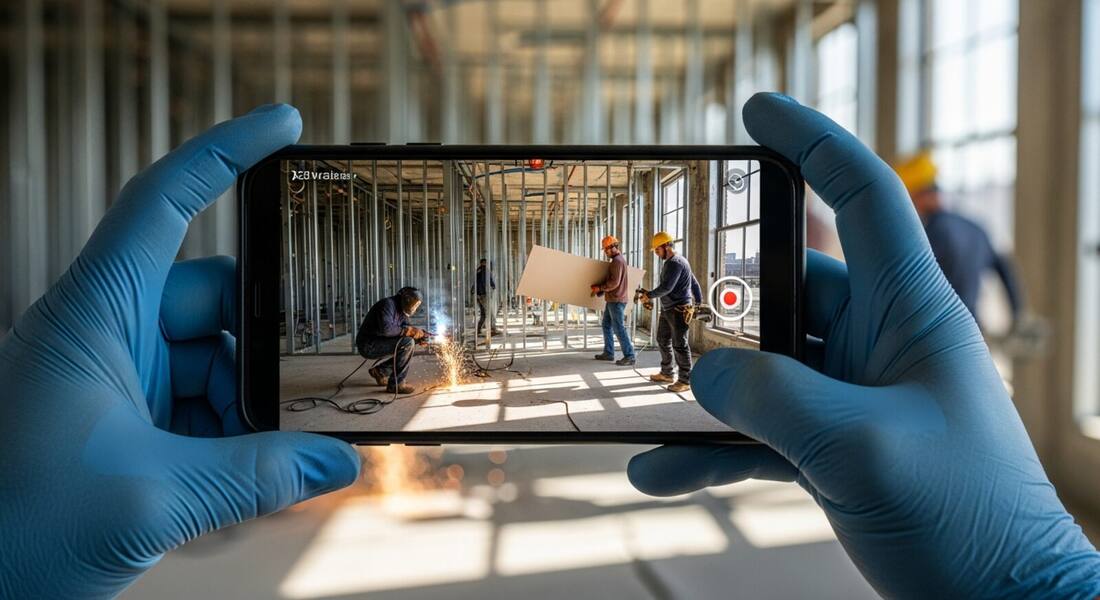
Safety checklists are thorough but slow, and they only happen on a schedule. Photo hazard detection is for the moments in between — the quick check before a crew starts, the second opinion on an area that looks off, the record you want before conditions change. Instead of filling out a form, you take a picture.
Because the analysis is driven by what is visible in the image, the quality of the photo matters. A clear, well-lit shot that captures the whole work area gives the AI the most to work with; a dark or partial frame gives it less. The tool is honest about this: each finding carries a confidence level so you know which results are clearly visible and which deserve a closer look in person.
OSHA's recordkeeping regulations (29 CFR 1904) require employers to log work-related injuries and illnesses, but the underlying expectation in effective safety management goes further: proactive hazard identification and correction should be documented so that the safety effort is visible to inspectors, insurers, and plaintiffs' attorneys. Photo evidence of hazard identification and correction is the most direct form of that documentation — it shows not just that a policy exists, but that it was applied at a specific time and place. The time-stamped photo record is the safety program's activity log.
Insurance carriers, general contractors conducting subcontractor prequalification, and corporate EHS teams increasingly expect photo-based inspection records as a baseline. The growth of safety management platforms built around mobile photo documentation reflects a broader shift: away from periodic paper audits toward continuous, photo-linked hazard tracking. For individual supervisors and crew leads, the practical value is immediate — a photo shared with a work order creates accountability for the correction that a verbal instruction does not. For the organization, a searchable archive of inspection photos is the evidence base for demonstrating due diligence when an incident occurs.
The same vision pipeline behind every scan, broken down.
The model looks across the whole image — people, surfaces, equipment, and surroundings — not just the obvious subject.
Each hazard is sorted into a category such as PPE, fall protection, housekeeping, or electrical, and given a risk level.
Every finding cites the OSHA standard it may relate to — phrased as a possibility, a starting point for follow-up, not a verdict.
A per-finding confidence level flags which results are clearly visible and which are worth confirming with a person on site.
Scan a photo like the one above and this is the report you get — score, findings, OSHA references, and fixes. It is an illustrative example, clearly marked — not live scan data.
Compliance score
44
Lower means more potential hazards found
5 potential hazards found
1Welding sparks near other trades without a screen or fire watch
CriticalPossibly related to welding fire prevention (29 CFR 1926.352)
Observed condition: Hot-work sparks can ignite nearby materials and expose unshielded workers to arc flash and burns.
Corrective action: Set up a welding screen, clear combustibles, and assign a fire watch before hot work continues.
High confidence
2Missing hard hat near overhead work
HighPossibly related to head protection (29 CFR 1926.100)
Observed condition: Falling tools or materials can cause serious head injuries in overhead-work zones.
Corrective action: Require head protection in the area and verify overhead operations are controlled.
High confidence
Upload a photo like the one above and get a compliance score and hazard count in seconds. No account needed to scan — create a free account to unlock the full report.
Use the real site or facility name. If you save the scan after signup, it becomes the report name.
Three angles, one deeper scan
Only the wide shot is required — every extra angle gives the AI more places to look.
Required: Set the scene — one wide shot lets the AI sweep the whole area at once
Stand at the entry point and capture corner to corner: floors, ladders, scaffolds, and everyone at work
Drop a job-site photo or walkthrough video
Click to upload, drag & drop, or snap a photo on site. Photos scan free in about 15 seconds — no signup, no card. Video walkthroughs (up to 3 min) run on a free account.
Small habits, sharper scans
Set the scene
Start with context
Fill the frame
2–3 ft for close-ups; keep ladders, cords and workers fully in view.
Capture clearly
Make the frame usable
Light it right
Keep the sun or lights behind you — glare and shadows hide hazards.
Tap to focus
Tap the hazard on screen and hold still one second — blur can't be flagged.
Choose the useful view
Give the AI room to understand
Go landscape
Turn your phone sideways — a wider frame catches more of the scene.
Only upload photos you have permission to use, and avoid images showing personal, customer, or confidential information. Demo photos and results are held privately for up to 48 hours so you can save them to a free account; unclaimed photos are deleted automatically. Results are an AI-assisted preliminary review, not an official OSHA determination.
New: Video walkthrough scans
Record up to 3 minutes of your site — the AI extracts frames and flags every hazard with exact timestamps. Free account required.
Get the best results
Wide shot first
Stand at the entrance and photograph the entire work area so AI sees the full context
Hazard areas
Photograph elevated surfaces, equipment, electrical panels, and anywhere workers are active
Close-ups last
Move in close on anything damaged, missing, or that looks risky — the AI catches more detail
What to photograph so the AI — and your own review — sees the whole picture. The first four points are free; create a free account to unlock the rest and start scanning.
Start with a wide establishing shot
One frame that captures the whole work area gives context: what work is happening, who is in it, and how the pieces relate.
Capture every person in the area
PPE findings depend on seeing workers clearly — photograph crews at working distance, not as specks at the edge of frame.
Photograph work at height
Ladders, scaffolds, lifts, and roof edges from an angle that shows the setup: footing, angle, guardrails, and connections.
Shoot the ground conditions
Walkways, cords, spills, debris, and excavation edges — the hazards underfoot cause more injuries than the dramatic ones.
OSHA Scan reads a single photo. That makes it fast and easy for anyone on site — but it also means it has real limits. Here's an honest look at both.
A scan is a fast first look, not the final word. Before treating this kind of area as safe, a competent person should still confirm:
It is strong at flagging clearly visible hazards like missing PPE, unprotected edges, and blocked walkways, and each finding carries a confidence level so you can weigh it. It is not a certainty engine: a photo has no depth or scale, so measurements and hidden conditions are beyond it. Treat it as a fast, consistent first look, not a final verdict.
A clear, well-lit shot that captures the whole work area from a useful angle. The more of the scene the AI can see, the more it can flag. Blurry, dark, or partial photos reduce what it can detect.
It generalizes across common job-site hazards rather than matching a fixed list, so it handles a wide range of scenes. Even so, it can only report what is visible in the frame, and unusual or hidden conditions may be missed — which is why a person confirms anything before a site is treated as safe.
Reviewed by OSHA Scan Editorial
Last updated August 29, 2026
This content is produced by the OSHA Scan Editorial team and reviewed with AI assistance. It is general safety information, not legal or compliance advice. OSHA Scan is an independent tool and is not affiliated with, endorsed by, or certified by OSHA or the U.S. Department of Labor.
Free PDF checklist
33 critical checks across 7 categories — the same visible gaps the AI scanner looks for. Sent to your inbox as a free PDF.
More ways to see what an AI OSHA scan can do for your site.
The overview hub — how the scanner works and every job, site, and hazard it covers.
What the AI reads out of one frame, finding by finding.
Hazard results in seconds, while the crew is still on site.
The technology behind the scan — and its honest limits.
Photo detection focused on missing protective equipment.
Cords, panels, and wet-area wiring in the frame.
Detection tuned to floor-level hazards in a photo.
The full self-inspection walkthrough this detection powers.
One scan across every hazard family in a single photo.
Turn one photo into a verified hazard list for your JHA.
See a complete labelled example of everything a scan returns.
Start with 5 included AI site scans plus a one-time 10-scan signup bonus — no credit card. Build JHA-ready reports and catch changing conditions sooner.
Start your free trial