
1
Set the scene
Start with context
Fill the frame
2–3 ft for close-ups; keep ladders, cords and workers fully in view.
Struck-by incidents — being hit by a suspended load, a vehicle, flying debris, or falling material — are one of OSHA's construction Focus Four killers, second only to falls. The controls are mostly about position: nobody under a suspended load (29 CFR 1926.1425 for cranes and derricks), exclusion zones barricaded around lifts and swing radii, spotters and high-visibility clothing where vehicles operate (1926.601–602), and secured materials overhead. OSHA Scan reads a photo of lifting or vehicle operations and flags who's visibly in the line of fire: workers beneath loads, missing barricades, and foot traffic through equipment zones. It is an AI-assisted first pass, not a lift plan review.
Free · No account needed to scan · Results in seconds
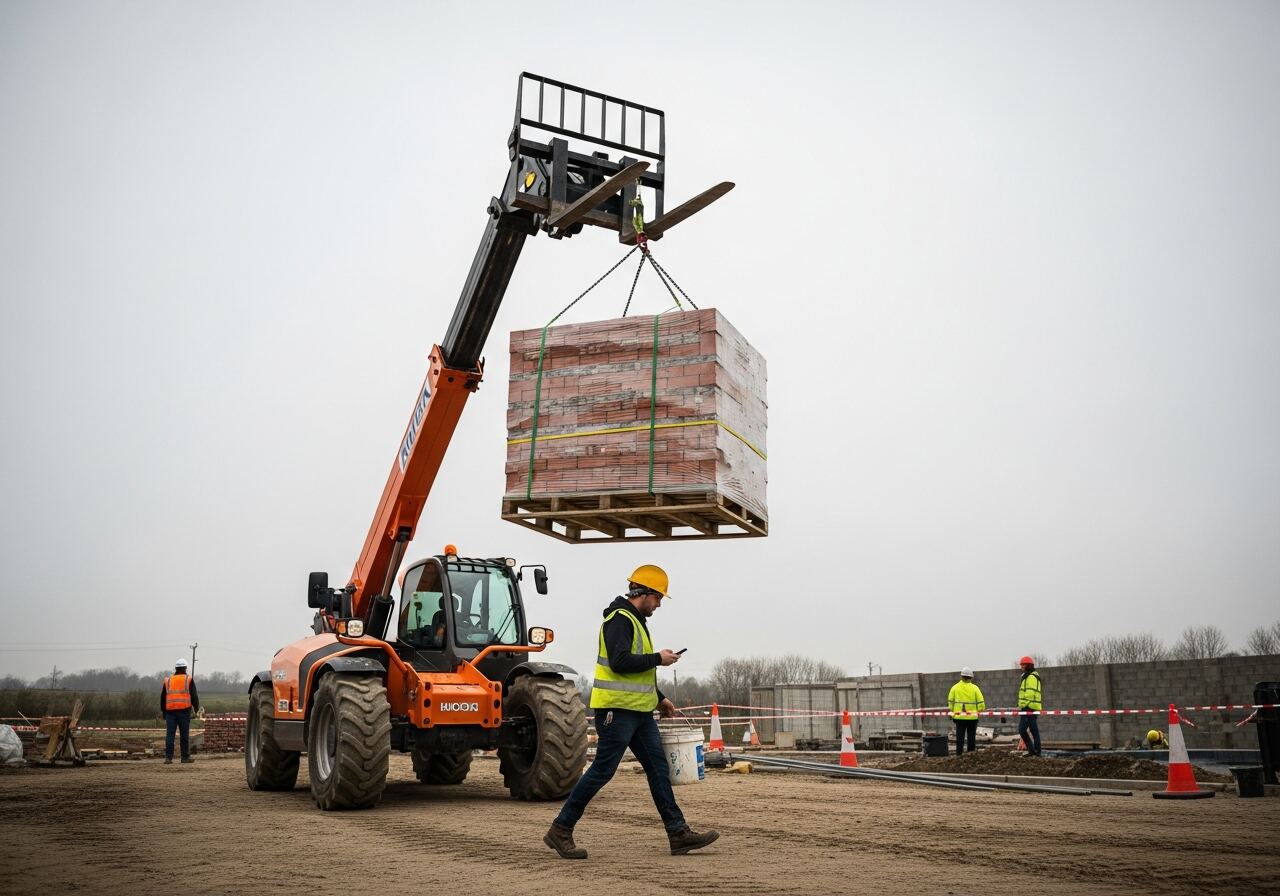
Struck-by is the Focus Four category with the widest reach: it covers the suspended pallet that slips its rigging, the reversing truck whose driver never saw the laborer, the grinder shard, and the unsecured pipe rolling off the scaffold above. What the fatal cases share is position — someone was in a space that should have been empty. That's why the controls read like traffic engineering: exclusion zones under and around lifts, barricaded swing radii, designated walk paths separated from equipment routes, spotters for every reverse, and rigging inspected before anything leaves the ground.
Position is also what a photo captures best. A worker walking under a raised load is an unambiguous frame — so is the missing barricade around a lift area, the laborer in a truck's blind path, and the crowd working directly below an open edge where material is staged. These aren't subtle judgment calls; they're geometry. OSHA cites suspended-load and exclusion-zone failures constantly because they're visible to any inspector who looks up. The checklist below adds what the camera can't verify: lift plans, rigging inspection records, and operator certification.
OSHA's Focus Four initiative identifies struck-by, fall, caught-in/between, and electrocution as the four hazard categories responsible for the majority of construction fatalities. Struck-by is the broadest of the four: it covers being hit by a flying object, a falling object, a swinging or suspended load, and a motor vehicle — four distinct mechanisms with different regulatory bases (1926.501 covers fall protection that also limits exposure below open edges; 1926.1400 covers crane and hoist operations; 1926.601–602 cover motor vehicle and materials-handling equipment). Compliance officers at construction sites routinely check all four simultaneously.
The exclusion zone under a crane or hoist load is one of the most cited struck-by violations — OSHA's crane standard (29 CFR 1926.1425) specifically requires that no employee be allowed under a suspended load. Workers who pass under loads to save walking time create an exposure that is both clearly prohibited and frequently photographed in incident investigations. Site layout planning that physically separates crane swing radius and load paths from pedestrian routes is the primary engineering control, supplemented by tagline procedures and lift plan documentation. General contractors bear responsibility for struck-by exposures created by any employer on the multi-employer site.
What the AI checks in a photo of lifting operations, vehicle zones, or overhead work.
Anyone positioned or walking beneath a raised load on a crane, telehandler, or forklift — the most direct struck-by exposure there is.
Lift areas and swing radii with no barricade tape, cones, or fencing keeping foot traffic out of the fall zone.
Workers walking through equipment travel routes, standing in reversing paths, or working near vehicles without high-visibility clothing.
Tools and materials staged at edges and on elevated surfaces above active work areas with no toe boards, netting, or securing visible.
This illustrative public sample of the real report interface shows visible findings, suggested actions, and score context from an inspection photo.
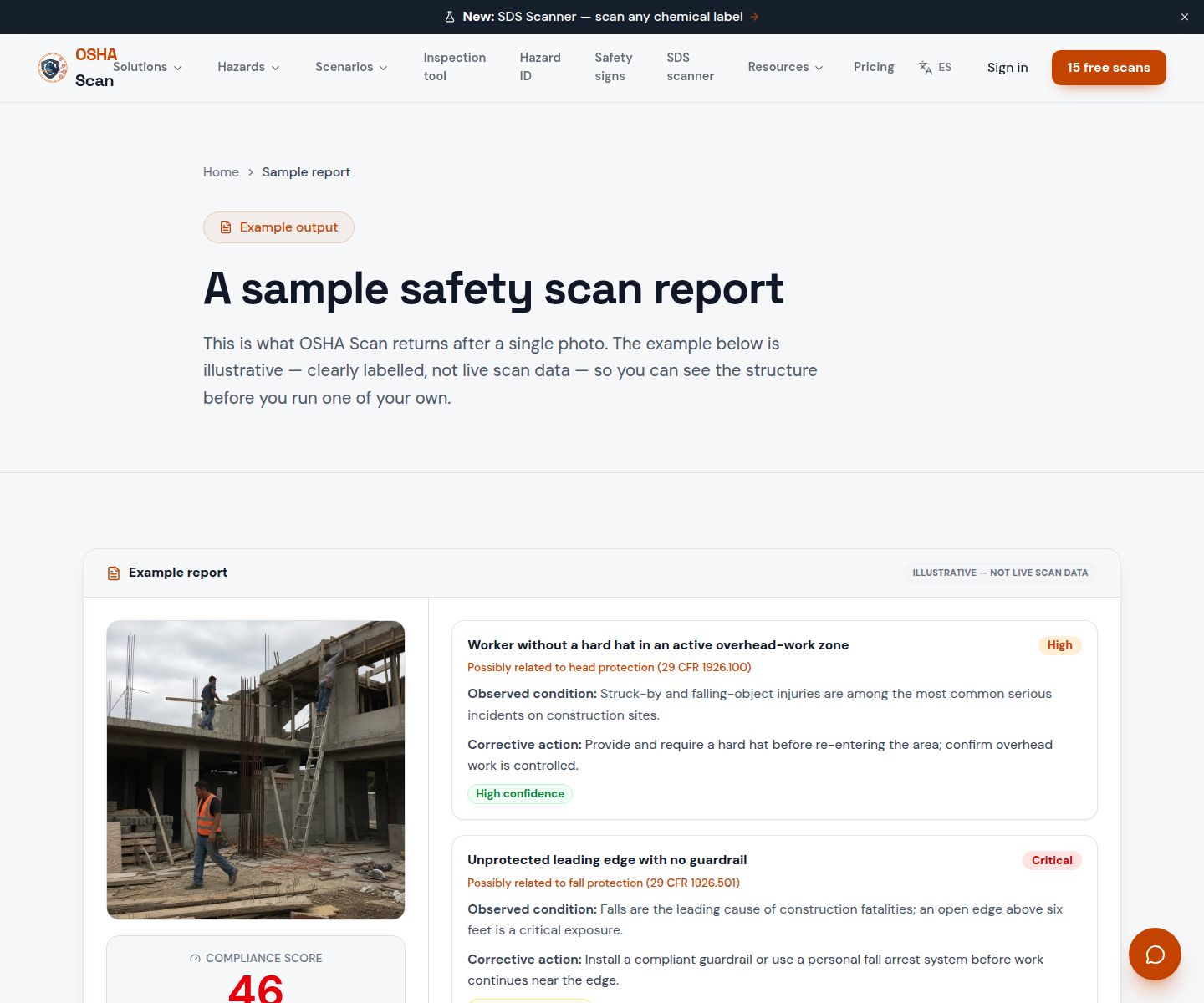
Scan a photo like the one above and this is the report you get — score, findings, OSHA references, and fixes. It is an illustrative example, clearly marked — not live scan data.
Compliance score
40
Lower means more potential hazards found
5 potential hazards found
1Worker walking directly beneath a suspended pallet of bricks raised on telehandler forks — attention on his phone, not the load
HighPossibly related to suspended load rules and material handling equipment operation (29 CFR 1926.1425, 1926.602)
Observed condition: A slipped strap or hydraulic failure drops that load in under a second with zero warning — being under a suspended load is the single exposure behind a large share of struck-by fatalities, and distraction removes the only remaining defense.
Corrective action: Stop the lift until the area below is clear; establish and enforce a rule that no one passes under a raised load, and hold loads low during any travel or waiting.
High confidence
2No barricade, cones, or exclusion zone marking around the active lift area — open foot traffic through the fall zone
HighPossibly related to fall/lift zone access control (29 CFR 1926.1424, 1926.1425(e))
Observed condition: Without a physical boundary, the exclusion zone exists only in the operator's head — every passing worker makes their own judgment about the fall zone, and it only takes one wrong judgment.
Corrective action: Barricade the lift area and swing radius with tape, cones, or fencing before raising loads, and assign a spotter to control access while the lift is active.
High confidence
Upload a photo like the one above and get a compliance score and hazard count in seconds. No account needed to scan — create a free account to unlock the full report.
Use the real site or facility name. If you save the scan after signup, it becomes the report name.
Three angles, one deeper scan
Only the wide shot is required — every extra angle gives the AI more places to look.
Required: Set the scene — one wide shot lets the AI sweep the whole area at once
Stand at the entry point and capture corner to corner: floors, ladders, scaffolds, and everyone at work
Drop a job-site photo or walkthrough video
Click to upload, drag & drop, or snap a photo on site. Photos scan free in about 15 seconds — no signup, no card. Video walkthroughs (up to 3 min) run on a free account.
Small habits, sharper scans
Set the scene
Start with context
Fill the frame
2–3 ft for close-ups; keep ladders, cords and workers fully in view.
Capture clearly
Make the frame usable
Light it right
Keep the sun or lights behind you — glare and shadows hide hazards.
Tap to focus
Tap the hazard on screen and hold still one second — blur can't be flagged.
Choose the useful view
Give the AI room to understand
Go landscape
Turn your phone sideways — a wider frame catches more of the scene.
Only upload photos you have permission to use, and avoid images showing personal, customer, or confidential information. Demo photos and results are held privately for up to 48 hours so you can save them to a free account; unclaimed photos are deleted automatically. Results are an AI-assisted preliminary review, not an official OSHA determination.
New: Video walkthrough scans
Record up to 3 minutes of your site — the AI extracts frames and flags every hazard with exact timestamps. Free account required.
Get the best results
Wide shot first
Stand at the entrance and photograph the entire work area so AI sees the full context
Hazard areas
Photograph elevated surfaces, equipment, electrical panels, and anywhere workers are active
Close-ups last
Move in close on anything damaged, missing, or that looks risky — the AI catches more detail
From the fall zone under every lift to vehicle routes and overhead staging. The first four are free — create a free account to unlock the rest and scan your own lift zones.
Free checklist — 12 points
Enter your email to unlock the full checklist
We'll also send you a printable PDF copy — no account required.
One email with the checklist, one follow-up. Unsubscribe anytime.
Jump to this page's downloadable checklist for lift zones, vehicle paths, and exclusion areas.
View the struck-by checklistOSHA Scan reads a single photo. That makes it fast and easy for anyone on site — but it also means it has real limits. Here's an honest look at both.
A scan is a fast first look, not the final word. Before treating this kind of area as safe, a competent person should still confirm:
OSHA groups struck-by into four types: flying objects (tool ejecta, grinder shards), falling objects (dropped tools, slipped loads, material off edges), swinging objects (crane loads, equipment booms), and rolling objects (vehicles, equipment, pipe). It's one of construction's Focus Four fatal hazards, and vehicle- and load-related events dominate the fatality data. The unifying control is position — keeping people out of the path — backed by securing loads, guarding machines, and making workers visible.
For crane and derrick operations, 29 CFR 1926.1425 prohibits hoisting loads over employees with narrow exceptions (like hooking and unhooking, with specific protections). As a site practice, the answer every competent lift director gives is no: work is sequenced and routes are arranged so nobody is ever beneath a raised load, whatever the machine holding it. Forklift and telehandler loads get the same treatment even though the citation may come under different sections — the physics doesn't read the standard.
It can flag the positional failures: someone under a raised load, a lift area with no barricade, workers in a reversing path, and material staged loose at an edge above people. It cannot verify rigging capacity, operator certification, or whether a lift plan exists — those live in documents and inspections. Use the scan during active lifts and deliveries, when exposure peaks and attention is scarcest.
Reviewed by OSHA Scan Editorial
Last updated August 29, 2026
This content is produced by the OSHA Scan Editorial team and reviewed with AI assistance. It is general safety information, not legal or compliance advice. OSHA Scan is an independent tool and is not affiliated with, endorsed by, or certified by OSHA or the U.S. Department of Labor.
More ways to see what an AI OSHA scan can do for your site.
The overview hub — how the scanner works and every job, site, and hazard it covers.
Use the free Excel structure to organize findings, severity, site, and corrective-action status.
The lift-specific scan — rigging, swing radius, and load path in detail.
A walkthrough of how an uncontrolled load finds the one person not watching.
The vehicle side of struck-by — travel paths, visibility, and load handling.
See a complete labelled example of everything a scan returns.
Start with 5 included AI site scans plus a one-time 10-scan signup bonus — no credit card. Build JHA-ready reports and catch changing conditions sooner.
Start your free trial