
SDS management for construction — a jobsite binder that lives on every phone
SDS management for a construction company means keeping a current safety data sheet for every adhesive, sealant, epoxy, fuel, and concrete chemical on the job — and making those sheets readable by any crew member on any site, not locked in a trailer binder that never leaves the office. The problem is that products change every project and every site has a different mix, so a paper binder is out of date the day it's printed. OSHA Scan handles the moving parts: a foreman photographs each product label as it arrives, the app reads the name, manufacturer, signal word, and GHS pictograms into a searchable library, you attach the manufacturer's SDS PDF, and a printed QR poster on the trailer or conex lets any worker pull that site's chemicals with no login.
Free · No account needed to scan · Results in seconds
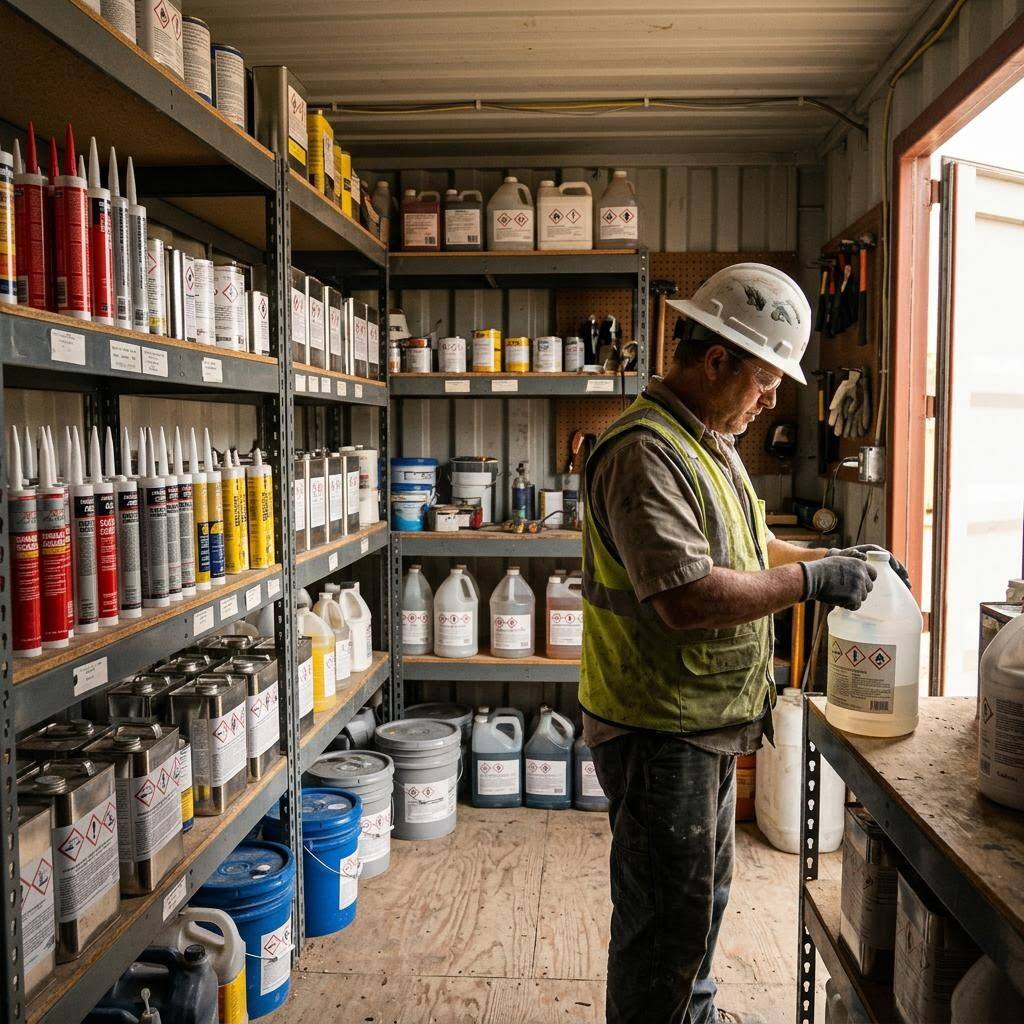
The chemical list changes every project, so the binder never catches up
No two construction jobs carry the same chemicals. A concrete pour brings form-release agents, curing compounds, and admixtures; the framing crew shows up with construction adhesive and spray foam; finishers bring epoxies, sealants, thinners, and caulk; and there is always diesel, gas for the generator, and a propane bottle somewhere. Products rotate in and out project to project, and each supplier substitution — a different brand of the same product — technically needs its own current SDS. A three-ring binder printed at mobilization is behind reality within a week, and it lives in one trailer while crews spread across a site or across town.
That is exactly the gap a phone-based library closes. As material arrives, the foreman scans the label with OSHA Scan and the product lands in a searchable list with its signal word, pictograms, and hazard and precautionary statements pulled from the label; you attach the manufacturer's SDS PDF once and it travels with the entry. The honest killer feature for construction is the per-location QR poster: print one, zip-tie it to the conex or trailer door, and any worker — or an inspector — scans it to see that site's chemicals and open the SDS PDFs without an account. The checklist below covers the parts of a construction HazCom program a camera cannot build for you.
Construction HazCom and 1926.59: multi-employer sites and the SDS-access gap inspectors look for
Construction's Hazard Communication requirement lives at 29 CFR 1926.59, which simply adopts the general-industry standard at 1910.1200. In practice that means the same obligations — written program, chemical inventory, GHS-compliant labels, accessible safety data sheets, and training before first exposure — apply on an active jobsite, where conditions make them harder to meet than in a fixed facility. Products arrive and leave with each phase, crews turn over, and the 'workplace' is spread across floors, buildings, or multiple addresses. Common HazCom findings in construction mirror general industry: unlabeled secondary containers, missing or outdated SDSs, a written program that doesn't reflect the site, and SDSs that workers cannot actually reach during the shift.
The multi-employer dimension is what makes construction distinct. A general contractor's site routinely hosts subs and trades — electrical, painting, flooring, cleaning — each bringing its own chemicals into shared space. Under OSHA's multi-employer citation policy, the controlling employer has responsibility for hazards created by others on the site, and HazCom expects employers to share SDS access and precautions for chemicals that workers of one employer could be exposed to from another. That is why 'the SDS is in the sub's truck' fails when a laborer working nearby needs it. A per-location QR poster listing the chemicals staged at that point, with the SDS PDFs one scan away, is a concrete way to make the shared access the standard contemplates actually work in the field.
What one label scan captures for the jobsite library
What OSHA Scan reads off a construction chemical label to build the searchable SDS library.
Product name & manufacturer
The AI reads the exact product identifier and maker off the container so an adhesive or sealant lands in the library correctly — not filed under a generic 'glue' guess.
Signal word & GHS pictograms
Danger or Warning plus the hazard pictograms on the label — flammable diesel and thinners, corrosives, and irritant epoxies flagged as they enter the site.
Hazard & precautionary statements
The label's hazard and precautionary text is captured so a crew member gets the short version on their phone before opening the full sheet.
SDS PDF attachment & QR reach
You attach the manufacturer's SDS PDF to each entry; a printed QR poster on the trailer or conex lets any worker open that site's chemicals with no login.
Demo: the library entry a scanned label comes back with
An illustrative example for this trade — product identity, signal word, GHS pictograms, and hazard statements, filed and searchable.
Petroleum-based concrete form-release agent
Example manufacturer
Form-release agent gets sprayed on formwork all over the pour deck, so the crew needs the flammability and aspiration hazards on their phone, not in a trailer file cabinet.
- H226 — Flammable liquid and vapour
- H304 — May be fatal if swallowed and enters airways
Now scan your own label — free
Photograph any chemical product on your shelf. The AI transcribes the label in seconds — no account needed to try it.
- A searchable chemical library built from label photos — no typing SKUs
- The manufacturer's SDS PDF attached to each product and openable from any phone
- A printable QR poster for the trailer or conex so crews reach SDSs with no login
Free · No account needed to scan · Results in seconds
The 12-point construction SDS management checklist
How to keep a jobsite SDS program current across projects and crews. The first four are free — create a free account or leave your email to unlock the rest and scan your own site's chemicals.
Free checklist — 12 points
Enter your email to unlock the full checklist
We'll also send you a printable PDF copy — no account required.
One email with the checklist, one follow-up. Unsubscribe anytime.
What the AI can and can't detect
OSHA Scan reads a single photo. That makes it fast and easy for anyone on site — but it also means it has real limits. Here's an honest look at both.
What it can catch from a photo
- Product name and manufacturer printed on a construction chemical label
- Signal word and GHS pictograms on the container
- Label hazard and precautionary statements as text for the library
- Whether a container's label is too weathered or damaged to read
What a photo can't tell it
- Whether the library is complete for every product on the site
- The exact chemical inside an unlabeled pail or decanted container
- Whether crews were trained before first exposure to a product
- Storage separation adequacy that depends on each SDS's fine print
Always confirmed by a person on site
A scan is a fast first look, not the final word. Before treating this kind of area as safe, a competent person should still confirm:
- Every product staged on site has a matching, current library entry and SDS PDF
- The QR poster reaches the actual chemicals at each trailer, conex, or storage point
- Training records cover the current crew, including recent hires and second shift
- The written HazCom program names a live owner for labels, SDSs, and training
People also ask
Does OSHA's HazCom standard apply to construction sites?
Yes. Construction is covered by 29 CFR 1926.59, which adopts the general-industry Hazard Communication Standard (1910.1200) and its GHS framework. That means a written program, a chemical inventory, GHS labels on containers, safety data sheets accessible to workers during the shift, and training — the same chain that applies in a plant applies on your job, with added attention to multi-employer sites where several contractors' chemicals share one space.
How do I keep an SDS library current when products change every project?
Make the library a byproduct of receiving material instead of a separate paperwork task. With OSHA Scan, the foreman scans each product's label as it arrives and it lands in a searchable list with the signal word, pictograms, and hazards read off the label; you attach the manufacturer's SDS PDF. When a job wraps, drop the products that left the site. There's no automatic manufacturer-database fetch — you attach the real sheet — but the label scan removes the typing that makes binders fall behind.
Can a QR poster satisfy the 'readily accessible' SDS requirement on a jobsite?
It directly addresses it. OSHA requires SDSs to be readily accessible to employees during their work shift — and a binder locked in a trailer three floors below the work is a common gap. A printed QR poster on the trailer or conex lets any worker scan it and open that location's SDS PDFs on their phone with no login. Keep it reachable at the point of use, and have a backup plan for a dead phone or no signal, which the standard expects for electronic access.
Does OSHA Scan handle the written program and training too?
No, and we won't pretend it does. OSHA Scan builds the inventory from label scans, stores the SDS PDFs, gives workers QR access, and prints chemical safety signs — the moving, visible parts. The written HazCom program and worker training are program duties that stay with your safety lead. The checklist above teaches those requirements so you can keep them current alongside the library.
Reviewed by OSHA Scan Editorial
Last updated August 29, 2026
This content is produced by the OSHA Scan Editorial team and reviewed with AI assistance. It is general safety information, not legal or compliance advice. OSHA Scan is an independent tool and is not affiliated with, endorsed by, or certified by OSHA or the U.S. Department of Labor.
Keep exploring
More ways to see what an AI OSHA scan can do for your site.
The AI OSHA inspection tool
The overview hub — how the scanner works and every job, site, and hazard it covers.
SDS scanner
Scan any chemical label to build the library and attach its SDS.
Construction safety inspection AI
Scan a jobsite photo for falls, struck-by, and PPE hazards too.
Contractor chemical management
Keep every sub's and trade's chemicals visible on one site.
Secondary container labeling
Generate workplace labels for pails and spray bottles in the field.
OSHA 1910.1200 — Hazard Communication
The federal HazCom standard construction adopts through 29 CFR 1926.59.
Official resource — osha.govA full sample report
See a complete labelled example of everything a scan returns.
Ready to secure your job sites?
Start with 5 included AI site scans plus a one-time 10-scan signup bonus — no credit card. Build JHA-ready reports and catch changing conditions sooner.
Start your free trial