
1
Set the scene
Start with context
Fill the frame
2–3 ft for close-ups; keep ladders, cords and workers fully in view.
OSHA compliance has two halves. The administrative half lives on paper: the OSHA poster on the wall, written programs like hazard communication and lockout/tagout, injury logs, training records, and a certified PPE hazard assessment. The physical half lives on the floor: guarded edges, labeled chemicals, clear exits, intact cords. This page covers both — a checklist for the paperwork inspectors ask for first, plus a free AI photo scan that flags the visible violations in seconds. The scan is an AI-assisted preliminary review of what a photo shows, not a legal compliance determination.
Free · No account needed to scan · Results in seconds
When OSHA shows up, the opening questions are administrative: where is your written hazard communication program, show me your 300 log, who certified the PPE hazard assessment, where are the training records for the person on that lift. Sites that handle physical hazards well still get cited because the paper trail behind those controls was never written down, never updated, or belongs to someone who left the company two years ago.
The practical fix is to split compliance into the two halves and check them differently. The administrative half is this checklist — a standing document review you repeat on a schedule. The physical half changes daily, which is where a photo scan earns its place: snap the work area and get an instant AI read on visible issues like missing PPE, blocked paths, and unguarded edges, then spend your walkthrough time on the items a camera cannot see.
OSHA evaluates employer compliance programs on two levels: substantive compliance (are the physical hazards actually controlled?) and administrative compliance (is there a written program, are records kept, are employees trained and is that training documented?). Many employers handle the physical side reasonably well but have administrative gaps — no written lockout program, no documented hazard assessment for PPE selection, no training records — that turn a good-faith effort into a citation. The administrative requirements in OSHA standards are not bureaucracy; they are the evidence that the safety effort exists and is maintained over time, not just patched after incidents.
Effective OSHA compliance programs also address multi-employer worksite liability. On construction sites and in facilities with contractors, the host employer and controlling employer have duties beyond their own direct employees: OSHA's multi-employer citation policy allows citations against employers who expose, create, correct, or control hazardous conditions, regardless of who employs the workers. A staffing agency, a host employer, and a subcontractor can each receive citations for the same hazard. Documenting that the host employer communicated safety expectations, conducted joint site orientations, and verified corrective action is the administrative record that supports the good-faith defense in a multi-employer inspection.
The AI covers the visible half of compliance — the conditions on the floor a photo can show.
Workers in frame missing hard hats, eye protection, or high-visibility apparel where the surrounding work calls for it.
Extension cords run through walkways, damaged leads, and material staged where people walk — the everyday citations that add up.
Unguarded edges and openings, absent machine guards, unlabeled containers, and blocked exits or extinguishers visible in frame.
Each visible finding cites the OSHA standard it may relate to, so the fix list doubles as documentation of your self-inspection effort.
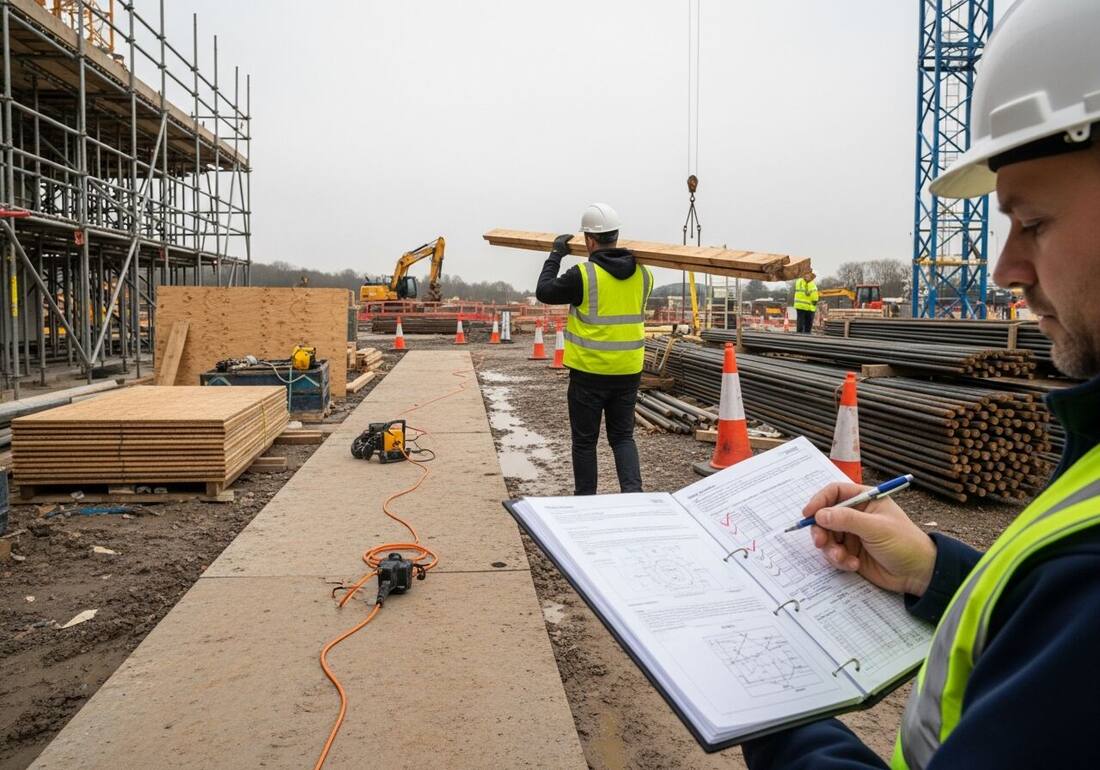
Scan a photo like the one above and this is the report you get — score, findings, OSHA references, and fixes. It is an illustrative example, clearly marked — not live scan data.
Compliance score
71
Lower means more potential hazards found
5 potential hazards found
1Extension cord and powered tool left across the pedestrian walkway
MediumPossibly related to housekeeping and passageways (29 CFR 1926.25)
Observed condition: Cords across a walking path are one of the most common — and most photographed — trip hazards on any site, and damaged cords add a shock risk on top.
Corrective action: Re-route the cord overhead or along the edge, use a cord cover where it must cross, and stage tools out of the walking path.
High confidence
2Upper scaffold platforms with no clearly visible guardrails
HighPossibly related to scaffold fall protection (29 CFR 1926.451(g))
Observed condition: Work platforms over 10 feet need guardrails or personal fall arrest; a platform that looks bare from the ground is worth stopping work to verify.
Corrective action: Verify guardrails, midrails, and toe boards on every working level before the scaffold is used — and tag it out until they are confirmed.
Medium confidenceNot fully clear from the photo — verify on site.
Upload a photo like the one above and get a compliance score and hazard count in seconds. No account needed to scan — create a free account to unlock the full report.
Use the real site or facility name. If you save the scan after signup, it becomes the report name.
Three angles, one deeper scan
Only the wide shot is required — every extra angle gives the AI more places to look.
Required: Set the scene — one wide shot lets the AI sweep the whole area at once
Stand at the entry point and capture corner to corner: floors, ladders, scaffolds, and everyone at work
Drop a job-site photo or walkthrough video
Click to upload, drag & drop, or snap a photo on site. Photos scan free in about 15 seconds — no signup, no card. Video walkthroughs (up to 3 min) run on a free account.
Small habits, sharper scans
Set the scene
Start with context
Fill the frame
2–3 ft for close-ups; keep ladders, cords and workers fully in view.
Capture clearly
Make the frame usable
Light it right
Keep the sun or lights behind you — glare and shadows hide hazards.
Tap to focus
Tap the hazard on screen and hold still one second — blur can't be flagged.
Choose the useful view
Give the AI room to understand
Go landscape
Turn your phone sideways — a wider frame catches more of the scene.
Only upload photos you have permission to use, and avoid images showing personal, customer, or confidential information. Demo photos and results are held privately for up to 48 hours so you can save them to a free account; unclaimed photos are deleted automatically. Results are an AI-assisted preliminary review, not an official OSHA determination.
New: Video walkthrough scans
Record up to 3 minutes of your site — the AI extracts frames and flags every hazard with exact timestamps. Free account required.
Get the best results
Wide shot first
Stand at the entrance and photograph the entire work area so AI sees the full context
Hazard areas
Photograph elevated surfaces, equipment, electrical panels, and anywhere workers are active
Close-ups last
Move in close on anything damaged, missing, or that looks risky — the AI catches more detail
The administrative requirements inspectors ask about first. The first four are free — create a free account to unlock the full checklist and scan your own site photos.
Free checklist — 12 points
Enter your email to unlock the full checklist
We'll also send you a printable PDF copy — no account required.
One email with the checklist, one follow-up. Unsubscribe anytime.
OSHA Scan reads a single photo. That makes it fast and easy for anyone on site — but it also means it has real limits. Here's an honest look at both.
A scan is a fast first look, not the final word. Before treating this kind of area as safe, a competent person should still confirm:
It depends on your industry and hazards, but nearly every employer must display the OSHA poster, record injuries (unless exempt by size or industry), report serious incidents on deadline, provide required PPE at no cost, train workers on their hazards, and keep written programs for things like hazard communication and lockout/tagout where those hazards exist. The checklist on this page covers the administrative core; the physical conditions on the floor are what a photo scan checks instantly.
OSHA publishes standards and self-inspection guidance rather than one universal checklist, because requirements vary by industry and hazard. This page distills the administrative items that apply to most employers. For the physical walkthrough side, see our OSHA inspection checklist — the two halves together are what an inspector actually evaluates.
No single tool can. The scan covers one half well: it reads a photo and flags visible hazards with the OSHA standard each may relate to, in seconds, which makes frequent documented self-inspections realistic. The written programs, records, and training on this checklist still have to be built and maintained by people. Treat the scan as an AI-assisted second set of eyes, not a compliance determination.
Reviewed by OSHA Scan Editorial
Last updated August 29, 2026
This content is produced by the OSHA Scan Editorial team and reviewed with AI assistance. It is general safety information, not legal or compliance advice. OSHA Scan is an independent tool and is not affiliated with, endorsed by, or certified by OSHA or the U.S. Department of Labor.
More ways to see what an AI OSHA scan can do for your site.
The overview hub — how the scanner works and every job, site, and hazard it covers.
The physical walkthrough counterpart to this page — what to check on the floor, area by area.
What non-compliance costs in 2026, and the most-cited standards behind the fines.
How the photo scanner works and every trade checklist it supports.
The water-shade-rest basics OSHA enforces under the General Duty Clause.
The floor half of compliance, scored from a photo in seconds.
Keep a dated record of the hazards you find and the fixes you make.
See a complete labelled example of everything a scan returns.
Start with 5 included AI site scans plus a one-time 10-scan signup bonus — no credit card. Build JHA-ready reports and catch changing conditions sooner.
Start your free trial