
1
Set the scene
Start with context
Fill the frame
2–3 ft for close-ups; keep ladders, cords and workers fully in view.
A construction site hazard assessment is the whole-site walkthrough that identifies the hazards workers face across the jobsite — not a single task, but the whole picture: unprotected edges and openings, the paths equipment and loads travel, excavations and stacked material, and temporary power. The backbone is OSHA's Focus Four — falls, struck-by, caught-in/between, and electrocution — because those hazard groups cause the largest share of construction deaths. With OSHA Scan you photograph areas as you walk the site and the AI flags visible hazards in each frame, names the OSHA standard each may relate to, and suggests a fix — a second set of eyes for the walk, not a replacement for it. The demo scan is free with no account. A site assessment is broader than a task-level JHA/JSA: use this to map the site, then a JHA to break down each high-risk task.
Free · No account needed to scan · Results in seconds
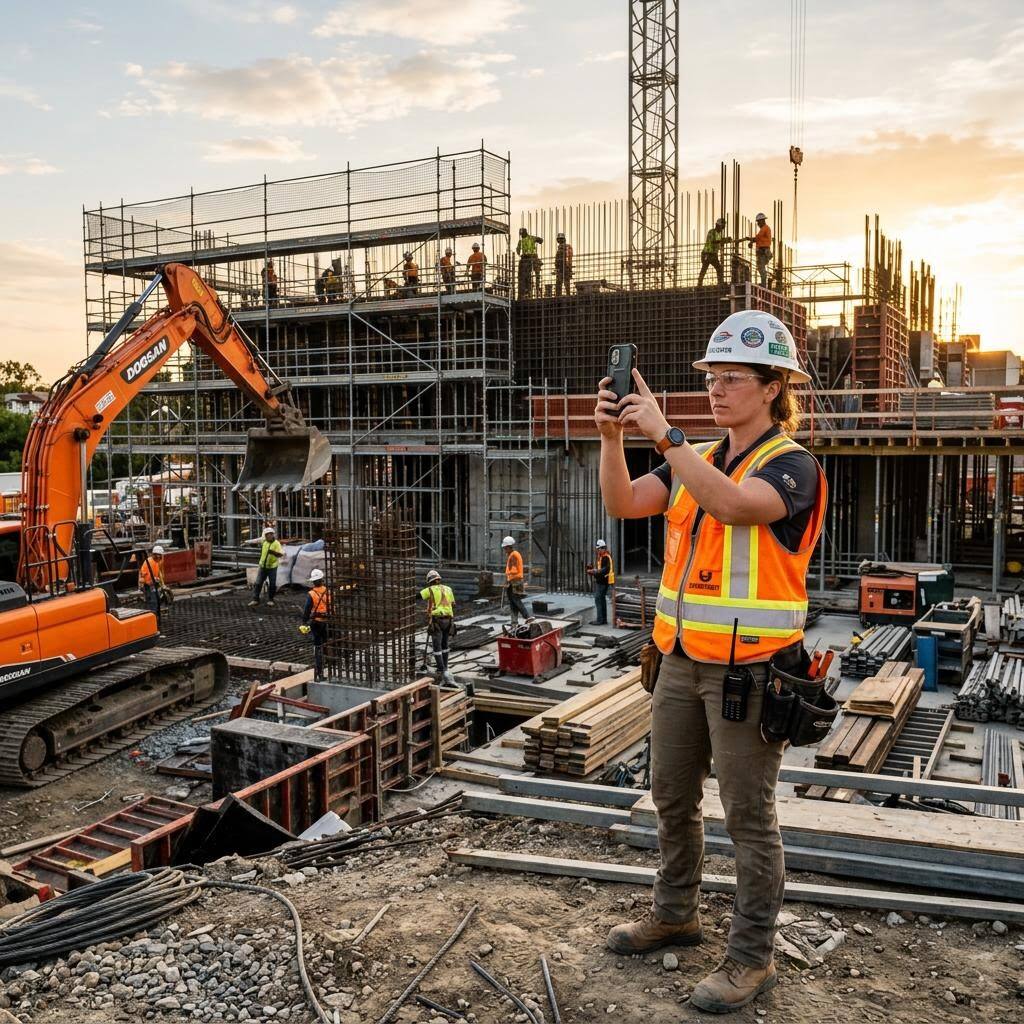
There are two different jobs that both get called 'hazard assessment,' and confusing them leaves gaps. The site hazard assessment is the wide-angle view: you walk the whole jobsite and identify the conditions everyone shares — the unguarded leading edge on the second floor, the excavation with no protective system, the loads swinging over a walkway, the temporary panel with an open cover. The task-level JHA (a JSA in OSHA's terms) is the zoom-in: one crew, one task, broken into steps. A good program runs both — the site assessment maps where the danger lives, and the JHA controls each high-risk task inside it.
OSHA's Focus Four gives the site assessment its structure. Falls, struck-by, caught-in/between, and electrocution account for the large majority of construction fatalities year after year, so a site walkthrough that systematically checks each of those four categories catches the hazards most likely to kill someone. OSHA Scan reads a photo of a site area against that same backbone: it flags the visible fall, struck-by, caught-in, and electrical hazards it can see, tags the standard each may relate to, and suggests a control — so the walk produces a documented, scored record instead of a memory.
The workflow fits how site walks actually happen. Photograph each area as you move through the site — the deck edge, the equipment lane, the trench spoil pile, the temporary power drop — and each frame comes back as findings you verify at the spot. Accepted findings become corrective actions with owners; a re-scan after the fix documents the improvement; and the dated reports roll up so a superintendent can see the whole site's exposure at a glance. The camera does the noticing; the competent person keeps the judgment and the sign-off.
It is worth being precise, because a lot of marketing is not: OSHA does not have a general standard that requires you to produce a written 'site hazard assessment' document, and it does not mandate a JHA. What OSHA does require in writing is the PPE hazard assessment under 29 CFR 1910.132(d) — the employer must assess the workplace to determine whether hazards are present that require personal protective equipment, select appropriate PPE, and certify that assessment in a written document that identifies the workplace evaluated, the person certifying, and the date(s). That certification is the one true 'assessment' paperwork requirement most sites can point to, and it maps naturally onto a site walkthrough: as you identify eye, head, foot, and hand hazards area by area, you are building the record 1910.132(d) asks for.
Everything else about hazard assessment is best-practice and general-duty territory. OSHA's recommended practices for safety programs describe hazard identification and assessment as a core element — collect information, inspect the workplace, investigate incidents, and prioritize — but that is guidance, not a numbered mandate to file a specific form. The General Duty Clause still applies: an employer must keep the workplace free of recognized hazards likely to cause death or serious harm, which is exactly what a systematic site assessment surfaces. So run the assessment because it prevents the Focus Four incidents and supports your 1910.132(d) certification — not because a fictional 'OSHA site-assessment form' exists.
The Focus Four is not a slogan; it is where the bodies are. Falls to a lower level are consistently the single largest cause of construction deaths, followed by struck-by incidents, electrocutions, and caught-in/between events. Structuring a site assessment around those four categories means the walk is organized by consequence, not by convenience — you are looking hardest at the hazards most likely to produce a fatality, in the order they occur. A frame of an active deck gets checked for edge protection and floor openings (falls), for what is stored or swinging above and beside it (struck-by), for pinch and crush points around equipment and material (caught-in/between), and for temporary power and overhead lines (electrocution).
That structure is also what makes the photo scan useful rather than gimmicky. Because the AI is reading each frame against the same four hazard groups every time, a large site walked by different supervisors comes back with hazards named consistently and mapped to the same 1926 references, scored on one scale. For a superintendent rolling up exposure across floors, buildings, or subcontractors, that uniformity is worth as much as the speed — and it feeds the corrective-action list and the 1910.132(d) certification without anyone re-keying notes from a clipboard.
A camera reads conditions, not systems. It can show you an unguarded edge, an open panel, or a trench with vertical walls — but it cannot tell you whether that trench soil is Type A or Type C, whether a circuit is energized, whether the swing radius is crossed twice an hour, or whether the competent person has already inspected the excavation today. It sees a single moment in one frame, so hazards behind the camera, below grade, or that only appear during an operation are outside its reach. And OSHA judges sites on actual conditions, not on how thorough the paperwork looks: a beautifully documented assessment of a fall hazard that was never guarded protects no one.
So use the scan for what it genuinely does: the fastest available first pass at the visible Focus Four hazards across a site, followed by a real walk. Photograph each area, read the flagged findings, verify every one in person, add what the camera cannot see — soil classification, energization status, atmospheric conditions, the site-specific judgments a competent person makes — and keep the dated record. Try that loop on a photo of your own site below; the scan is free and takes about a minute.
Run through these steps before crews start — each one covers a visible gap the AI can help you catch.
Before you start, decide the route and check each area against OSHA's Focus Four: falls, struck-by, caught-in/between, and electrocution. Organizing the walk by those consequence categories keeps the assessment focused on the hazards most likely to cause a fatality.
Move through the site and photograph each area — the deck edges and floor openings, the equipment lanes and load paths, the excavations and spoil piles, and the temporary power drops. Capture the relationships between workers, edges, loads, and equipment, not just close-ups.
Upload each frame to OSHA Scan. The AI flags the visible hazards it can see across the Focus Four, notes the OSHA standard each may relate to, assigns a risk level, and suggests a corrective action — a scored, dated draft of the walkthrough for you to verify.
Walk to each flagged item and confirm it in context. Add what the photo cannot show — soil classification, energization status, swing-radius timing, atmospheric conditions — and dismiss findings that do not apply. The competent person's judgment and authority stay central.
Turn each verified hazard into a corrective action with an owner and a deadline, build the written PPE hazard assessment certification the areas call for under 29 CFR 1910.132(d), and re-scan after fixes so the dated before-and-after record lives with the assessment.
One frame of a site area during the walkthrough — this is what the AI flags as visible hazards, grouped the way a site assessment should be.
Unprotected leading edges, open floor and roof holes, missing guardrails on decks and stairs, and ladders and platforms in visibly unsafe positions.
Loads suspended over walkways, unsecured or overstacked material, equipment operating near workers on foot, and unshored spoil piles at trench edges.
Excavations with no visible protective system, pinch and crush points around equipment and material, and unguarded rotating or moving parts.
Temporary panels with open covers, damaged cords and improper routing, and equipment or lifts working in visible proximity to overhead lines.
Scan a photo like the one above and this is the report you get — score, findings, OSHA references, and fixes. It is an illustrative example, clearly marked — not live scan data.
Compliance score
48
Lower means more potential hazards found
7 potential hazards found
1Open leading edge on an elevated deck with no guardrail or covered opening
CriticalPossibly related to fall protection (29 CFR 1926.501)
Observed condition: Falls to a lower level are the leading cause of construction deaths, and an unprotected edge above six feet is the exact condition that produces them — anyone stepping back, carrying material, or losing footing goes over.
Corrective action: Install a compliant guardrail system or covers on the openings before crews work near the edge; where that is not feasible, put each exposed worker in a personal fall arrest system tied to a rated anchor, and verify in person.
High confidence
2Suspended load traveling over a walkway used by workers on foot
HighPossibly related to rigging and material handling (29 CFR 1926.251)
Observed condition: A struck-by hazard: workers under or beside a moving load are exposed if rigging fails or the load shifts, and a shared walkway means people pass through the drop zone without realizing it.
Corrective action: Establish and barricade an exclusion zone under and around the load path, route foot traffic clear of it, and confirm the rigging and the signal person on site — do not rely on the photo to judge rigging condition.
Medium confidenceNot fully clear from the photo — verify on site.
3Excavation with near-vertical walls and no visible protective system
CriticalPossibly related to excavation protective systems (29 CFR 1926.652)
Observed condition: A caught-in/between hazard: an unprotected trench can bury a worker in seconds, and a cubic yard of soil weighs enough that a partial collapse is often fatal or crippling.
Corrective action: Keep workers out until a competent person classifies the soil and specifies sloping, benching, shoring, or a trench box; the photo cannot judge soil type or depth, so this must be verified on site before entry.
Medium confidenceNot fully clear from the photo — verify on site.
4Temporary power panel with an open cover near a wet work area
HighPossibly related to temporary wiring and GFCI protection (29 CFR 1926.404)
Observed condition: An electrocution hazard: an open panel exposes energized parts to contact, and moisture nearby lowers the threshold for a fatal shock or an arc flash during routine plug-ins.
Corrective action: Close and secure the panel cover, confirm GFCI protection on temporary receptacles, keep cords out of standing water, and have a qualified person verify the temporary power installation.
High confidence
Upload a photo like the one above and get a compliance score and hazard count in seconds. No account needed to scan — create a free account to unlock the full report.
Use the real site or facility name. If you save the scan after signup, it becomes the report name.
Three angles, one deeper scan
Only the wide shot is required — every extra angle gives the AI more places to look.
Required: Set the scene — one wide shot lets the AI sweep the whole area at once
Stand at the entry point and capture corner to corner: floors, ladders, scaffolds, and everyone at work
Drop a job-site photo or walkthrough video
Click to upload, drag & drop, or snap a photo on site. Photos scan free in about 15 seconds — no signup, no card. Video walkthroughs (up to 3 min) run on a free account.
Small habits, sharper scans
Set the scene
Start with context
Fill the frame
2–3 ft for close-ups; keep ladders, cords and workers fully in view.
Capture clearly
Make the frame usable
Light it right
Keep the sun or lights behind you — glare and shadows hide hazards.
Tap to focus
Tap the hazard on screen and hold still one second — blur can't be flagged.
Choose the useful view
Give the AI room to understand
Go landscape
Turn your phone sideways — a wider frame catches more of the scene.
Only upload photos you have permission to use, and avoid images showing personal, customer, or confidential information. Demo photos and results are held privately for up to 48 hours so you can save them to a free account; unclaimed photos are deleted automatically. Results are an AI-assisted preliminary review, not an official OSHA determination.
New: Video walkthrough scans
Record up to 3 minutes of your site — the AI extracts frames and flags every hazard with exact timestamps. Free account required.
Get the best results
Wide shot first
Stand at the entrance and photograph the entire work area so AI sees the full context
Hazard areas
Photograph elevated surfaces, equipment, electrical panels, and anywhere workers are active
Close-ups last
Move in close on anything damaged, missing, or that looks risky — the AI catches more detail
Walk the whole site against the Focus Four, area by area. The first few points are free — create a free account to unlock the full walkthrough and scan your own site photos.
Falls — every unprotected edge above six feet guarded or arrested
Leading edges, deck perimeters, roof edges, and stair openings have compliant guardrails, covers, or a personal fall arrest system in use; anchor points are rated and connectors are appropriate.
Falls — floor and roof openings covered, marked, and secured
Every hole a person or tool could fall through is covered with material rated for the load, secured against displacement, and marked 'HOLE' or 'COVER'.
Struck-by — load paths and swing radii cleared of workers on foot
Exclusion zones under suspended loads and around equipment swing radius are barricaded; foot traffic is routed clear; signal persons are posted where visibility is limited.
Struck-by — material stacked, secured, and stored stably
Stacked material is within safe height, blocked or banded against sliding, and kept back from edges and excavations; nothing is stored where it can fall on workers below.
OSHA Scan reads a single photo. That makes it fast and easy for anyone on site — but it also means it has real limits. Here's an honest look at both.
A scan is a fast first look, not the final word. Before treating this kind of area as safe, a competent person should still confirm:
It is a systematic walkthrough of the whole jobsite to identify the hazards workers are exposed to and the controls needed for each. Most programs structure it around OSHA's Focus Four — falls, struck-by, caught-in/between, and electrocution — because those categories cause the majority of construction deaths. It is broader than a task-level JHA/JSA, which analyzes one crew's one task; the site assessment maps where danger lives across the site.
OSHA does not have a general standard requiring a specific written 'site hazard assessment' form, and it does not mandate a JHA. The one closely related written requirement is the PPE hazard assessment under 29 CFR 1910.132(d), where the employer must assess the workplace for hazards requiring PPE and certify that assessment in writing. Beyond that, the General Duty Clause and OSHA's recommended safety-program practices make hazard identification a core expectation — but as best practice and general duty, not a numbered form mandate.
Scope. A JHA (which OSHA calls a JSA) breaks a single task into steps and analyzes the hazard of each step for one crew. A site hazard assessment is the wide-angle walkthrough of the entire jobsite, checking the shared conditions everyone faces. Run both: use the site assessment to map the site against the Focus Four, then a JHA to control each high-risk task inside it. OSHA also publishes a free JHA booklet (Publication 3071) if you want a task-level template.
You photograph each area as you walk the site and upload the frames. The AI flags the visible Focus Four hazards it can see — unprotected edges, suspended loads, unprotected excavations, open temporary panels — names the OSHA standard each may relate to, and suggests a corrective action, all scored and dated. It is a second set of eyes for the walk, meant to be verified in person, not a replacement for a competent person's inspection.
No. Standards for excavation, scaffolds, and fall protection require a competent person — a human able to identify hazards and with the authority to correct them — and no software has authority on your site. The scan reads visible conditions in a photo; it cannot classify trench soil, tell whether a circuit is energized, or judge a swing radius over time. Use it to produce a fast, documented first pass, then have the competent person verify every finding and add what the camera cannot see.
Trying it is free with no account: upload a site photo and see the score and hazard count. A free account unlocks the full findings with OSHA references, saved reports, corrective-action tracking, and PDF/Excel export. OSHA Scan is an independent tool and is not affiliated with, endorsed by, or certified by OSHA — the standard references it surfaces are possible relationships to help you investigate, not compliance verdicts.
Reviewed by OSHA Scan Editorial
Last updated August 29, 2026
This content is produced by the OSHA Scan Editorial team and reviewed with AI assistance. It is general safety information, not legal or compliance advice. OSHA Scan is an independent tool and is not affiliated with, endorsed by, or certified by OSHA or the U.S. Department of Labor.
Free PDF checklist
33 critical checks across 7 categories — the same visible gaps the AI scanner looks for. Sent to your inbox as a free PDF.
More ways to see what an AI OSHA scan can do for your site.
The overview hub — how the scanner works and every job, site, and hazard it covers.
The task-level zoom-in that pairs with the site-wide assessment.
Draft the hazard and control columns of a task JHA from one photo.
The second Focus Four category — loads, equipment, and flying objects.
The caught-in/between hazard that a site walk must catch early.
The electrocution category — temporary power, cords, and overhead lines.
The full hub of every hazard type and industry the scanner covers.
OSHA's recommended practices for identifying and assessing workplace hazards — the process a site walkthrough carries out.
Official resource — osha.govSee a complete labelled example of everything a scan returns.
Start with 5 included AI site scans plus a one-time 10-scan signup bonus — no credit card. Build JHA-ready reports and catch changing conditions sooner.
Start your free trial