
1
Set the scene
Start with context
Fill the frame
2–3 ft for close-ups; keep ladders, cords and workers fully in view.
Real-time hazard detection means identifying a hazard fast enough to act on it — while the condition still exists. With OSHA Scan, that speed comes from a photo: snap a picture of the work area and the AI returns its visible findings in seconds — each hazard named, referenced to the OSHA standard it may relate to, with a suggested fix, a confidence level, and a 0-100 score. It is on-demand analysis of a photo, not continuous video surveillance — which means it works on any site, from any phone, with nothing installed. Free to try, no account needed. A person verifies every finding on the floor.
Free · No account needed to scan · Results in seconds
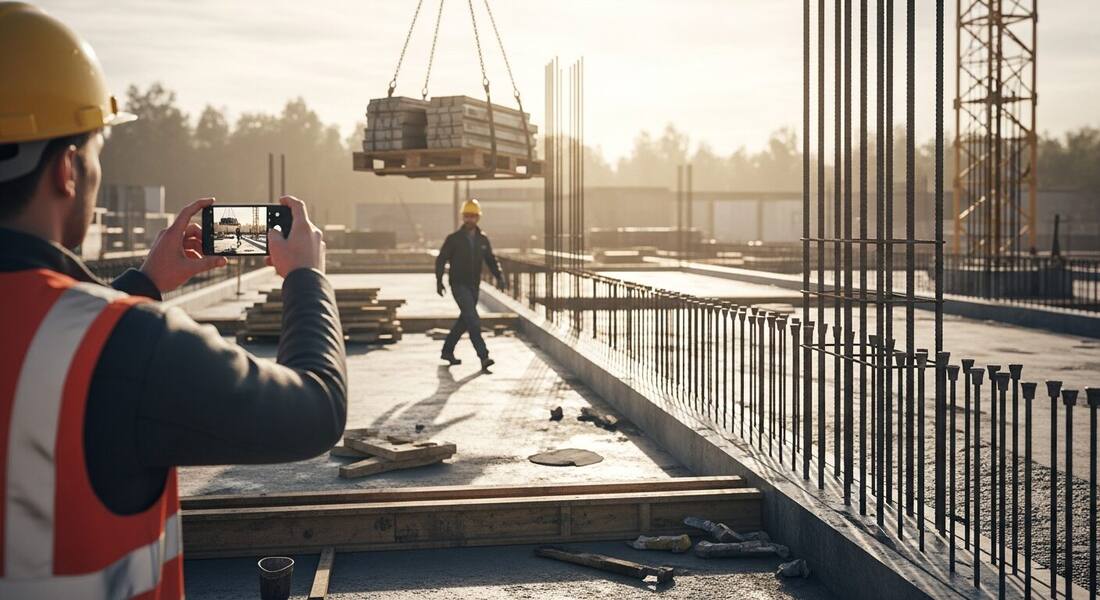
Most hazards are found late. The trailing cord gets written up at the monthly inspection, three weeks after it appeared. The missing rebar caps surface in an audit photo long after the crew moved on. The gap between when a hazard appears and when someone with authority knows about it is where incidents live — and traditional inspection cycles leave that gap open for days or weeks at a time.
Photo-based detection collapses the gap to seconds. The supervisor who notices something off frames a photo, and before they have walked ten steps the analysis is back: each visible hazard named, weighted, referenced to the standard family it may relate to, and paired with a suggested correction. The hazard is still there — which means the fix can happen now, to the actual condition, instead of being a line item about a condition nobody quite remembers.
Speed also changes who detects. When analysis takes seconds and lives in a phone browser, hazard detection stops being the safety manager's Tuesday task and becomes something any lead can do at task start, at shift change, or the moment a site changes — the exact moments risk actually moves.
Two different technologies wear the 'real-time' label, and it is worth being precise. Continuous systems — AI-enabled fixed cameras — watch one location around the clock and alert on defined events. They are genuinely real-time for that one field of view, and they carry the costs of a capital project: hardware, mounting, network, workforce privacy considerations, and a view that never moves. OSHA Scan is the other kind: on-demand analysis that runs the moment you take a photo and returns findings in seconds. It is not watching anything between photos — and in exchange, it covers any viewpoint on any site with zero installation, today.
For the moments that decide most incidents — a new task starting, a delivery staged in the wrong place, a subcontractor's setup, a changed condition after weather — the on-demand model is usually the more practical fit: those are precisely the moments a person is present, looking, and able to take a picture. The photo turns their attention into a documented, analyzed record in the time it takes to keep walking.
Detection only matters if it shortens the path to correction. Every OSHA Scan finding arrives as an actionable unit: the hazard, why it matters, the OSHA standard family it may relate to, a suggested corrective action, and a confidence level. Accepted findings become checklist items with owners — so the same minutes that detected the hazard also assigned its fix. When the correction is done, re-scanning the same viewpoint produces the closing evidence: the recovered score and a clean finding list, timestamped, attached to the same inspection record.
Compare that to the traditional loop: hazard noticed, noted on paper, typed up, emailed, triaged, assigned, verified — each handoff adding a day and losing detail. The compression is not about working faster; it is about removing the handoffs where hazards used to wait.
Some hazard families are stable for weeks — a missing sign, a faded label. Others are lethal precisely because they are momentary: a worker's path crossing under a suspended load, an unprotected edge on a deck that was guarded yesterday, an impalement hazard uncapped between pours. These are the exposures where a monthly inspection is statistically blind — they appear and resolve between visits. Fast photo analysis is the counter: the supervisor who sees the lift starting can scan the area in the time the load takes to rise, and the findings — suspended-load clearance, rebar caps, edge protection — come back while the crane is still in the air. That is the honest case for speed: not replacing the inspection program, but covering the exposures that never survive long enough to appear in it.
One photo in, a weighted finding list out — fast enough to act while the condition still exists.
Detection runs on the photo you just took — no mounted cameras, no network drops, no integrator. The phone in your pocket is the sensor.
The analysis returns while you are still standing there: hazards named, weighted, and referenced to the OSHA standard each may relate to.
Suspended-load paths, missing caps, open edges — the short-lived, high-severity conditions that monthly inspection cycles are blind to.
Each fast scan is also a timestamped inspection entry — findings, fixes, and re-scans accumulate into your compliance history automatically.
Scan a photo like the one above and this is the report you get — score, findings, OSHA references, and fixes. It is an illustrative example, clearly marked — not live scan data.
Compliance score
39
Lower means more potential hazards found
5 potential hazards found
1Worker walking beneath a suspended pallet of material
HighPossibly related to hoisting and suspended-load safety (29 CFR 1926.1425)
Observed condition: A person under a suspended load has no margin — rigging failure, load shift, or a snagged sling turns the walk-under into a struck-by event with no warning time.
Corrective action: Stop the walk-under now: barricade the swing path, brief the crew on the exclusion zone, and hold foot traffic until the load lands.
High confidence
2Rows of vertical rebar standing without protective caps
HighPossibly related to impalement protection (29 CFR 1926.701(b))
Observed condition: Uncapped rebar below any surface a person could fall from converts a stumble into an impalement — and this deck has workers moving at the same level as the exposed ends.
Corrective action: Cap or bend the exposed ends, or guard the rows — and add cap checks to the task setup for every pour sequence.
High confidence
Upload a photo like the one above and get a compliance score and hazard count in seconds. No account needed to scan — create a free account to unlock the full report.
Use the real site or facility name. If you save the scan after signup, it becomes the report name.
Three angles, one deeper scan
Only the wide shot is required — every extra angle gives the AI more places to look.
Required: Set the scene — one wide shot lets the AI sweep the whole area at once
Stand at the entry point and capture corner to corner: floors, ladders, scaffolds, and everyone at work
Drop a job-site photo or walkthrough video
Click to upload, drag & drop, or snap a photo on site. Photos scan free in about 15 seconds — no signup, no card. Video walkthroughs (up to 3 min) run on a free account.
Small habits, sharper scans
Set the scene
Start with context
Fill the frame
2–3 ft for close-ups; keep ladders, cords and workers fully in view.
Capture clearly
Make the frame usable
Light it right
Keep the sun or lights behind you — glare and shadows hide hazards.
Tap to focus
Tap the hazard on screen and hold still one second — blur can't be flagged.
Choose the useful view
Give the AI room to understand
Go landscape
Turn your phone sideways — a wider frame catches more of the scene.
Only upload photos you have permission to use, and avoid images showing personal, customer, or confidential information. Demo photos and results are held privately for up to 48 hours so you can save them to a free account; unclaimed photos are deleted automatically. Results are an AI-assisted preliminary review, not an official OSHA determination.
New: Video walkthrough scans
Record up to 3 minutes of your site — the AI extracts frames and flags every hazard with exact timestamps. Free account required.
Get the best results
Wide shot first
Stand at the entrance and photograph the entire work area so AI sees the full context
Hazard areas
Photograph elevated surfaces, equipment, electrical panels, and anywhere workers are active
Close-ups last
Move in close on anything damaged, missing, or that looks risky — the AI catches more detail
How to build speed into detection — and keep the fast findings honest. The first four points are free; a free account unlocks the rest and lets you scan your own site.
Scan at the moments risk changes
Task start, deliveries, weather shifts, subcontractor setups, lifts — schedule scans around change, not the calendar.
Act on high-severity findings before leaving the spot
A struck-by or fall exposure found in real time deserves a real-time response: stop, barricade, brief — then document.
Photograph the exposure, not the equipment
Frame where people and hazards meet — the walking path under the load, not just the crane. Relationships are what the model reads.
Keep the phone's view honest
Shoot from where a worker actually stands. A flattering angle produces a flattering score, and the score is only useful if it is true.
OSHA Scan reads a single photo. That makes it fast and easy for anyone on site — but it also means it has real limits. Here's an honest look at both.
A scan is a fast first look, not the final word. Before treating this kind of area as safe, a competent person should still confirm:
No — and that is a deliberate design choice. OSHA Scan analyzes photos on demand: you take a picture, findings return in seconds. Continuous AI camera systems watch one fixed view around the clock, but they are a capital project with hardware, network, and privacy overhead. Photo-based detection covers any viewpoint on any site with zero installation — real-time in the sense that matters: the findings arrive while the hazard still exists.
Seconds per photo — typically before you have walked to the next work area. Each result includes the visible hazards, the OSHA standard each may relate to, a suggested fix, a confidence level, and a 0-100 score for the area.
Short-lived, high-severity exposures: people under suspended loads, uncapped rebar between pours, edges unguarded during a transition, blocked egress during deliveries. These appear and resolve between scheduled inspections, so speed is the only way they get caught at all.
No. Quick scans cover the gaps between scheduled inspections and feed the same record — they do not replace the walkthroughs, JHAs, and instrument checks a program requires. Every finding is AI-assisted draft output that a person verifies before it becomes the record.
Nothing. It runs in the phone's browser — take or upload a photo and the analysis returns in the same page. Free to try with no account; a free account adds the full finding-by-finding report, 5 free scans, saved history, and PDF export.
Reviewed by OSHA Scan Editorial
Last updated August 29, 2026
This content is produced by the OSHA Scan Editorial team and reviewed with AI assistance. It is general safety information, not legal or compliance advice. OSHA Scan is an independent tool and is not affiliated with, endorsed by, or certified by OSHA or the U.S. Department of Labor.
Free PDF checklist
33 critical checks across 7 categories — the same visible gaps the AI scanner looks for. Sent to your inbox as a free PDF.
More ways to see what an AI OSHA scan can do for your site.
The overview hub — how the scanner works and every job, site, and hazard it covers.
The technology reading the frame behind every fast scan.
The upload-to-findings pipeline, step by step.
The camera-first inspection walk for construction sites.
Running scans from the phone already in your pocket.
How the 0-100 score turns scans into a trend line.
OSHA's construction hub — the standards behind struck-by, impalement, and fall exposures that fast detection helps catch between inspections.
Official resource — osha.govSee a complete labelled example of everything a scan returns.
Start with 5 included AI site scans plus a one-time 10-scan signup bonus — no credit card. Build JHA-ready reports and catch changing conditions sooner.
Start your free trial