
SDS management for manufacturing — build a plant library one label scan at a time
SDS management for manufacturing means keeping a safety data sheet on file for every hazardous chemical across every department, keeping it current as suppliers and formulations change, and making it reachable by any worker on any shift. In a plant, that inventory drifts constantly — production adds a new coolant, maintenance swaps a solvent, receiving takes in a substitute the buyer never flagged. OSHA Scan turns your phone into an SDS scanner: photograph a product label and the AI reads the product name, manufacturer, signal word, GHS pictograms, and hazard statements to create a searchable library entry, and you attach the manufacturer's SDS PDF. Print a QR poster for each department so workers reach the sheets during the shift. It builds and organizes the library — it does not fetch SDSs from a database or monitor revisions for you.
Free · No account needed to scan · Results in seconds
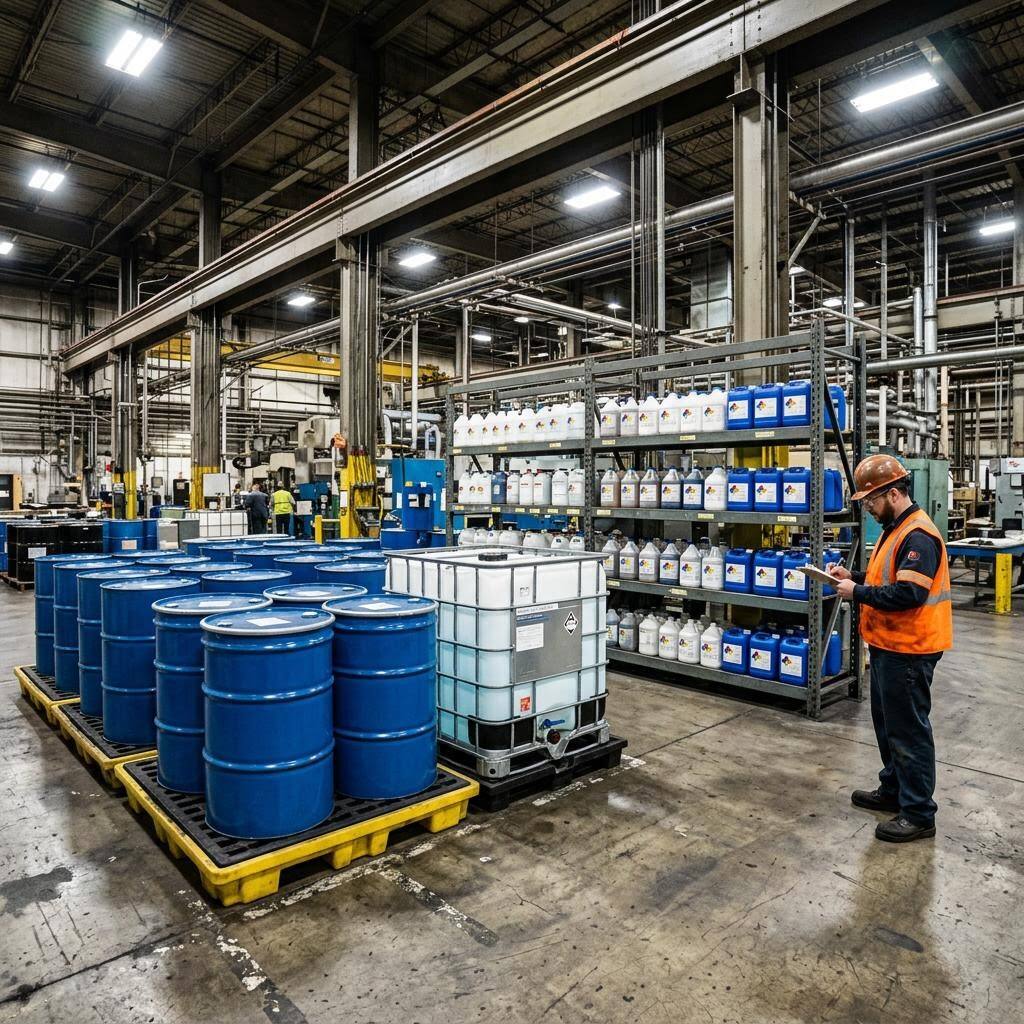
Why the plant SDS binder is always a step behind the floor
A manufacturing plant runs on chemicals that never stop changing. Production has coolants, cutting fluids, and release agents; maintenance keeps solvents, penetrating oils, and adhesives; the finishing line has paints, primers, and thinners; sanitation and the boiler room have their own inventories. Each department buys on its own schedule, a supplier discontinues a product mid-year, and a substitute lands on the receiving dock that nobody added to the master list. By the time the annual HazCom review happens, the binder describes a plant that no longer exists — a dozen containers on the floor have no matching sheet.
The fix is to make SDS capture a habit at the moment a chemical enters the building, not a project you dread once a year. Scan the label the instant the pallet lands on the receiving dock, and the product is in the library before it ever reaches a department. OSHA Scan reads the label with your phone camera and builds the entry; you attach the manufacturer's PDF and reconcile the library against what's physically on the shelf. The educational reality: the software organizes and stores — it will not go find a manufacturer's SDS for you or tell you a revision dropped, so your buyers and EHS lead still own sourcing the current sheet.
Why manufacturing HazCom citations cluster on the SDS and inventory pieces
Hazard communication (29 CFR 1910.1200) is perennially among OSHA's most-cited standards, and in manufacturing the citations concentrate on the parts that decay fastest: an incomplete chemical inventory, safety data sheets that are missing or don't match the product on the floor, and sheets that aren't readily accessible to the workers exposed to them. Plants are especially exposed because chemical turnover is continuous and distributed — purchasing, production, maintenance, and sanitation all introduce products, and no single binder keeps pace. A compliance officer can open a container, read the label, and ask for the matching sheet in seconds; if the library describes last year's inventory, the gap is immediate and visible.
OSHA's 2024 update to the Hazard Communication Standard, aligned to a newer revision of the Globally Harmonized System, changed elements of hazard classification and the information required in SDS sections and on labels, with phased compliance dates. For a plant that means the manufacturer sheets you have on file will be reissued as suppliers update to the new format — and because no software monitors those revisions for you, keeping the library current is an ongoing sourcing task your buyers and EHS lead own. A tool that makes the inventory searchable and accessible from any phone lowers the cost of that upkeep, but the responsibility to hold the current manufacturer sheet stays with the employer.
What the SDS scanner reads off a manufacturing chemical label
Photograph a product label anywhere in the plant — the AI extracts the fields that build the library entry.
Product identity and manufacturer
Reads the exact product name and manufacturer off the label so a coolant, a solvent, and a near-identical substitute each get their own entry instead of one vague line.
Signal word and GHS pictograms
Captures the signal word (Danger or Warning) and the GHS pictograms shown on the container so the hazard picture is on file the moment the drum is logged.
Hazard and precautionary statements
Pulls the hazard and precautionary statements printed on the label into a searchable entry any department can pull up on a phone.
Per-department QR access
Assign each scanned chemical to a storage room and print a QR poster; workers scan it and get that department's chemicals and attached SDS PDFs with no login.
Demo: the library entry a scanned label comes back with
An illustrative example for this trade — product identity, signal word, GHS pictograms, and hazard statements, filed and searchable.
Water-soluble metalworking fluid concentrate
Example manufacturer
The concentrate is mixed at the CNC sumps by whoever tops off coolant, so an operator handling the neat product needs the eye-damage and skin-sensitizer hazards at the machine.
- H318 — Causes serious eye damage
- H317 — May cause an allergic skin reaction
Now scan your own label — free
Photograph any chemical product on your shelf. The AI transcribes the label in seconds — no account needed to try it.
- A library entry built from each label scan — product name, manufacturer, signal word, GHS pictograms, and hazards
- A place to attach each manufacturer's SDS PDF and a printable QR poster for every department storage area
- A running inventory the whole plant can search from any phone, so a missing-SDS gap shows up before an inspector finds it
Free · No account needed to scan · Results in seconds
The 12-point manufacturing SDS management checklist
The full plant-wide SDS workflow, from receiving dock to shift access. The first four are free — enter your email to unlock the rest and start scanning your own chemical labels.
Free checklist — 12 points
Enter your email to unlock the full checklist
We'll also send you a printable PDF copy — no account required.
One email with the checklist, one follow-up. Unsubscribe anytime.
What the AI can and can't detect
OSHA Scan reads a single photo. That makes it fast and easy for anyone on site — but it also means it has real limits. Here's an honest look at both.
What it can catch from a photo
- Product name and manufacturer printed on a chemical label
- Signal word and GHS pictograms on the container
- Hazard and precautionary statements shown on the label
- Whether a scanned chemical has an SDS PDF attached in the library
What a photo can't tell it
- Whether the attached SDS is the manufacturer's current revision
- Chemicals stored in a department that were never scanned in
- The contents of an unlabeled or worn-label container
- Whether every exposed worker has been trained on the chemical
Always confirmed by a person on site
A scan is a fast first look, not the final word. Before treating this kind of area as safe, a competent person should still confirm:
- The library matches the physical inventory in every department, one container to one entry
- Each attached SDS is the current version from the current supplier
- Night and weekend shifts can actually reach the QR access points
- Contractor chemicals brought on site are accounted for and communicated both ways
People also ask
How do I keep a manufacturing SDS library current when products change constantly?
Make capture happen at the source. Scan the label at the receiving dock so a product is in the library before it hits a department, and treat every supplier switch or reformulation as a brand-new chemical — scan the new label, attach the new sheet, retire the old one. OSHA Scan builds the entry from the label with your phone and stores the PDF you attach; it does not automatically fetch sheets or alert you to revisions, so a scheduled review where a named owner confirms each sheet is current stays a manual duty.
What does OSHA require for safety data sheets in a manufacturing plant?
Under 29 CFR 1910.1200, you must maintain an SDS for each hazardous chemical in the workplace and keep those sheets readily accessible to employees during every work shift — not locked in an office. You also need a chemical inventory, GHS-compliant labels on shipped and secondary containers, a written program, and training. Manufacturing is a high-enforcement sector, and missing or inaccessible SDSs are a routine citation because plant inventories drift so fast.
How does a QR SDS poster meet the 'readily accessible' requirement across shifts?
Print a QR poster for each department storage area — production, maintenance, finishing, the boiler room. A worker on any shift scans it with a phone and gets that room's chemicals with signal words, pictograms, hazards, precautions, and the attached SDS PDFs, with no login. That directly answers the requirement that workers can reach the information during their shift, including nights and weekends when the office and its binder are locked.
Does OSHA Scan look up or write SDSs for products I can't find a sheet for?
No. It does not fetch sheets from manufacturer databases and it does not author official SDSs — chemical manufacturers and importers are responsible for their products' sheets. If no SDS is on file, the app can hold an AI-drafted chemical profile, but that is always labeled an internal draft and is never a substitute for the manufacturer's authoritative SDS. Your buyers or EHS lead still source the real sheet from the manufacturer or distributor.
Can we reconcile our chemical inventory against the SDS library?
That reconciliation is exactly the point of scanning at intake. The library doubles as your HazCom chemical inventory, so walking each department and confirming every container has a matching entry — and every entry still has a container on the shelf — surfaces the missing-SDS gaps and the orphan sheets. The app makes the list searchable from any phone; the physical walk-down that proves the two match is still a person's job.
Reviewed by OSHA Scan Editorial
Last updated August 29, 2026
This content is produced by the OSHA Scan Editorial team and reviewed with AI assistance. It is general safety information, not legal or compliance advice. OSHA Scan is an independent tool and is not affiliated with, endorsed by, or certified by OSHA or the U.S. Department of Labor.
Keep exploring
More ways to see what an AI OSHA scan can do for your site.
The AI OSHA inspection tool
The overview hub — how the scanner works and every job, site, and hazard it covers.
SDS scanner
Scan any chemical label to build the library entry the whole plant can search.
Manufacturing safety inspection checklist
Run a plant-floor safety scan for guarding, LOTO, and chemical hazards from a photo.
Chemical inventory list
Turn scanned labels into the HazCom chemical list your library doubles as.
HazCom training requirements
What worker training the SDS library supports — and what stays manual.
OSHA 1910.1200 — Hazard Communication
The federal standard requiring an SDS for every hazardous chemical, readily accessible to workers.
Official resource — osha.govA full sample report
See a complete labelled example of everything a scan returns.
Ready to secure your job sites?
Start with 5 included AI site scans plus a one-time 10-scan signup bonus — no credit card. Build JHA-ready reports and catch changing conditions sooner.
Start your free trial