
1
Set the scene
Start with context
Fill the frame
2–3 ft for close-ups; keep ladders, cords and workers fully in view.
A photo-based safety inspection replaces the clipboard walkthrough with a camera. Photograph any area of your facility — the shop floor, a storage aisle, the dock — and the AI inspects the frame for visible hazards: open electrical panels, blocked extinguishers and exits, unsafe storage, cord conditions, missing PPE. Each finding returns with the OSHA standard it may relate to, why it matters, a suggested fix, and a 0-100 score, in seconds. It is free to try with no account. It is an AI-assisted preliminary inspection of what the camera can see — a person still verifies findings and covers the rest.
Free · No account needed to scan · Results in seconds
The hazards that hurt people in a facility are rarely exotic — a panel door left open after a repair, boxes stacked in front of the extinguisher during a busy receiving day, a cord run across an aisle 'just for now.' They are conditions that appear between inspections. A quarterly clipboard audit inspects the facility four days a year; the other 361 days, hazard detection is whoever happens to walk past.
Making the inspection as cheap as a photo changes the frequency. Any supervisor who notices something can photograph the area and have a scored, standard-referenced finding list before they have walked away — no form, no scheduling, no safety-department bottleneck. The safety manager stops being the only set of trained eyes and becomes the reviewer of a stream of documented observations.
The record matters as much as the catch. Each scan is a dated report with findings, corrective actions, and a score — evidence for OSHA, an insurer, or a corporate audit that hazards were being found and closed continuously, not just in the week before the annual review.
The formal safety audit is thorough by design — it covers written programs, training records, permits, instrument-based measurements, and physical conditions across the whole facility. But it happens, at most, a few times a year, and the conditions it evaluates are the conditions that exist on audit day. OSHA's General Duty Clause does not recognize the audit schedule as a defense: the standard is that the employer maintain a workplace free from recognized hazards continuously, not just on the dates the safety consultant visits. The gap between audits is where most facility incidents occur, because hazards that are introduced or overlooked between audit cycles have no mechanism for correction.
Photo-based safety inspection addresses the frequency gap without requiring the depth of a formal audit. A daily or weekly photo sweep of high-hazard areas — the dock, the electrical room, the aisle in front of the fire equipment — catches the conditions that change between audits: the pallet staged in front of the exit at 2pm, the panel left open after a Thursday repair, the cord run across the aisle by Friday's last delivery. The audit finds the systemic problems; the photo inspection catches the transient ones that are statistically more likely to be present when an incident occurs.
Workers' compensation insurers increasingly weight experience modification factors (EMR or X-mod) based on the frequency and severity of claims relative to industry peers. Facilities with documented, consistent inspection programs — particularly programs that generate correction records, not just finding records — tend to build the loss-control evidence that supports favorable EMR adjustments. Many commercial insurers and specialty lines carriers in manufacturing and warehousing now request inspection documentation as part of underwriting, and the presence or absence of a systematic inspection program affects both premiums and coverage availability.
The connection between documented inspection and insurance outcome runs through incident prevention first. A facility that consistently catches and corrects the same hazard categories that drive workers' compensation claims — floor hazards, storage stability, electrical condition — will have fewer claims regardless of documentation. But documentation also matters directly: when a claim is contested or when a subrogation issue arises, the inspection record showing that the condition was not present at the last inspection, or that a corrective action was completed, is often the deciding evidence.
The AI reads the whole frame and reports by hazard family — this is what it inspects for.
Open or blocked panels, exposed wiring, damaged cords, overloaded strips, and equipment run in wet or dirty conditions.
Extinguishers and pull stations blocked or obscured by storage, combustibles accumulating, and flammables stored near ignition sources.
Leaning or unstable stacks, overloaded racking, and material staged where it blocks equipment, sprinklers, or people.
Blocked exits and aisles, trip hazards in walking paths, and spills or clutter in pedestrian lanes.
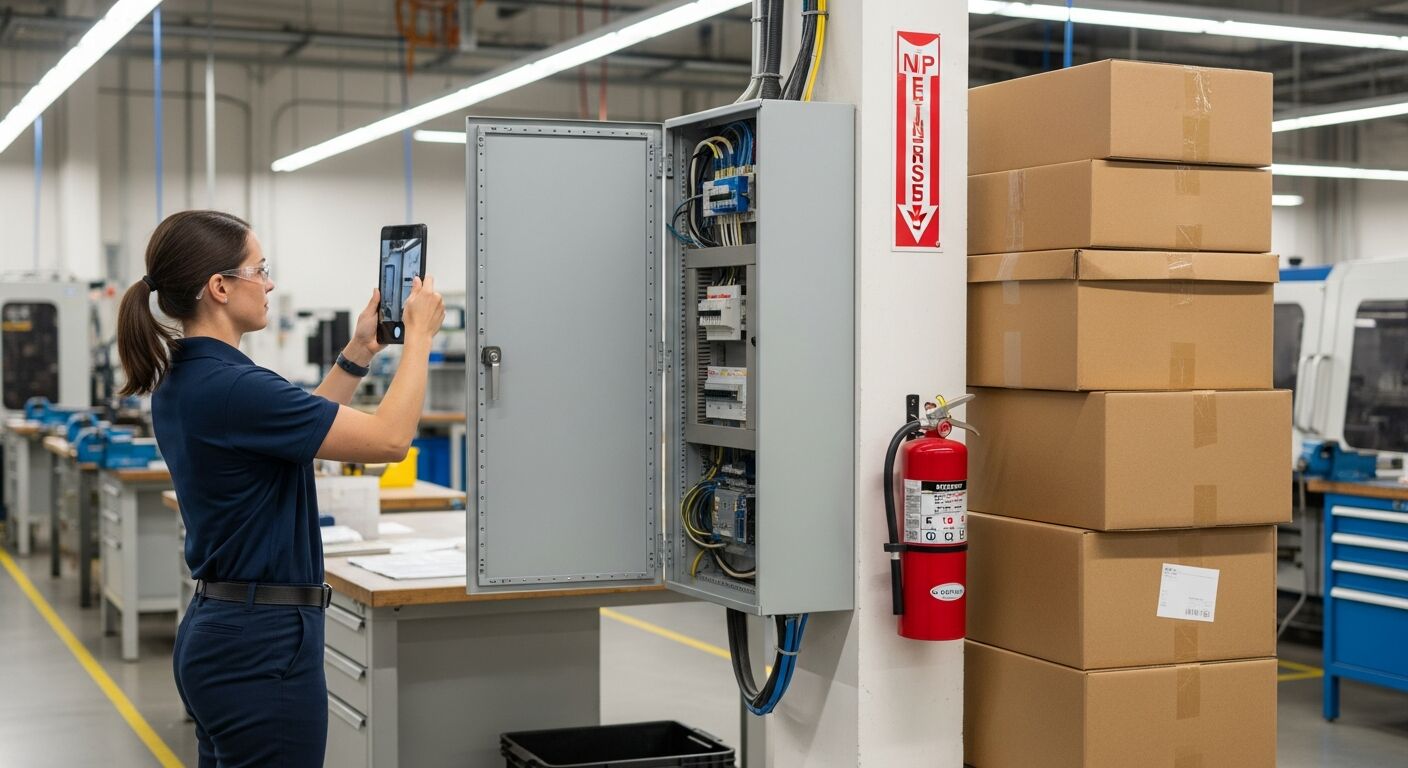
Scan a photo like the one above and this is the report you get — score, findings, OSHA references, and fixes. It is an illustrative example, clearly marked — not live scan data.
Compliance score
43
Lower means more potential hazards found
5 potential hazards found
1Electrical panel door left open with breakers exposed
HighPossibly related to electrical equipment installation and guarding (29 CFR 1910.303)
Observed condition: An open panel exposes energized parts to contact and to dust and damage — and it usually means the last person in the panel was rushed, which is worth knowing on its own.
Corrective action: Close and latch the panel door, verify the dead front and covers are in place, and check the panel schedule is current while you are there.
High confidence
2Stacked boxes crowding access to the mounted fire extinguisher
HighPossibly related to portable fire extinguisher access (29 CFR 1910.157)
Observed condition: An extinguisher hemmed in by storage costs the seconds that decide whether a small fire stays small — access has to survive the busiest receiving day, not just the audit.
Corrective action: Relocate the stacked boxes, mark a keep-clear zone on the floor around the extinguisher, and add the location to the routine photo route.
High confidence
Upload a photo like the one above and get a compliance score and hazard count in seconds. No account needed to scan — create a free account to unlock the full report.
Use the real site or facility name. If you save the scan after signup, it becomes the report name.
Three angles, one deeper scan
Only the wide shot is required — every extra angle gives the AI more places to look.
Required: Set the scene — one wide shot lets the AI sweep the whole area at once
Stand at the entry point and capture corner to corner: floors, ladders, scaffolds, and everyone at work
Drop a job-site photo or walkthrough video
Click to upload, drag & drop, or snap a photo on site. Photos scan free in about 15 seconds — no signup, no card. Video walkthroughs (up to 3 min) run on a free account.
Small habits, sharper scans
Set the scene
Start with context
Fill the frame
2–3 ft for close-ups; keep ladders, cords and workers fully in view.
Capture clearly
Make the frame usable
Light it right
Keep the sun or lights behind you — glare and shadows hide hazards.
Tap to focus
Tap the hazard on screen and hold still one second — blur can't be flagged.
Choose the useful view
Give the AI room to understand
Go landscape
Turn your phone sideways — a wider frame catches more of the scene.
Only upload photos you have permission to use, and avoid images showing personal, customer, or confidential information. Demo photos and results are held privately for up to 48 hours so you can save them to a free account; unclaimed photos are deleted automatically. Results are an AI-assisted preliminary review, not an official OSHA determination.
New: Video walkthrough scans
Record up to 3 minutes of your site — the AI extracts frames and flags every hazard with exact timestamps. Free account required.
Get the best results
Wide shot first
Stand at the entrance and photograph the entire work area so AI sees the full context
Hazard areas
Photograph elevated surfaces, equipment, electrical panels, and anywhere workers are active
Close-ups last
Move in close on anything damaged, missing, or that looks risky — the AI catches more detail
How to turn photo scans into a standing inspection program for a facility. The first four points are free — create a free account to unlock the full checklist and start inspecting from photos.
Map a fixed photo route
List the areas that generate findings — panels, docks, storage aisles, exits — and photograph the same points in the same order every cycle.
Set frequency by how fast the area changes
A receiving dock changes hourly and earns a daily photo; a records room changes yearly. Match the cadence to the churn, not the calendar.
Give every supervisor the camera
The program scales when scanning is everyone's tool, not the safety department's task — the person who notices is the person who scans.
Photograph electrical rooms and panels first
Panel condition, clearance in front of panels, and cord routing produce the highest-severity findings for the least walking.
OSHA Scan reads a single photo. That makes it fast and easy for anyone on site — but it also means it has real limits. Here's an honest look at both.
A scan is a fast first look, not the final word. Before treating this kind of area as safe, a competent person should still confirm:
It is a workplace inspection performed from photographs instead of a clipboard walkthrough. The AI reviews each photo for visible hazards — electrical condition, fire-equipment access, storage, egress, housekeeping, PPE — and returns findings with the OSHA standard each may relate to, suggested fixes, and a 0-100 area score. A person verifies the findings and covers what a camera cannot see.
Frequency and cost. A traditional audit is thorough but rare; a photo inspection takes seconds, so it can happen daily and be performed by anyone on the floor. It does not replace the audit — written programs, training records, and instrument-based checks still need the full review — it fills the long gaps between audits.
Everyone with a phone. The strongest programs let any supervisor or lead photograph a concern the moment they see it, with the safety manager reviewing the stream of findings. The tool drafts the finding; the trained person accepts, prioritizes, and assigns it.
Yes to try: upload a photo and see the score and hazard count with no account. A free account unlocks the full finding-by-finding report with OSHA references and the corrective-action checklist, plus 5 free scans, saved history, and PDF export.
Reviewed by OSHA Scan Editorial
Last updated August 29, 2026
This content is produced by the OSHA Scan Editorial team and reviewed with AI assistance. It is general safety information, not legal or compliance advice. OSHA Scan is an independent tool and is not affiliated with, endorsed by, or certified by OSHA or the U.S. Department of Labor.
Free PDF checklist
33 critical checks across 7 categories — the same visible gaps the AI scanner looks for. Sent to your inbox as a free PDF.
More ways to see what an AI OSHA scan can do for your site.
The overview hub — how the scanner works and every job, site, and hazard it covers.
How the AI turns one frame into scored findings.
The floor half of compliance, scored from a photo.
The paperwork half a photo inspection cannot cover.
Racking, forklifts, and aisle hazards from a photo.
The bigger picture: AI-assisted hazard ID from photos.
See a complete labelled example of everything a scan returns.
Start with 5 included AI site scans plus a one-time 10-scan signup bonus — no credit card. Build JHA-ready reports and catch changing conditions sooner.
Start your free trial