
1
Set the scene
Start with context
Fill the frame
2–3 ft for close-ups; keep ladders, cords and workers fully in view.
A HazScan is a fast AI hazard scan of a single workplace photo. Upload a picture of any US job site — a construction floor, a warehouse aisle, a shop bay — and the AI reviews the whole frame at once: missing PPE, unprotected edges, damaged cords, blocked exits, trip hazards, and unsafe material storage. Each visible finding comes back with the OSHA standard it may relate to, a suggested fix, and a 0-100 compliance score. It takes about 15 seconds, needs no account and no safety training, and works from the phone already in your pocket. It is an AI-assisted first look, not a formal inspection.
Free · No account needed to scan · Results in seconds
Most job-site injuries trace back to a hazard someone could have seen — an open edge, a cord across a walkway, a missing hard hat — that simply was not flagged in time. Formal inspections catch these, but they happen on a schedule; the hazard shows up whenever it wants. A HazScan closes that gap: any person on site photographs the area, and in seconds the AI returns every hazard it can see in the frame, referenced to the OSHA standard each may relate to.
That speed changes who does the checking. A foreman scans the platform before the crew climbs on. A warehouse lead scans an aisle that looks off. A superintendent scans each area on the morning walk and has a documented, scored record before the first coffee is finished. Because the scan is free to try and needs no account, there is no reason to skip it — the cost of checking drops to the time it takes to take a photo.
US employers also carry the documentation burden: OSHA's General Duty Clause expects workplaces kept free of recognized hazards, and when something goes wrong, the question is always what you knew and when. A stream of dated, scored scan reports shows a site that was actively looking — and gives the safety professional a prioritized list instead of a blank page.
Traditional safety inspection checklists organize findings by category — one checklist for electrical, one for housekeeping, one for PPE. That structure works well for a formal, scheduled audit but creates gaps in daily monitoring: the worker who notices something off will run one checklist, miss the hazard that belongs to a different category, and walk past it. A full-frame hazard scan reverses that logic — one photo of the work area surfaces hazards across all visible categories simultaneously, the way an experienced safety professional does when walking into a space and reading the whole picture at once.
OSHA's General Duty Clause requires employers to keep workplaces free of recognized hazards that are likely to cause death or serious physical harm. 'Recognized' means the employer knew or should have known — and the practical defense to that standard is a program that actually looks. A cross-category scan run as part of every pre-task or area-entry routine documents that the employer looked systematically, across hazard families, before work began. That record is qualitatively different from a single-category checklist because it cannot be dismissed as addressing only the hazard that happened to be on the form.
OSHA publishes its top-cited standards annually, and the list is remarkably stable year to year. In general industry, fall protection (1910.29), hazard communication (1910.1200), respiratory protection (1910.134), lockout/tagout (1910.147), and machine guarding (1910.212) consistently appear in the top ten. In construction, fall protection duties (1926.501), scaffolding (1926.451), ladders (1926.1053), eye and face protection (1926.102), and fall protection training (1926.503) consistently top the list, with struck-by exposures addressed across several equipment and rigging standards. The hazard families a HazScan checks — falls and unprotected edges, PPE gaps, electrical condition, housekeeping and egress, and struck-by exposures — map directly to the conditions behind these top citations.
This alignment is not coincidental: the most-cited standards track the most common, most visible hazard conditions across US workplaces. An employer who consistently scans for these conditions and documents findings and corrections is building an inspection record that directly addresses the hazard categories with the highest enforcement and penalty exposure. The HazScan approach is designed to surface these conditions in a single pass, so a morning photo of the work area becomes a documented compliance touchpoint rather than an anecdote.
The scan reviews the whole frame at once — these are the hazard families it looks for.
Missing hard hats, eye protection, and hi-vis on anyone visible in the frame, checked against the work going on around them.
Unprotected edges and openings, ladder setup, scaffold guardrails, and workers above six feet without visible fall protection.
Damaged or badly routed cords, open panels, blocked electrical clearance, and temporary power run through wet areas.
Trip hazards, blocked exits and walkways, unstable material stacks, and people working under or beside suspended loads.
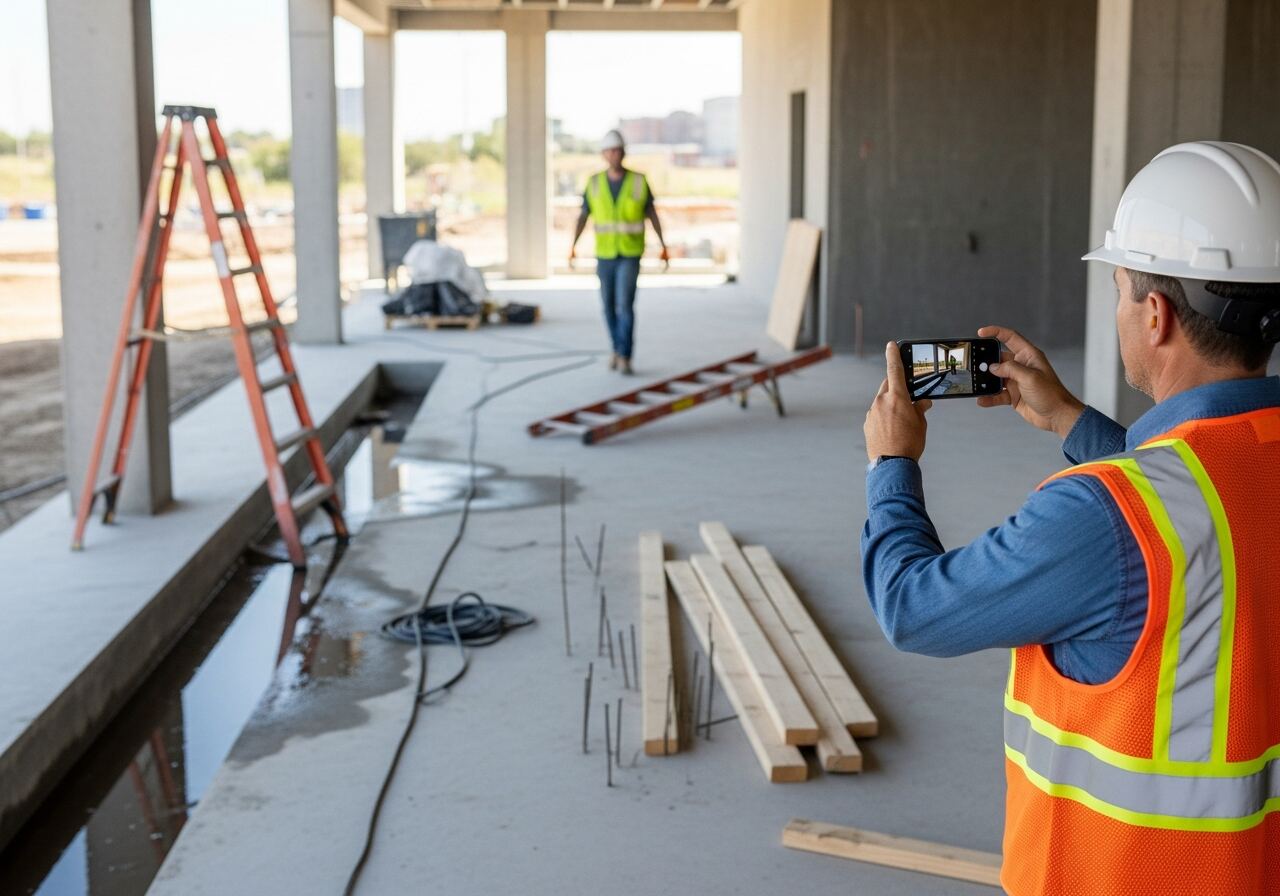
Scan a photo like the one above and this is the report you get — score, findings, OSHA references, and fixes. It is an illustrative example, clearly marked — not live scan data.
Compliance score
44
Lower means more potential hazards found
5 potential hazards found
1Extension cord trailing across the walkway near standing water
HighPossibly related to flexible cords and cables (29 CFR 1926.405)
Observed condition: A cord across a wet walking path combines a trip hazard with electrical exposure — two of the most common injury sources in one spot.
Corrective action: Re-route the cord overhead or under a protective cover and clear the standing water from the walkway.
High confidence
2Ladder laid flat across the pedestrian route
MediumPossibly related to housekeeping (29 CFR 1926.25)
Observed condition: A ladder left across an access route is a trip hazard for everyone moving through, and it gets stepped on and damaged in the process.
Corrective action: Move the ladder to a storage rack or staging area clear of walkways.
High confidence
Upload a photo like the one above and get a compliance score and hazard count in seconds. No account needed to scan — create a free account to unlock the full report.
Use the real site or facility name. If you save the scan after signup, it becomes the report name.
Three angles, one deeper scan
Only the wide shot is required — every extra angle gives the AI more places to look.
Required: Set the scene — one wide shot lets the AI sweep the whole area at once
Stand at the entry point and capture corner to corner: floors, ladders, scaffolds, and everyone at work
Drop a job-site photo or walkthrough video
Click to upload, drag & drop, or snap a photo on site. Photos scan free in about 15 seconds — no signup, no card. Video walkthroughs (up to 3 min) run on a free account.
Small habits, sharper scans
Set the scene
Start with context
Fill the frame
2–3 ft for close-ups; keep ladders, cords and workers fully in view.
Capture clearly
Make the frame usable
Light it right
Keep the sun or lights behind you — glare and shadows hide hazards.
Tap to focus
Tap the hazard on screen and hold still one second — blur can't be flagged.
Choose the useful view
Give the AI room to understand
Go landscape
Turn your phone sideways — a wider frame catches more of the scene.
Only upload photos you have permission to use, and avoid images showing personal, customer, or confidential information. Demo photos and results are held privately for up to 48 hours so you can save them to a free account; unclaimed photos are deleted automatically. Results are an AI-assisted preliminary review, not an official OSHA determination.
New: Video walkthrough scans
Record up to 3 minutes of your site — the AI extracts frames and flags every hazard with exact timestamps. Free account required.
Get the best results
Wide shot first
Stand at the entrance and photograph the entire work area so AI sees the full context
Hazard areas
Photograph elevated surfaces, equipment, electrical panels, and anywhere workers are active
Close-ups last
Move in close on anything damaged, missing, or that looks risky — the AI catches more detail
How to sweep a site with photo scans in under ten minutes. The first four points are free — create a free account to unlock the full checklist and start scanning your own site.
Start where people walk
Scan the main access routes, stairways, and exits first — housekeeping and egress findings are the most common and the fastest to fix.
Scan every crew at working distance
Frame workers close enough that hard hats, eye protection, and hi-vis are clearly visible; PPE findings need faces and gear in focus.
Photograph every edge and opening
Leading edges, floor holes, stairwells without rails, and skylights — the fall-protection family drives the most serious injuries on US sites.
Capture ladders and scaffolds as set up
Shoot the whole ladder or scaffold, base to top, so angle, footing, extension above the landing, and guardrails are all in one frame.
OSHA Scan reads a single photo. That makes it fast and easy for anyone on site — but it also means it has real limits. Here's an honest look at both.
A scan is a fast first look, not the final word. Before treating this kind of area as safe, a competent person should still confirm:
A HazScan is an AI hazard scan of a single workplace photo. OSHA Scan's vision model reviews the image for visible hazards across every category at once — PPE, falls, electrical, housekeeping, struck-by — and returns each finding with the OSHA standard it may relate to, a suggested fix, and a 0-100 compliance score.
A HazScan is a fast preliminary review anyone can run from a phone, in seconds, as often as needed. A formal inspection is a scheduled, documented process led by a competent person. The scan feeds the inspection — it surfaces and prioritizes visible issues early — but it never replaces the qualified professional or the formal process.
Yes. The scan reviews whatever is in the photo, so it works on warehouses, manufacturing floors, restaurants, and general facilities as well as construction sites. The hazard families it checks — PPE, falls, electrical, egress, housekeeping — apply across US workplaces covered by OSHA.
You can run a scan and see the compliance score and hazard count with no account at all. A free account unlocks the full report — every finding, OSHA references, and the corrective-action checklist — plus 5 free scans, saved history, and PDF export. No credit card.
Reviewed by OSHA Scan Editorial
Last updated August 29, 2026
This content is produced by the OSHA Scan Editorial team and reviewed with AI assistance. It is general safety information, not legal or compliance advice. OSHA Scan is an independent tool and is not affiliated with, endorsed by, or certified by OSHA or the U.S. Department of Labor.
Free PDF checklist
33 critical checks across 7 categories — the same visible gaps the AI scanner looks for. Sent to your inbox as a free PDF.
More ways to see what an AI OSHA scan can do for your site.
The overview hub — how the scanner works and every job, site, and hazard it covers.
The vision pipeline behind every HazScan.
The bigger picture: AI-assisted risk assessment from photos.
The scanner applied to active construction sites.
The full area-by-area self-inspection walkthrough.
Floor-level hazards: spills, cords, clutter, and surfaces.
Missing hard hats, eye protection, and hi-vis in the frame.
See a complete labelled example of everything a scan returns.
Start with 5 included AI site scans plus a one-time 10-scan signup bonus — no credit card. Build JHA-ready reports and catch changing conditions sooner.
Start your free trial