
1
Set the scene
Start with context
Fill the frame
2–3 ft for close-ups; keep ladders, cords and workers fully in view.
Hazard communication compliance comes down to a chain: every chemical on site appears on an inventory, carries a complete GHS label, has a safety data sheet workers can actually reach, and is covered by training and a written program. The chain breaks at visible points — a spray bottle someone filled and never labeled, a faded drum label, an SDS binder locked in an office. OSHA Scan gives you a fast first pass: photograph your chemical storage and the AI flags visible label and storage issues with the standard each may relate to. It is an AI-assisted review of what the photo shows — it cannot read your SDS library or verify training.
Free · No account needed to scan · Results in seconds
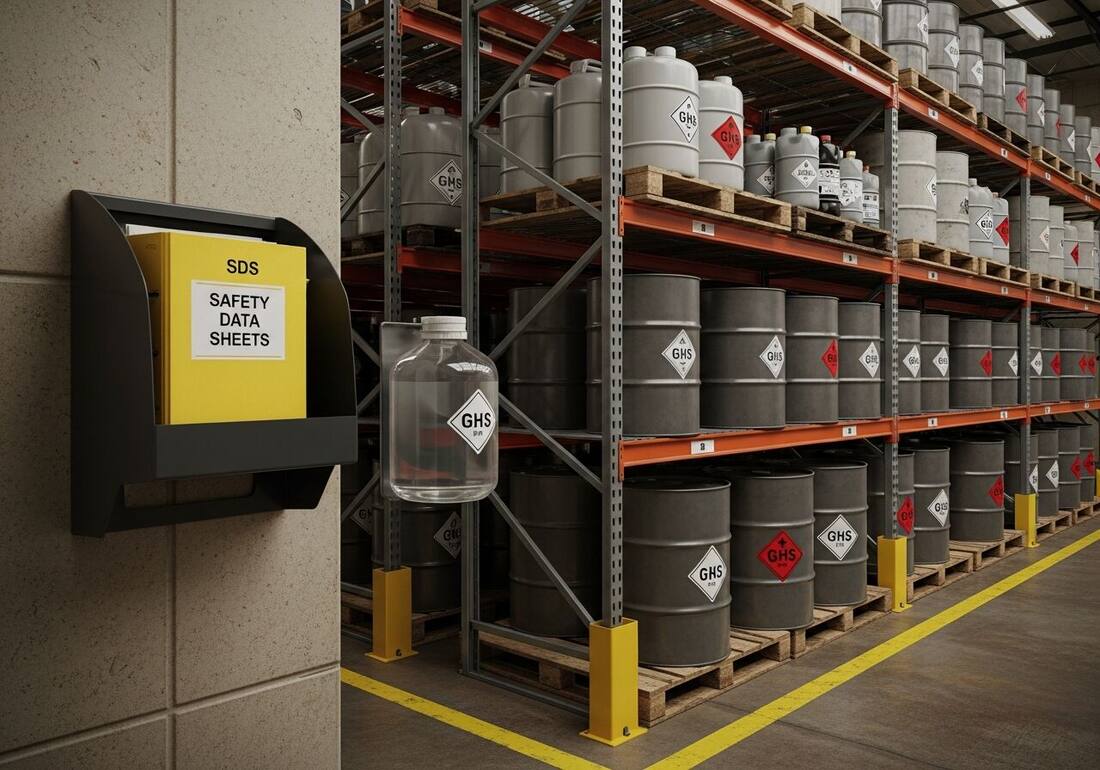
Hazard communication sits near the top of OSHA's most-cited standards year after year — not because employers ignore it, but because compliance decays one container at a time. A product gets transferred into a spray bottle during a rush and the label never happens. A supplier changes formulations and the old SDS stays in the binder. A new hire starts mid-year and misses the training cycle. Each gap is minor until an inspector, or an exposure, finds it.
The visible half of that decay shows up in a photo: unlabeled secondary containers, labels too faded or damaged to read, chemicals stored where labels face the wall, no SDS access point anywhere near the storage area. Scanning your storage areas on a schedule catches the drift early, and the checklist below covers the rest of the chain — the written program, inventory, and training a camera cannot verify.
OSHA's Hazard Communication Standard (29 CFR 1910.1200), aligned with the Globally Harmonized System of Classification and Labeling of Chemicals (GHS), is one of the most frequently cited OSHA standards in both general industry and construction. The citation categories are consistent: missing or incomplete Safety Data Sheets, labels on secondary containers that don't meet GHS requirements, a written HazCom program that doesn't list all chemicals on site, and training that cannot be documented. The SDS requirement is universal — every chemical with a hazardous classification must have a current SDS accessible to employees during the work shift, not just in the office or on the manager's computer.
The label element of HazCom is where many employers slip on secondary containers. A chemical transferred from the original supplier container into any other container must be labeled with the product identifier and words, pictograms, and statements required by GHS — or with the employer's own labeling system, provided all employees are trained on that system. Spray bottles, portable tanks, and shop containers are the most common secondary-container citation points. Construction's HazCom standard (29 CFR 1926.59) uses the same GHS framework as general industry but adds requirements specific to multi-employer sites where chemicals from different employers are used in shared spaces.
Visible hazard communication issues the AI checks in a photo of a storage or work area.
Bottles, jugs, and drums with no visible label at all — the classic secondary-container gap that 1910.1200(f)(6) exists for.
Labels missing visible hazard pictograms, faded or damaged past legibility, or turned away so workers cannot see them.
Whether an SDS station or binder is visible near the storage area — and flagged for follow-up when nothing is in frame.
Unsecured glass containers, chemicals stored above eye level over walkways, and containers staged without containment where the photo shows it.
Scan a photo like the one above and this is the report you get — score, findings, OSHA references, and fixes. It is an illustrative example, clearly marked — not live scan data.
Compliance score
62
Lower means more potential hazards found
5 potential hazards found
1Glass chemical container strapped to a rack upright at head height over the aisle
HighPossibly related to hazardous chemical handling and storage (29 CFR 1910.1200; general duty)
Observed condition: A glass container stored overhead in a traffic aisle is one bump away from a breakage, a spill, and an exposure — with the label too high to read before it happens.
Corrective action: Move the container to a secured shelf at or below shoulder height, in secondary containment, with the label facing out.
Medium confidenceNot fully clear from the photo — verify on site.
2Drums with hazard diamonds but no readable product identifier from the aisle
MediumPossibly related to workplace container labeling (29 CFR 1910.1200(f)(6))
Observed condition: A pictogram alone doesn't tell a worker what's inside or which SDS to pull — workplace labels need the product identifier plus hazard information.
Corrective action: Verify each drum's label carries the product identifier and hazard information, and re-label or reorient any container that can't be read from the aisle.
Medium confidenceNot fully clear from the photo — verify on site.
Upload a photo like the one above and get a compliance score and hazard count in seconds. No account needed to scan — create a free account to unlock the full report.
Use the real site or facility name. If you save the scan after signup, it becomes the report name.
Three angles, one deeper scan
Only the wide shot is required — every extra angle gives the AI more places to look.
Required: Set the scene — one wide shot lets the AI sweep the whole area at once
Stand at the entry point and capture corner to corner: floors, ladders, scaffolds, and everyone at work
Drop a job-site photo or walkthrough video
Click to upload, drag & drop, or snap a photo on site. Photos scan free in about 15 seconds — no signup, no card. Video walkthroughs (up to 3 min) run on a free account.
Small habits, sharper scans
Set the scene
Start with context
Fill the frame
2–3 ft for close-ups; keep ladders, cords and workers fully in view.
Capture clearly
Make the frame usable
Light it right
Keep the sun or lights behind you — glare and shadows hide hazards.
Tap to focus
Tap the hazard on screen and hold still one second — blur can't be flagged.
Choose the useful view
Give the AI room to understand
Go landscape
Turn your phone sideways — a wider frame catches more of the scene.
Only upload photos you have permission to use, and avoid images showing personal, customer, or confidential information. Demo photos and results are held privately for up to 48 hours so you can save them to a free account; unclaimed photos are deleted automatically. Results are an AI-assisted preliminary review, not an official OSHA determination.
New: Video walkthrough scans
Record up to 3 minutes of your site — the AI extracts frames and flags every hazard with exact timestamps. Free account required.
Get the best results
Wide shot first
Stand at the entrance and photograph the entire work area so AI sees the full context
Hazard areas
Photograph elevated surfaces, equipment, electrical panels, and anywhere workers are active
Close-ups last
Move in close on anything damaged, missing, or that looks risky — the AI catches more detail
The full HazCom chain, from written program to label maintenance. The first four are free — create a free account to unlock the rest and scan your own storage areas.
Free checklist — 12 points
Enter your email to unlock the full checklist
We'll also send you a printable PDF copy — no account required.
One email with the checklist, one follow-up. Unsubscribe anytime.
OSHA Scan reads a single photo. That makes it fast and easy for anyone on site — but it also means it has real limits. Here's an honest look at both.
A scan is a fast first look, not the final word. Before treating this kind of area as safe, a competent person should still confirm:
29 CFR 1910.1200 requires a written program, a chemical inventory, GHS-compliant labels on shipped and workplace containers, safety data sheets accessible to workers during their shifts, and effective training before first exposure and when new hazards arrive. It is consistently among OSHA's most-cited standards, and most citations land on the visible pieces: labels and SDS access.
Yes, in almost every case. Secondary containers need a workplace label with the product identifier and hazard information. The narrow exception is a container filled by one worker for their own immediate use within the same shift — the moment it sits unattended or passes to someone else, it needs a label.
It checks the visible chain: unlabeled containers, unreadable or missing labels, risky storage arrangements, and whether SDS access is anywhere in frame. It cannot read your SDS library, confirm training, or identify what's inside a container — those need a person. Use the scan to catch label drift between formal reviews, with each finding referencing the OSHA standard it may relate to.
Reviewed by OSHA Scan Editorial
Last updated August 29, 2026
This content is produced by the OSHA Scan Editorial team and reviewed with AI assistance. It is general safety information, not legal or compliance advice. OSHA Scan is an independent tool and is not affiliated with, endorsed by, or certified by OSHA or the U.S. Department of Labor.
More ways to see what an AI OSHA scan can do for your site.
The overview hub — how the scanner works and every job, site, and hazard it covers.
A deep dive on how unlabeled containers lead to real exposures.
What happens when the SDS isn't there the day it's needed.
The full administrative checklist HazCom is one chapter of.
The document that names who owns each HazCom duty on your site.
What 'readily accessible during each shift' really demands of your SDS access.
See a complete labelled example of everything a scan returns.
Start with 5 included AI site scans plus a one-time 10-scan signup bonus — no credit card. Build JHA-ready reports and catch changing conditions sooner.
Start your free trial