
1
Set the scene
Start with context
Fill the frame
2–3 ft for close-ups; keep ladders, cords and workers fully in view.
Cut through the fog, dust, and glare before the crew works
Fog, dust, smoke, glare, and darkness all do the same dangerous thing: they hide hazards and hide people. When visibility drops, workers miss edges and openings, equipment operators can't see spotters, and moving machinery becomes a struck-by threat. OSHA Scan lets a supervisor photograph the work area in its actual visibility conditions and flag the low-visibility hazards a crew is about to walk into.
Free · No account needed to scan · Results in seconds
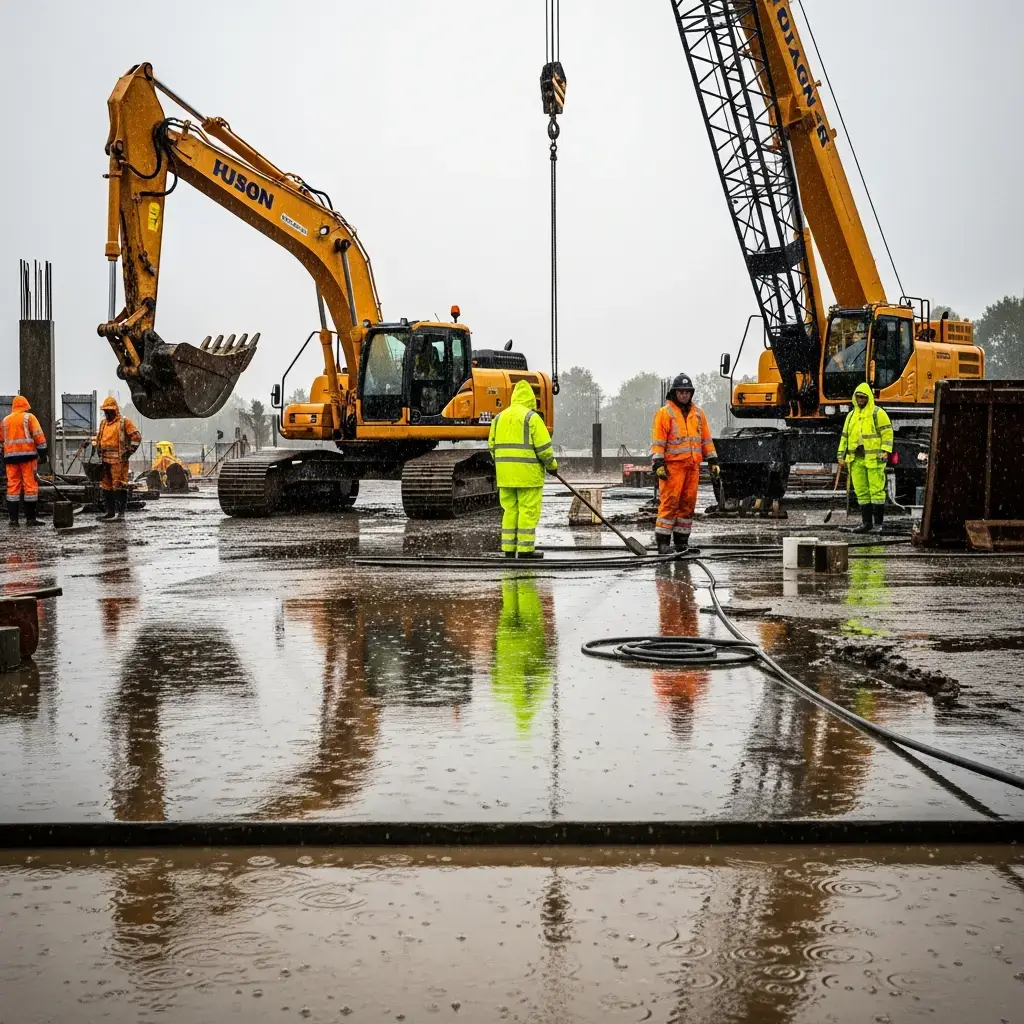
May relate to 29 CFR 1926.56
Minimum OSHA illumination for general work areas
Struck-by deaths involve vehicles or equipment
Per serious OSHA illumination violation
Typical time to get scan results
Reduced visibility work is any task performed where workers cannot clearly see their surroundings — due to fog, dust, smoke, steam, glare, precipitation, or inadequate lighting. The core danger is uniform: hazards and people become invisible, so the normal visual defenses against falls, struck-by, and equipment incidents stop working.
In practice it looks like a crew working through morning fog near an unguarded edge, dust clouds from cutting or demolition hiding openings and moving equipment, low sun glare blinding an equipment operator to a spotter, or a dim interior where a floor hole disappears into shadow. The hazard is often not new — visibility just removes the ability to see and avoid it.
The danger is that people adapt to poor visibility and press on, underestimating how much they can no longer see. A worker cannot dodge a swinging load, step around an edge, or make eye contact with an operator they cannot see. Because the impairment is the conditions themselves, the safe response is to restore visibility or verify the area before committing the crew.
Here is what an OSHA Scan report looks like for reduced visibility work. It is an illustrative example built from this scenario's hazards — clearly marked, not live scan data.
Compliance score
41
Lower means more potential hazards found
3 potential hazards found
Reduced Visibility Work
CriticalPossibly related to Illumination (29 CFR 1926.56)
Observed condition: Reduced visibility work is any task performed where workers cannot clearly see their surroundings — due to fog, dust, smoke, steam, glare, precipitation, or inadequate lighting.
Corrective action: Add lighting to meet OSHA minimums across the whole work area and travel paths
High confidence
Reduced Visibility Work: Motor vehicles
HighPossibly related to Motor vehicles (29 CFR 1926.601)
Observed condition: Requires safe operation of vehicles and equipment, including visibility aids and spotters, critical when fog, dust, or glare hides workers from operators.
Corrective action: Use dust suppression (water, misting, ventilation) to clear airborne obscurants
Medium confidenceNot fully clear from the photo — verify on site.
Reduced Visibility Work: Duty to have fall protection
MediumPossibly related to Duty to have fall protection (29 CFR 1926.501)
Observed condition: Applies when reduced visibility conceals unprotected edges and floor openings that workers cannot see to avoid.
Corrective action: Install position lighting, reversing alarms, and cameras on mobile equipment
High confidence
Invisible hazards cause the falls, struck-by, and equipment-contact incidents that visibility normally prevents. A worker who cannot see an edge, an opening, or a moving machine has no chance to react before contact.
OSHA 1926.56 sets minimum illumination levels, and low-visibility conditions are cited alongside the hazard they concealed. Serious violations exceed $16,000, and knowingly working blind conditions supports willful classification above $165,000.
Low-visibility incidents cause stoppages, equipment collisions, and rework, and often occur during weather or dust events that are already slowing the job, compounding the delay.
Roadwork, demolition, excavation, warehousing, and any operation with mobile equipment face the highest risk, since struck-by hazards depend entirely on operators and workers being able to see one another.
OSHA Scan evaluates the scene as visibility has left it: a supervisor photographs the work area in its actual conditions, and the AI vision model flags obscured edges and openings, dust and fog impairing sightlines, workers in equipment paths without visibility, and inadequate lighting, each with a severity rating and the OSHA citation it may relate to. It turns a subjective 'it's a bit hard to see' into a specific, documented call on whether the area is safe to work.
Analyze your first photo freeUpload a real job-site photo and OSHA Scan detects visible hazards in seconds — no account needed to run your first scan.
Use the real site or facility name. If you save the scan after signup, it becomes the report name.
Three angles, one deeper scan
Only the wide shot is required — every extra angle gives the AI more places to look.
Required: Set the scene — one wide shot lets the AI sweep the whole area at once
Stand at the entry point and capture corner to corner: floors, ladders, scaffolds, and everyone at work
Drop a job-site photo or walkthrough video
Click to upload, drag & drop, or snap a photo on site. Photos scan free in about 15 seconds — no signup, no card. Video walkthroughs (up to 3 min) run on a free account.
Small habits, sharper scans
Set the scene
Start with context
Fill the frame
2–3 ft for close-ups; keep ladders, cords and workers fully in view.
Capture clearly
Make the frame usable
Light it right
Keep the sun or lights behind you — glare and shadows hide hazards.
Tap to focus
Tap the hazard on screen and hold still one second — blur can't be flagged.
Choose the useful view
Give the AI room to understand
Go landscape
Turn your phone sideways — a wider frame catches more of the scene.
Only upload photos you have permission to use, and avoid images showing personal, customer, or confidential information. Demo photos and results are held privately for up to 48 hours so you can save them to a free account; unclaimed photos are deleted automatically. Results are an AI-assisted preliminary review, not an official OSHA determination.
New: Video walkthrough scans
Record up to 3 minutes of your site — the AI extracts frames and flags every hazard with exact timestamps. Free account required.
Get the best results
Wide shot first
Stand at the entrance and photograph the entire work area so AI sees the full context
Hazard areas
Photograph elevated surfaces, equipment, electrical panels, and anywhere workers are active
Close-ups last
Move in close on anything damaged, missing, or that looks risky — the AI catches more detail
During an interior demolition, heavy concrete-cutting dust filled a work bay where an excavator was loading debris. A ground worker acting as spotter moved into the bay to guide the machine, trusting the operator could see him as usual.
The dust cloud thickened and the operator lost sight of the spotter entirely. Swinging the boom to reposition, the operator struck the worker, who had stepped into the swing radius believing he was visible. The worker suffered serious crush injuries — a struck-by incident caused purely by lost visibility.
A photo scan of the bay would have flagged the dust-obscured sightlines and a worker in the equipment path without reliable visibility as critical struck-by hazards, cited 29 CFR 1926.601 and illumination requirements, and prompted the crew to add dust suppression and lighting, establish an exclusion zone, or halt equipment until sightlines were restored.
Struck-by protection depends on people seeing each other. When dust, fog, or glare breaks that sightline, the answer is to restore visibility and separate workers from equipment — not to trust that everyone knows where everyone is.
Layered controls, from most to least effective.
Restore visibility and remove the hazards it hides.
Manage work and traffic when visibility cannot be fully restored.
Make workers visible and protect them in impaired conditions.
The federal standards this hazard may relate to.
Requires work areas, ramps, and corridors to be lighted to minimum intensities, the primary control when darkness or dim conditions reduce visibility.
Up to $16,550 per serious violation; $165,514 for willful or repeat
Requires safe operation of vehicles and equipment, including visibility aids and spotters, critical when fog, dust, or glare hides workers from operators.
Up to $16,550 per serious violation
Applies when reduced visibility conceals unprotected edges and floor openings that workers cannot see to avoid.
Up to $16,550 per serious violation
If an incident occurs, act fast and in order.
Workers and operators will understand how reduced visibility hides hazards and people, recognize when conditions are unsafe, and know how to restore visibility, separate workers from equipment, or stop work.
Train the crew at onboarding, refresh annually, and reinforce with a documented visibility scan whenever fog, dust, glare, or dim conditions arise during the shift.
Run these checks to stay ahead of citations.
10 more checklist points are waiting. Register with your email to reveal every item and download the complete OSHA compliance checklist as a printable PDF. Free, and it only takes a few seconds.
Already have an account? Sign in
OSHA 1926.56 sets minimum illumination levels for work areas, and standards for mobile equipment and struck-by hazards require that workers and operators can see one another. Employers must control fog, dust, glare, and darkness that impair safe visibility.
Struck-by protection depends on operators seeing workers and workers seeing equipment. When dust, fog, or glare breaks that sightline, spotters become invisible and workers step into swing radii and travel paths without warning, causing serious struck-by incidents.
OSHA 1926.56 requires minimum illumination by area — for example, at least 5 foot-candles in general construction areas, with higher levels for shops and specific tasks. The full work area and travel paths must meet these levels, not just the immediate task.
Use water spray, misting, and ventilation to suppress airborne dust at the source. This restores sightlines and reduces respiratory exposure. When dust cannot be controlled enough to see safely, equipment work in the area should pause.
Trained spotters and radio communication help coordinate work when line of sight is limited, but a spotter must remain visible to the operator and clear of the equipment path. If the spotter cannot be reliably seen, the work should stop until visibility is restored.
High-visibility, retroreflective apparel and personal or area lighting make workers easier to see. Combined with exclusion zones separating people from mobile equipment, these measures reduce struck-by risk when visibility drops.
A serious violation of illumination, motor-vehicle, or fall protection standards exceeds $16,000, and OSHA typically cites the concealed hazard as well. Knowingly working blind conditions can support willful classification above $165,000.
OSHA Scan detects low-visibility hazards. It flags obscured edges, dust and fog sightline loss, and workers in equipment paths with a severity rating and the specific OSHA citation.
Photograph your work area in its actual visibility conditions and get instant feedback on the hazards fog, dust, and glare are hiding.
Get startedPut our low-visibility work checklist to work so lighting, dust control, and traffic separation are set before the crew starts.
Get startedSee how OSHA Scan fits your operation and get recommendations for managing low-visibility conditions on your sites.
Get startedSee how other crews use OSHA Scan to verify sightlines before working through fog, dust, and glare.
Get startedReview findings, organize chemical records, and open relevant official resources for your saved locations and work context.
You make the final call. Review, edit, or dismiss any AI-flagged hazard before finalizing your inspection report.
Scan chemical labels or upload legacy MSDS sheets to create structured drafts that support your team's search for and review of current official manufacturer Safety Data Sheets.
Open official OSHA and State Plan guidance, required posters, emergency contacts, and relevant publications for saved locations and work requirements.
OSHA Scan reads a single photo. That makes it fast and easy for anyone on site — but it also means it has real limits. Here's an honest look at both.
Reviewed by OSHA Scan Editorial
Last updated August 29, 2026
This content is produced by the OSHA Scan Editorial team and reviewed with AI assistance. It is general safety information, not legal or compliance advice. OSHA Scan is an independent tool and is not affiliated with, endorsed by, or certified by OSHA or the U.S. Department of Labor.
Start with 5 included AI site scans plus a one-time 10-scan signup bonus — no credit card. Build JHA-ready reports and catch changing conditions sooner.
Start your free trial